Lecture 8
Authentication, Firewalls, the DMZ
Authentication
- Authentication: the process of validating a supplicant’s purported identity
- Authentication factors (from weakest to strongest methods)
- Something a supplicant knows
- Password: a private word or combination of characters that only the user should know
- Passphrase: a series of characters, typically longer than a password, from which a virtual password is derived
- Something a supplicant has
- Smart card: contains a computer chip that can verify and validate information
- Synchronous tokens
- Asynchronous tokens
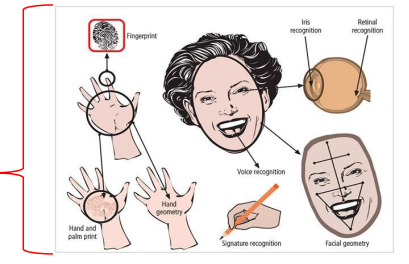
- Something a supplicant is
- Relies upon individual characteristics
- Strong authentication
- Something a supplicant knows
- use a password manager
- Use synchronous and asynchronous tokens
- keyring for synchronous token, using push for Duo
- tokens can be valid for a long period of time
Kerberos guarding Hades
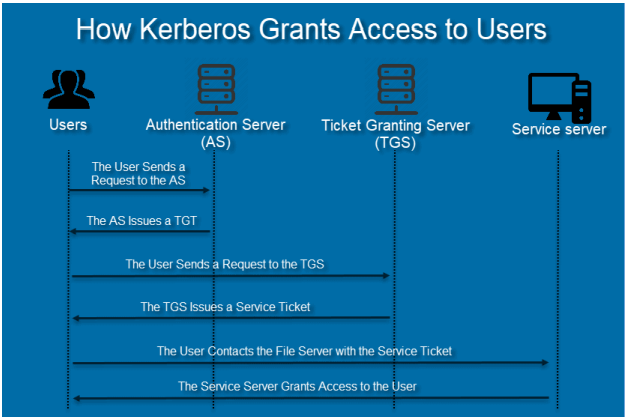
- Users - local computer
- only you get to see your files
- all services need your authentication
First communication with authentication server
- returns a ticket granting ticket
- like a credit card institution
- 'Can I get a credit card to make purchases at shops'
Second to ticket granting server
- serves a service ticket
Service ticket sent to service center
Kerberos - Overview
- Secure Third-Party Authentication: Kerberos provides secure, third-party authentication for both users and services. It ensures mutual authentication—both the user and the service authenticate each other during the process, preventing attacks such as impersonation.
- Symmetric Key Encryption: Kerberos primarily relies on symmetric key encryption to authenticate users and grant access to various network resources. Each user and service shares a secret key with the Key Distribution Center (KDC), which facilitates secure communication.
- Shared Secret for Authentication: Authentication in Kerberos is based on the concept of a shared secret (symmetric key). This key is used to validate the identities of both clients (users) and servers (services), ensuring that only authorized entities can communicate.
- Private Key Database: The KDC maintains a secure database of private keys, which includes client and server keys. Client keys are typically derived from hashed passwords, while service keys are preconfigured during the setup phase. These keys are used for encrypting tickets and session keys.
Mutual authentication
- System authenticates itself to you
- know its not some fake network
- based on symmetric key encryption
- Each party has to have the same key
- KDC has database of primary keys
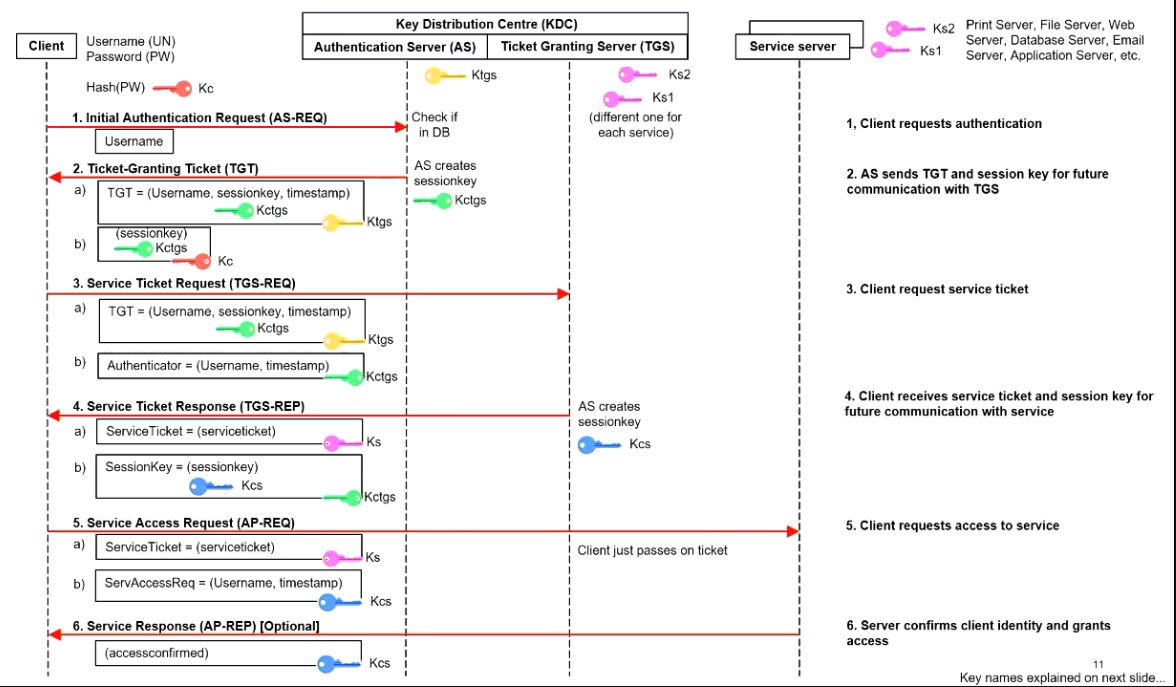
NEWER IMAGE:
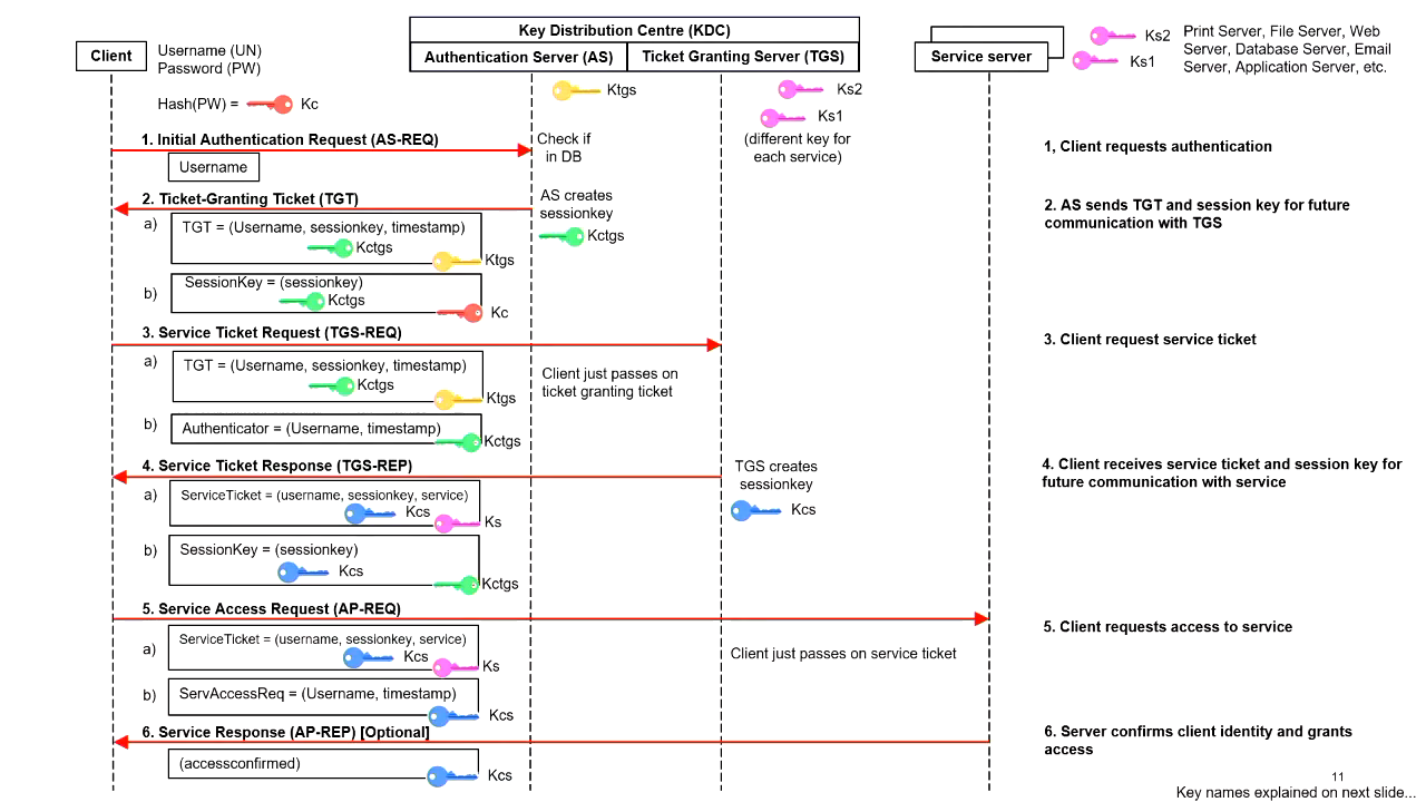
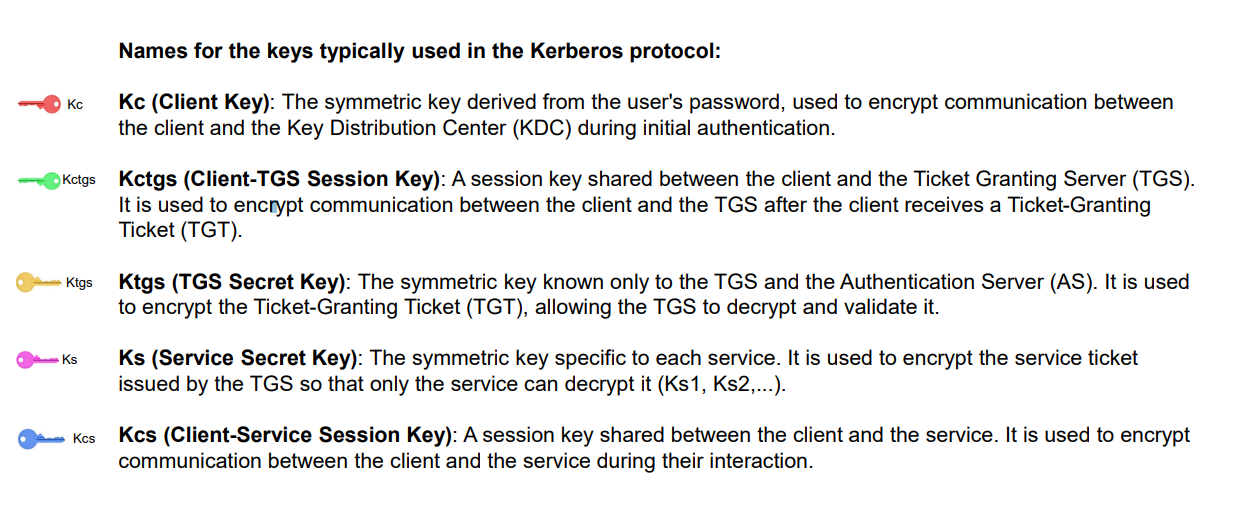
- all service centres have a key
- when you setup the system, have to distribute the keys
Start at client side
- give you a session key
- only valid for a particular time
- including a username and a timestamp
- timestamp to avoid replay attempts
- needs to be roughly the same time
- time server that always gives you the same time
Step two, send the Ticket-granting ticket to ticket granting server
- send also the username, and timestamp
Step 3
- Send service ticket
- Send session key, encrypted with the green key
Step 5
- Service ticket to service center
- Send also a second session key to prohibit replay attacks
Step 6
- Optionally send back a confirmed access
More on the topic of a ‘secure network‘
- Describe firewall principles and the various approaches to firewall implementation
- Discuss the proxy firewall approach
- Describe the strategy that enables the business use & benefits of a demilitarized zone (DMZ)
- purpose of firewall is to let packets through to device or stop them
Revision - communication protocols
- A protocol is a standard means for coordinating an activity between two or more entities.
- We have political protocols, and many other types – including communication protocols (and last week we talked of ‘secure communication protocols)
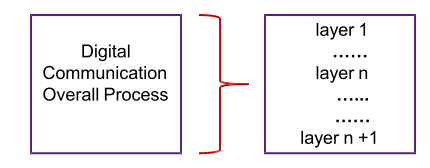
- Communications protocols are broken into levels or layers
- for both ‘snail mail’ and for computer communication.
Revision - computer network communication
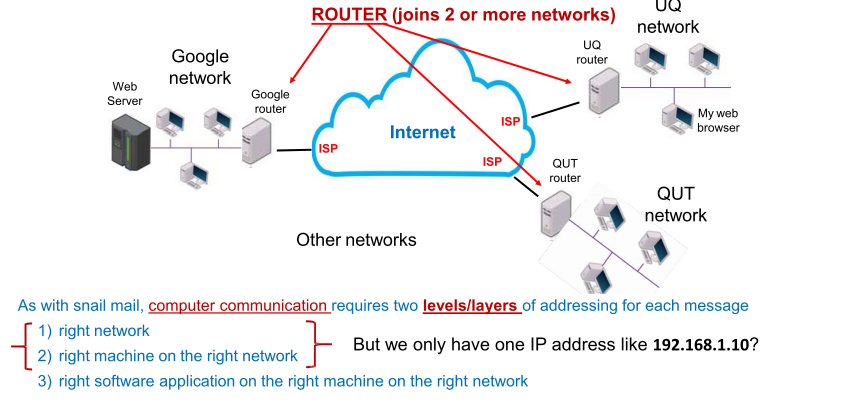
- Everyone will have a border router before the network
- filter packets out that do not belong to the network
Which part of the IP address specifies the network and which the host machine?
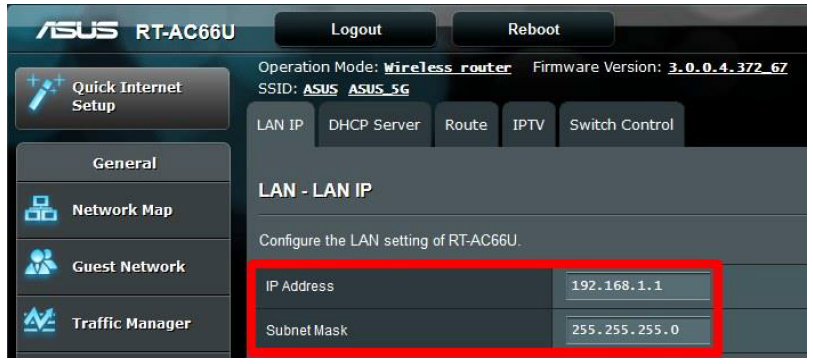
We use the subnet mask used to determine which part of the IP address specifies the network and which part specifies the host.
The mask uses a specific number of bits, set to 1, to identify the network portion of the IP address, and the remaining bits, set to 0, to identify the host portion, which separates the IP address into two distinct parts.b
The subnet mask is a 32-bit number that is used in conjunction with the IP address to determine which part of the IP address specifies the network and which part specifies the host.
In binary form, the subnet mask is a series of 1s followed by a series of 0s. For example, the subnet mask 255.255.255.0 in binary form is 11111111.11111111.11111111.00000000.
To determine the network and host portions of an IP address using the subnet mask, the following process is used:
- Convert the IP address and subnet mask to binary form.
- Perform a bitwise AND operation between the binary IP address and the binary subnet mask.
- The resulting value is the network portion of the IP address.
- The remaining bits are the host portion of the IP address.
- 32 bit num for IP
- 32 bit num for subnet mask
For example, consider the IP address 192.168.1.10 and subnet mask 255.255.255.0. In binary form, the IP address is (4 octets, i.e. 4 times 8 binary digits)
- 11000000.10101000.00000001.00001010 and the subnet mask is
- 11111111.11111111.11111111.00000000.
Performing a bitwise AND operation between the IP address and subnet mask yields the following result:
- 11000000.10101000.00000001.00001010 (IP address) AND
- 11111111.11111111.11111111.00000000 (Subnet mask) equals
- 11000000.10101000.00000001.00000000 (Network portion)
- 00000000.00000000.00000000.00001010 (Host portion)
So, the network portion of the IP address is 192.168.1.0, and the host portion is 0.0.0.10. This means that any IP address with the same network portion as 192.168.1.0 (e.g. 192.168.1.54) belongs to the same network, and traffic destined for that network can be forwarded using the information in the routing table.
Revision - TCP/IP and OSI Architecture
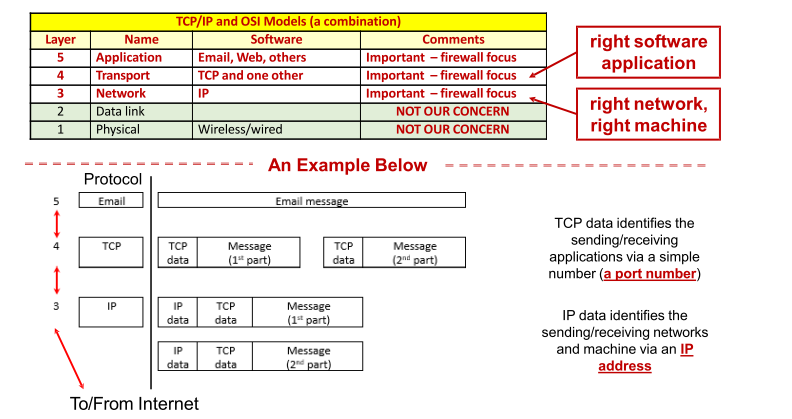
- Firewalls open the packet up and make a decision whether to let the packet through or not
- Each of the applications have a different port number
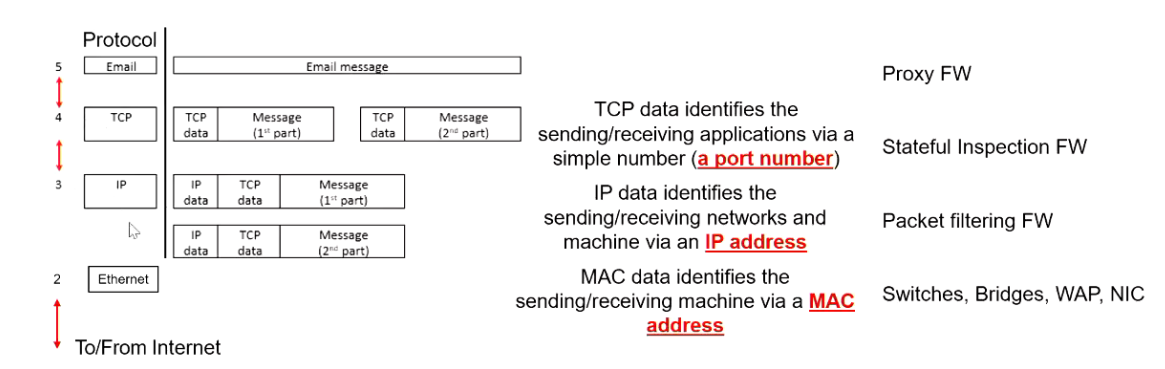
- TCP is designed to process CONNECTIONS (related groups of packets)
- IP is designed to process individual PACKETS (each packet individually)
- Some firewalls work at the IP level, some at the TCP level, some at the application level. This ‘level of operation’ significantly determines the level of security a firewall can introduce into a network and its use in the network
- MAC address - don't change, and is given by the manufacturer
Firewalls
- Software – running on some type of computer configuration
- Prevent specific types of information from moving between the outside world (untrusted network) and the inside world (trusted network)
- Maybe: separate computer system; software service running on existing router or server; or separate network containing supporting devices
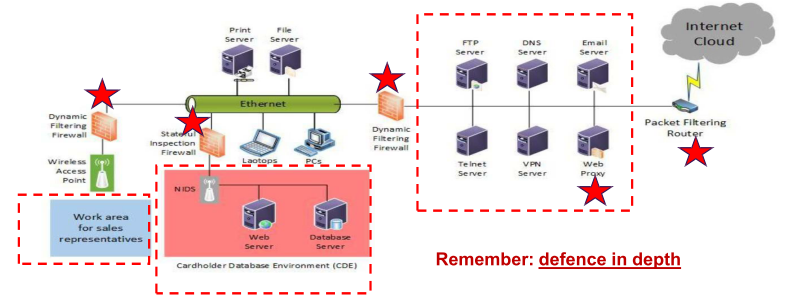
- INCORRECT ICON
- proxy servers receive traffic
- dynamic filtering firewall removes unnecessary information
- only passing on information if it is correct
- call DMZ a 'firewall'
- red stars mean a firewall of different types
Next, trusted company internet
- goes through WAP
Red area
- highly sensitive information
- NIDS - network intrusion detection system
- database with credit cards
- must have additional infrastructure implemented
- need to be on a separate network
Firewall rules
- Operate by examining data packets and performing comparison with predetermined rules
- Most firewalls use packet data/header OR connection data/header information to determine whether specific packet should be allowed or denied
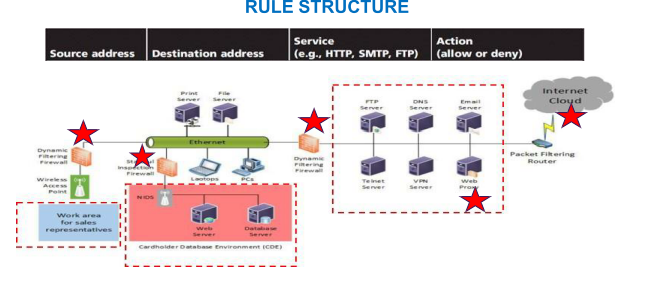
- Network administrator can put in their own rules depending on what they want to do
Firewalls and Network Devices by OSI Layer
- L7 Application Layer: Application Layer Firewalls (Proxy Firewalls)
- L4 Transport Layer: Stateful Inspection Firewalls, Intrusion Prevention Systems (IPS)
- L3 Network Layer: Packet-Filtering Firewalls, Routers, VPN gateways
- L2 Data Link Layer: Switches, Bridges, WAPs, NICs
- L1 Physical Layer: HUBs
- NIC - the ones
Firewall processing modes
- Packet filtering firewalls examine header information of data packets
- Most often based on combination of:
- Internet Protocol (IP) source and destination address
- Direction (inbound or outbound) - both directions are critical!
- Transmission Control Protocol (TCP) source and destination port requests
- Three subsets of packet filtering firewalls (in order of increasing level of security):
- Static filtering: requires that filtering rules governing how the firewall decides which packets are allowed and which are denied are developed and installed - work at PACKET level
- Dynamic filtering: allows firewall to react to emergent event and update or create rules to deal with event - work at PACKET level
- Stateful inspection: firewalls that keep track of each network CONNECTION between internal and external systems using a state table
Static filtering – fastest – most limited security
- Static filtering: requires that filtering rules governing how the firewall decides which packets are allowed and which are denied are developed and installed – AND ARE STATIC (cannot be changed until firewall is reprogrammed!)
- It is very simple in its capabilities but it is the quickest of all firewalls. It sees all traffic!
- A static filtering firewall can (easily) be overwhelmed by ‘unexpected’ increases in workload – the firewall can be ‘crashed’ and therefore service is ‘denied’ to all legitimate users.
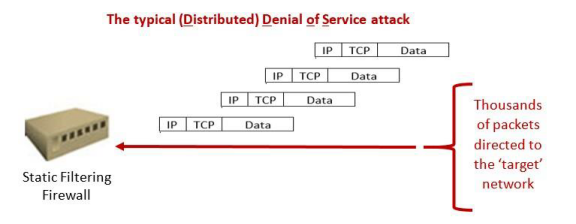
- Rules implemented in the firewall
Dynamic filtering – next level (up) of sophistication
- Dynamic filtering: filtering rules can be changed DYNAMICALLY by the firewall itself (more intelligent).
A dynamic filtering firewall can detect ‘emergent’ events – implement a consequential rule – deal with more ‘situations’.
- This firewall, however, does not view the traffic as ‘connections. It sees all traffic!
- We can move to a more sophisticated design
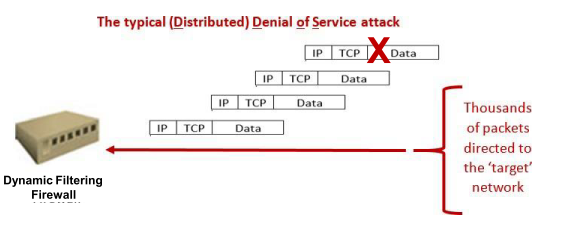
- Can detect emerging attacks
- Can 'black it off'
Stateful inspection – top level of sophistication
- Stateful inspection: firewalls that keep track of each network CONNECTION between internal and external systems using a state table. This is the most sophisticated of the layer3/4 firewalls – it can deal with attacks such as ‘spoofing’ (see below)
- It sees (examines) all traffic!
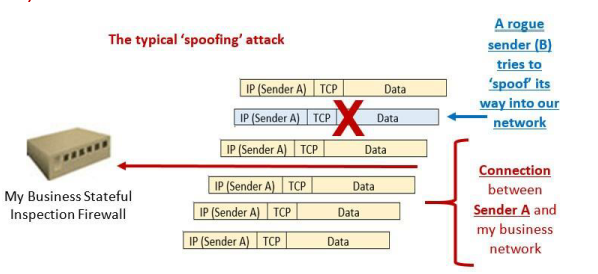
Firewall architectures (how we position firewalls)
- Firewall devices can be configured in a number of network connection architectures
- Best configuration depends on three factors:
- Objectives of the network
- Organization’s ability to develop and implement architectures
- Budget available for function
Four common architectural implementations of firewalls:
- packet filtering routers/firewalls,
- screened host firewalls & (3) dual-homed firewalls : NOT FOR US,
- screened subnet firewalls – these work with proxies (application gateways)
- Screen subnet firewall (actually an implementation of the DMZ)
Packet filtering firewalls/routers (mainly work at layer 3)
- Most commonly deployed for small, uncomplicated sites – but is problematic
- Blocks packets from entry – can allow selective access to systems and services – depending on the policy
- Strengths: fast processing (not much of each packet to inspect) – good on ‘main entrances’ to networks
- Drawbacks: a lack of auditing (no logging), rules are difficult to test thoroughly, rules may become unmanageable, and strong authentication missing
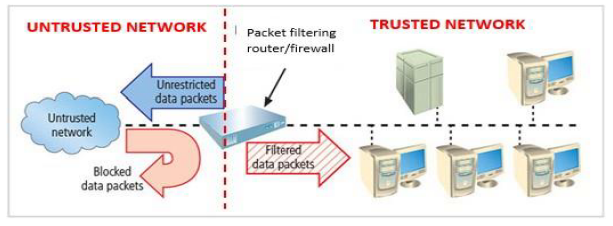
- Screened subnet firewall is the dominant architecture used today
- Commonly consists of two or more internal proxies (aka application gateways OR bastion hosts) behind packet filtering router, with each host protecting trusted network:
- Let’s firstly discuss the proxy server concept and also the design approach known as a screened subnet or DMZ (demilitarized zone)
- honeypots or honeywalls
- honeynet sends messages across a fake network to distract the attacker
- Proxies/application gateways
- Frequently installed on a dedicated computer, also known as a proxy (server). We (almost) always have a web proxy, an email proxy – and others
- Proxies only look at their traffic (not like packet filtering)
- Since proxy server is often placed in unsecured area of the network because it must be accessible to outside world – it is exposed to higher levels of risk from less trusted networks
- Additional filtering routers/firewalls can be implemented behind the proxy server, further protecting internal systems (REMEMBER: DEFENCE IN DEPTH)
- When we place proxy servers between two firewalls/routers – we create a DMZ (or also called a screen subnet)
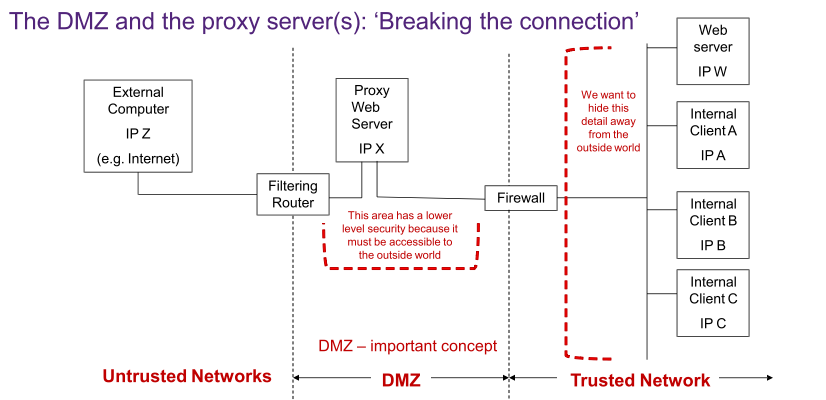
- External people cannot figure out what is behind the firewall
The request from Client A to the External Server is ‘proxied’ – the Proxy acts as the agent – this breaks the connection – a very important security benefit – the details of the trusted network are hidden away – defence in depth also
- Screened subnet firewall is the dominant architecture used today
- Commonly consists of two or more internal proxies (bastion hosts) behind packet filtering router, with
each host protecting trusted network:
- Connections from outside (untrusted network) routed through external filtering router
- Connections from outside (untrusted network) are routed into and out of routing firewall to separate network segment known as DMZ
- Connections into trusted internal network allowed only from DMZ proxy servers
- Screened subnet performs two functions:
- Creates and protects DMZ systems and information from outside threats
- Protects the internal networks by limiting how external connections can gain access to internal systems
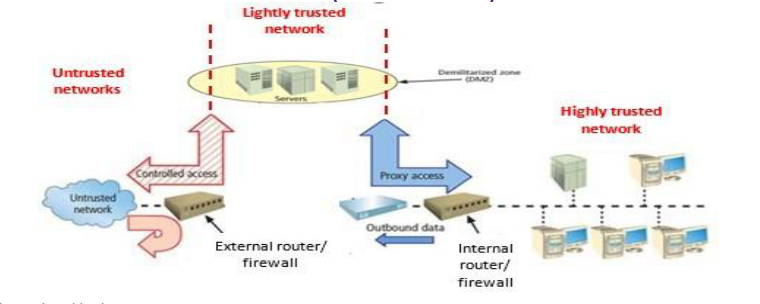
Operational logic:
- All application traffic (email, Web, etc.) gets routed to the proxies
- All application traffic from trusted network (going to Internet) gets routed to proxies
- All other traffic (incoming/outgoing) blocked
- This would mean all application servers in internal network – proxies only in DMZ. Thus no site is directly reachable from the Internet (and vice-versa) – this ‘breaks the connection’ and hides internal network details