Lecture 9
Week 09: Security Technology (Part 2)
- Proxies (continued)
- Virtual Private Networks (VPNs)
- Intrusion Detection Systems (IDSs)
TCP/IP layers
- HUB Layer 1 Physical
- Bridge Layer 2 Data Link
- Switch Layer 2 Data Link
- Router Layer 3 Network
- Firewall Layer 3/4 Network/Transport
- DMZ
- Server
- Proxy Layer 7/4 Application/Transport
- VPN
- IDS
Security: the Demilitarized Zone (DMZ)
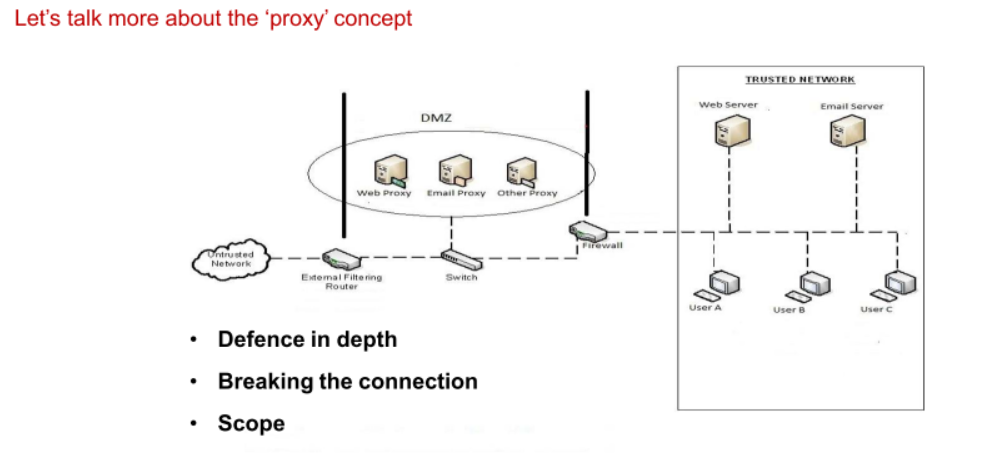
- Untrusted network
- Bordered router
- destinted for anything
- Switch to other computers
- Proxy servers, for web traffic, file transfer traffic, etc.
- Proxies will only allow for the correct protocol
- Only traffic from the proxy service is allowed to go through the firewall
- Coming from a proxy I know, will allow it through
- HTTP or HTTPS, FTP, etc.
- Hacker cannot know the network topology
Home web server - What is happening
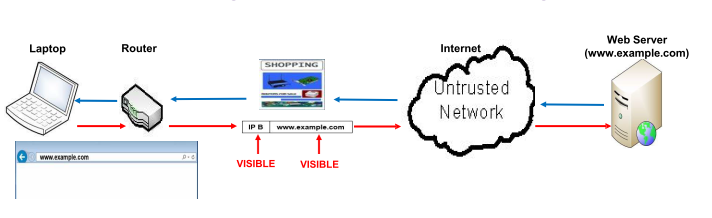
- Basis of online business – but no security unless we add it (refer back to TLS discussion)
- What information is available to the business Web Server?
WhatIsMyIPAddress.com (or worse, https://amiunique.org/fp)
- Now let’s consider the same web request from a business network
- How can you be unique
- combination of settings make you unique
- Use this to find fingerprint and used for advertising, etc.
Business web surfing – what is happening?
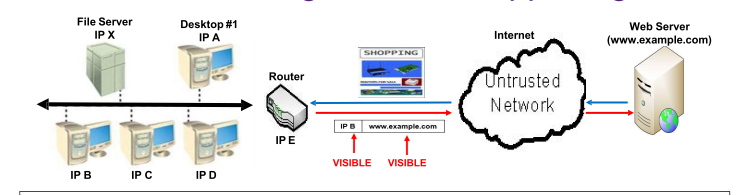
- Easily build a profile of who is coming out of this router
- It’s easy to build up (profile) a business network which has no controls in place to mitigate this risk!
- From a hacker/security analyst viewpoint – easier to attack what you know!
The benefits of a proxy (#1)
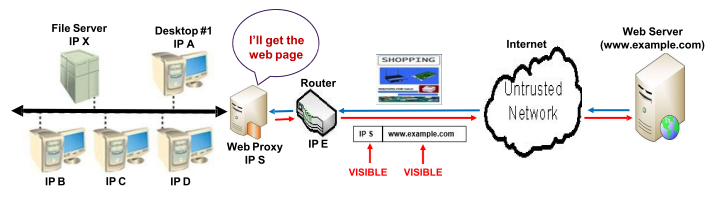
- web proxy can cache web pages for you
- Go to amazon multiple times e.g. will get the page out of its cache
- Can also log where/when you go
- Go to malicious websites, etc.
Benefit #1:
- Privacy (for individual machines & the network overall)
- Privacy in terms of web surfing history – this is a large component of ‘business intelligence’ – the outside world knows the web sites we visit – how long we stay on these sites – what parts of these sites we access. Web sites we visit have a very good idea of our details – including (approximately) where we live.
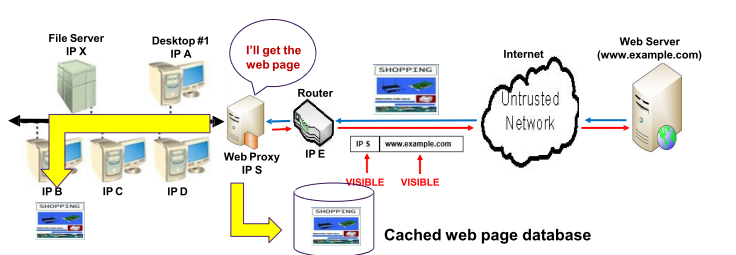
Benefit #2:
- Speed – faster retrieval of web pages AND
- Bandwidth – reduces the need to go out onto the Internet – this is being responsible at a corporate level – it should be part of the Issue Specific Security policy (‘Planning’ in week 3)
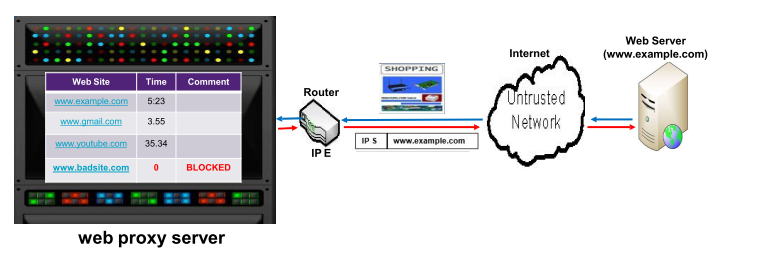
- Management – web usage enforced as per Issue Specific Security
- Activity logging – we see this in all entries – this is just an example
- ‘Blacklisted Sites’ – we see this in the 4th entry – the proxy stops the corporate network being used for ‘undesirable’ activities
- All these details are logged for a long term record and ongoing analysis
- We shall come back to this issue – proxies assist in good management of corporate policy
- Implement corporate proxy
- Crackstation.net - can't reverse the hash but knows what it is
- Can be visited from the UQ network, used for education purposes
- Other websites are blocked by UQ
Proxy types
Transparent Proxy
- Definition: A transparent proxy, also known as an intercepting or inline proxy, intercepts the client’s requests without modifying them.
- Characteristics:
- The client is unaware of the proxy’s presence.
- The client’s IP address is visible to the destination server.
- Often used for content filtering, caching, and monitoring.
- served faster and monitor what you visit
Non-Transparent Proxy
- Definition: A non-transparent proxy, also known as an anonymous proxy, modifies the client’s requests before forwarding them to the destination server.
- Characteristics:
- The client is aware of the proxy’s presence.
- The client’s IP address is hidden from the destination server.
- Often used for privacy, security, and bypassing geo-restrictions.
- Can modify the clients request before forwarding to the destination server
- IP address is hidden from the destination server
- Georestrictions - VPN
- Cannot go from one point in the world to another
Explicit Proxy
- Definition: An explicit proxy requires the client to configure their browser or application to use the proxy server.
- Characteristics:
- The client must be configured to use the proxy.
- Can be either transparent or non-transparent.
- Often used in corporate environments for access control and monitoring.
- Config in the browser, will go to that particular proxy
- used in corporate envrionments for access control and monitoring
Proxies – in summary
- Proxies are firewalls – application ‘layer’ firewalls
- Proxies are specialized – they only deal with ‘their’ protocol (e.g. web, email) – this is completely different to layer 3/4 firewalls that look at everything (all protocols)
- Proxies can analyse the data in packets – again this is different to layer 3/4 firewalls that only analyse the packet headers – proxies are therefore slower than packet filtering firewalls – but the ‘nasty stuff’ is always in the data!
- Proxies are very efficient in implementing corporate web policy
- We have talked about a proxy as a single role entity – actually there are ‘forward’ and ‘reverse’ proxies (diagram below) – we treat them as a single entity
- Proxies go at the application layer
- Look at the data and analyse what is in the data
Virtual private networks (VPNs)
- Transparent proxies cannot encrypt data!
- A significant need for private, secure network connection between businesses (e.g. professional practices, SMEs, even corporates); any entity using data communication capability of unsecured, public network
- The need to maintain the business policies when workers are remote from the business (but using the business network). This usually involves the VPN working in cooperation with the corporate proxy server.
- VPN must accomplish:
- Encryption of ALL incoming and outgoing data
- Authentication
- Proxies cannot decrypt on encrypt data
- Proxies cannot deal with encrypted data
- Buy a box - or install software
- Connection between software - anything between two endpoints is totally encrypted
- Software installed on your computer instead of a physical box - VPN client
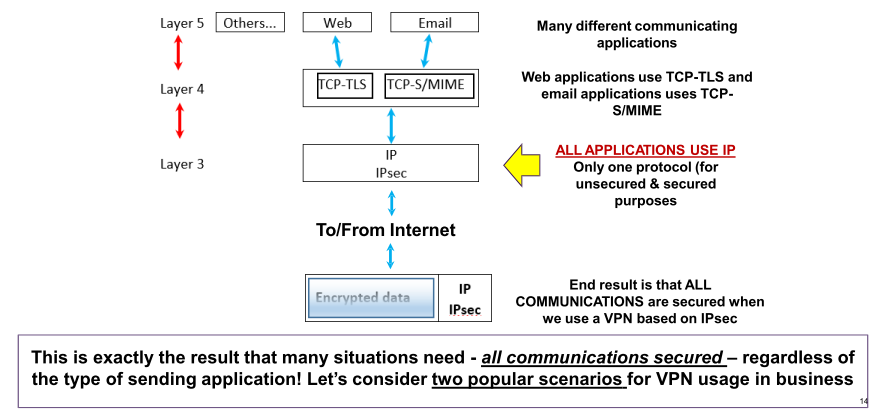
This is exactly the result that many situations need - all communications secured – regardless of the type of sending application! Let’s consider two popular scenarios for VPN usage in business
(1)Transport mode
- Allows user to establish secure link directly with remote host, encrypting only data contents of packet
- Most popular use:
- Remote access worker connects to office network over Internet by connecting to a VPN server on the perimeter
- We say that using the VPN puts the remote worker ‘behind’ the firewall/router – ‘inside’ their work network. The worker can use all her/his usual work resources from home.
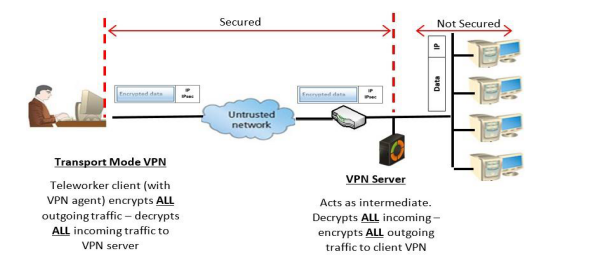
- goes into the VPN box - then no longer encrypted
- Server will log what you are doing
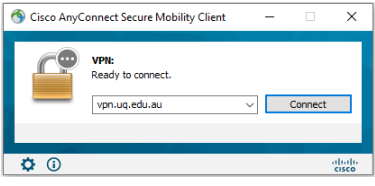
- It will authenticate you
Virtual private networks (VPNs) – Design #2
(2)Tunnel mode
- Organization establishes two perimeter tunnel servers
- These servers act as encryption points, encrypting all traffic that will traverse unsecured network
- Very popular secure solution for professional practices (e.g. medical, legal, dental)
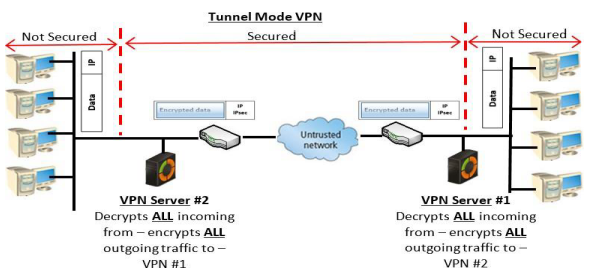
- VPN server would even encrypt the encrypted stuff
- HTTPS is already encrypted e.g.
‘Geographical’ restrictions to certain services are problematical

- Access something in America
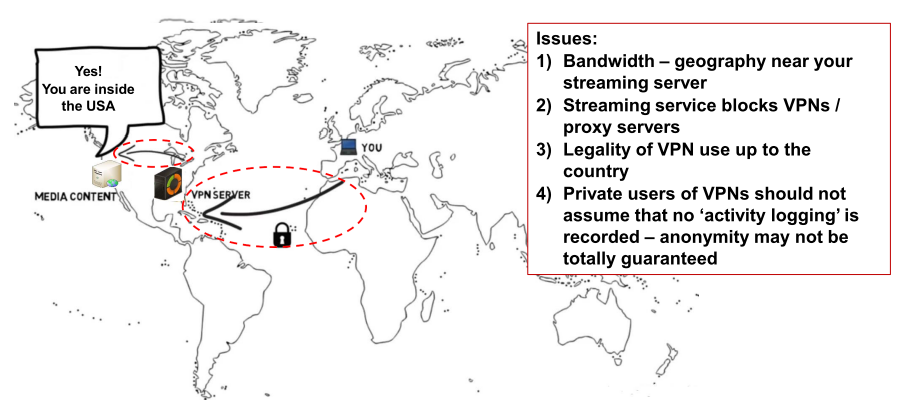
- buy a VPN server in America
- Want to watch an episode in Australia
- Log into UQ's VPN
- Would go against's UQ's policy of using their equipment for studying only
VPNs – the ‘business case’
- VPNs provide a cheap, secure and flexible way to extend the ‘boundaries’ of the business network
- The ‘teleworker’ – becoming more popular in many sectors
- Business to business linkages – opening up (in a secure way) the necessary resources to business partners
- In the ‘teleworker’ model, the VPN also means that the remote network users (i.e. the ‘teleworkers’) must follow the same corporate policies as workers ‘within’ the network must embrace. This is a good result for the organization.
- Point 2 is further enhanced (for web usage) when we consider how a VPN server and a Web Proxy server interact – we now look to consider this!
- Using UQ VPN - they will think you are on campus
- Do a lot of stuff you can do in computer labs e.g.
Proxies AND VPNs – working together #1
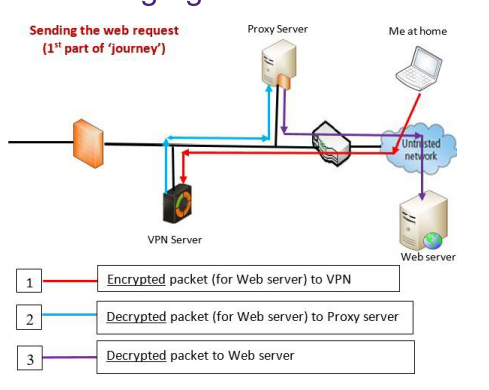
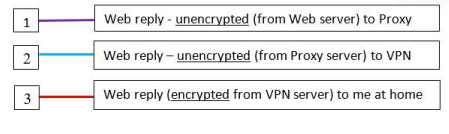
- Encrypted, using HTTPS
- Logged into UQ VPN e.g.
- VPN encrypts again and goes to proxy server - will help to connect to a web server
- At home secure tunnel to VPN
- from VPN, decrypted, only HTTPS
- web server is serving back HTTPS
- Proxy server IP address is shown to the server
- proxy server sends pack to VPN - VPN creates secure tunnel to device
- HTTPS is going to brower, and is decrypted.
Intrusion Detection System (IDS) : Introduction – why needed?
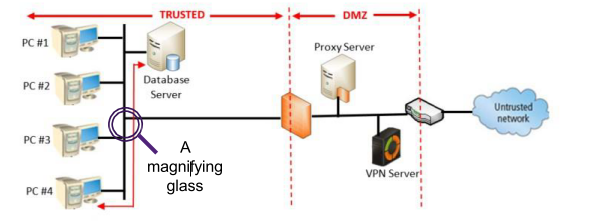
- We have a ‘secure’ network: firewalls, proxy, VPN server, ‘defence in depth’
- At least 50% of security incidents originate INSIDE the organization
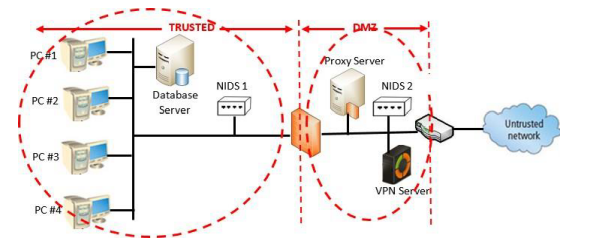
- At staff member (PC #4) is a disgruntled employee – plans to steal corporate data (stored on the database server)
- The employee plans the incident – stays late to avoid other staff
- What is in place to stop this – the employee is ‘behind’ all the existing controls!
We need something like a ‘magnifying glass’ over the internal network - IDS
- IDS is connected to a network segment
- Alter the staff if there is something unusual going on
- How does it work?
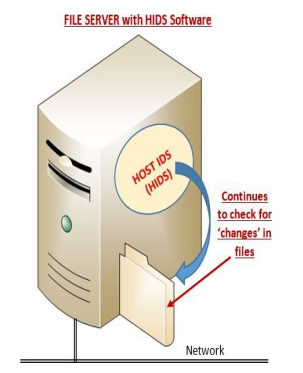
- Host IDS
IDS (intrusion detection systems) – strategy in overview
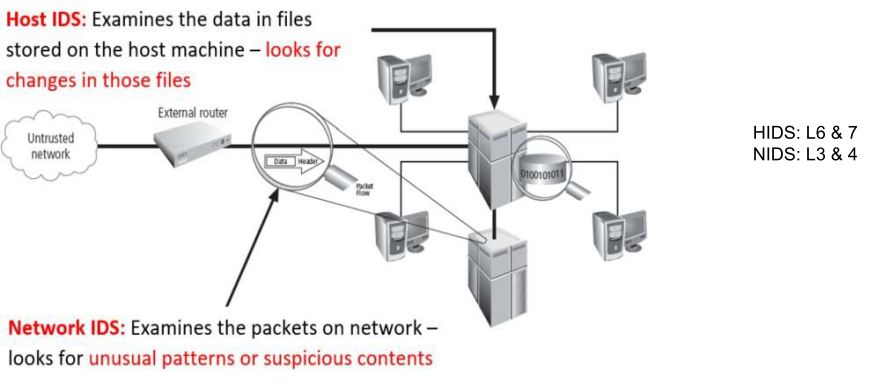
- IDS knows OS, and the files OS needs
- names of the files, length in bytes, etc.
- changes contents of the file, adds and deletes files
- Alters and operator whether this has happened or not
- Like a burglar alert system
- Doesn't do anything - just raises alarm
IDS
- Looks at the packets that are going past on the network
- Have to dimension IDS so it can handle packets
- Put on a segment - IDS on each segment of network
- Look at network traffic on the segments
- Put one in the DMZ
- in Private network
- Special segment with credit cards - put an IDS there as well
An intrusion detection system (IDS) – a software system - will:
- detect a violation of its configuration and activate alarm
- enable administrators to configure systems to notify them directly of trouble
Important terminology
- Intrusion: type of attack on information assets in which instigator attempts to gain entry into or disrupt system with harmful intent
- Incident response: identification of, classification of, response to, and recovery from an incident
- Intrusion prevention: consists of activities that seek to deter an intrusion from occurring
- Intrusion detection: consists of procedures and systems created and operated to detect system intrusions
IDS – More terminology
- Alert or alarm
- False attack stimulus – event causes alarm – but no attack - false alarm this is a nuisance - can be time consuming for IT staff
- False negative – does not respond to actual attack – this is very bad – must be avoided if possible (accuracy of IDS)
- False positive – alarm/alert – but no attack – again, a nuisance!
- Noise – ‘normal’ ongoing activity – usual operating situation
Why use an IDS
- Prevent problem behaviors by increasing the perceived risk of discovery and punishment
- To manage insider risk – to complement firewalls
- Detect attacks and other security violations
- Detect preambles to attacks
- Provide useful information about intrusions that take place (remember our discussion about ‘risk actuals’ – the actual security incidents that the organization experiences)
- Used as a deterrent
- IDS is monitoring
- Alter before the attack happens
- How does the IDS tell the operator?
- SMS, email, in a computer room, a screen on the wall
IDS: 2 types of operating scope & 2 detection methods used
- IDS operating scope:
- Network-based - NIDS
- Host-based - HIDS
- Application-based - AIDS (we do not treat this type)
- All IDSs use one of two detection methods:
- Signature-based
- Statistical anomaly-based
- network IDS and host IDS
- IDS for one particular piece of software
Detection method (1) : signature-based IDS
- Examine data traffic in search of patterns that match known signatures
- Widely used because many attacks have clear and distinct signatures (patterns)
- Problem with this approach: as new attack strategies are identified, the IDS’s database of signatures must be continually updated (very similar to the virus ‘pattern-matching approach)
Detection method (2) : statistical anomaly-based IDS
- The statistical anomaly-based IDS (stat IDS) or behavior-based IDS sample network activity to compare to traffic that is known to be normal
- When measured activity is outside baseline setting, IDS will trigger an alert
- This type of IDS can detect new types of attacks, but requires much more overhead and processing capacity than signature-based - may generate many false positives
IDS Scope (1): Network-Based IDS (NIDS)
- Scope – where we place the IDS and the boundary set for the operation of the IDS
- Resides on computer or appliance connected to segment of an organization’s network; looks for signs of attacks
- Installed at specific place in the network where it can watch traffic going into and out of particular network segment
Advantages and Disadvantages of NIDSs
- Good network design and placement of NIDS can enable organization to use a few devices to monitor large network
- NIDSs not usually susceptible to direct attack and may not be detectable by attackers
- Can become overwhelmed by network volume and fail to recognize attacks
- Cannot analyze encrypted packets AND cannot reliably ascertain if attack was successful or not
IDS Scope (2): Host-based IDS
- Host-based IDS (HIDS) resides on a particular computer or server and monitors activity only on that system
- Benchmark and monitor the status of key system files and detect when intruder creates, modifies, or deletes files
- Most HIDSs work on the principle of configuration or change management
- Advantage over NIDS: can usually be installed so that it can access information decrypted before/after traveling over network
- Can detect local events on host systems and detect attacks that may elude a network-based IDS
Advantages and Disadvantages of HIDSs
- Vulnerable both to direct attacks and attacks against host operating system
- Susceptible to some denial-of- service attacks
- Can use large amounts of disk space
- Can inflict a performance overhead on its host systems
Deploying Network-Based IDSs
- NIST recommends several locations for NIDS machines
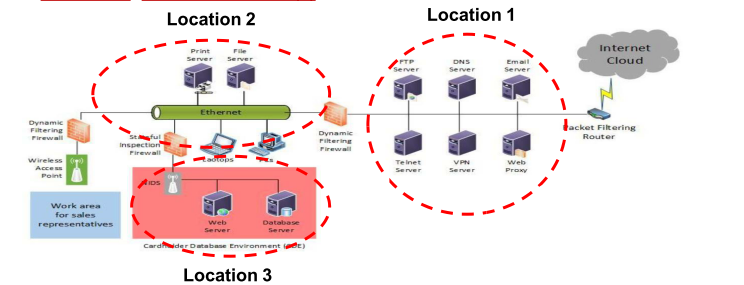
- Location 1: behind external firewall, in the network DMZ
- Location 2: On major network backbones
- Location 3: On critical subnet(s)