Module 3 - Relation Query Languages - SQL
Three Types of SQL Statements:
Data Definition Language (DDL)
- Statements to define the database schema
Data Manipulation Language (DML)
- Statements to manipulate the
Data Control Language (DCL)
- Statements to specify transaction control, semantic integrity (triggers and assertions), authorization and management of privileges
- Statements for specifying the physical storage parameters such as file structures and access paths (indexes)
- Statements to specify the role-based security controls.
Data Definition Language
| DDL Statement | Explanation | Example/syntax |
|---|---|---|
| DROP TABLE | - Drops all constraints defined on the table including constraints in other tables which reference this table - Deletes all tuples within the table - Removes the table definition from the system catalog |
DROP TABLE <table name> [CASCADE] |
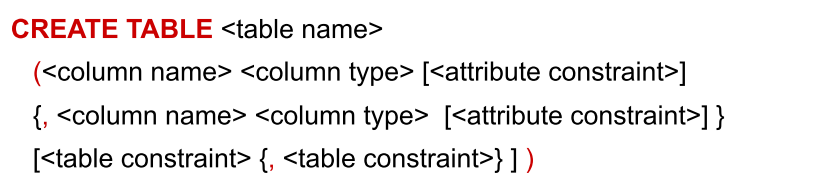
| CREATE TABLE | - statement creates a new relation, by specifying its name, attributes and constraints. - The key, entity and referential integrity constraints are specified within the statement after the attributes have been declared. |
 |
| ALTER TABLE | - The definition of a table created using the CREATE TABLE command can be changed using the ALTER TABLE command. | 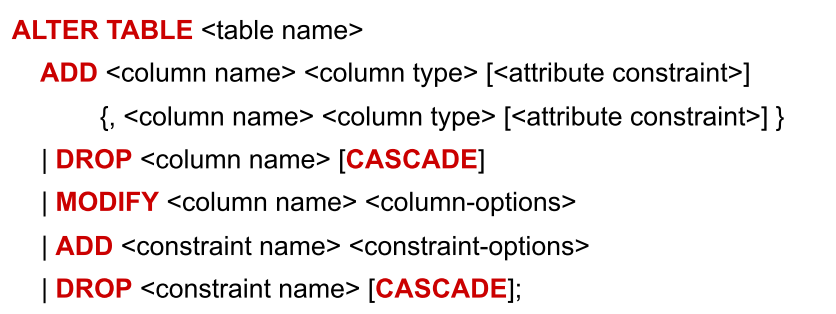 |
Constraints in SQL
| Constraint | Description |
|---|---|
| PRIMARY KEY | Ensures attribute value is unique and not null |
| FOREIGN KEY | Ensures attribute value exists in parent table |
| CHECK | Ensures attribute values meets a predefined condition(s) |
| UNIQUE | Ensures attribute value is unique or null. |
Constraint Names
You can give constraints a name which has the following benefits:
- Easier to understand errors. If a query violates a constraint, SQL will generate an error message that will contain the constraint name.
- Easier to modify or remove the constraint.
Referential Integrity Constraint : Foreign Key
- What should be done if an employee tuple is deleted, and there is another employee tuple that refers to it?
ON {DELETE, UPDATE}
SET NULL -- set the FK references to null
SET DEFAULT <value> -- set it to a defaulted value
CASCADE -- delete all the tuples which refer to it

-- Example
CONSTRAINT ssn_fk FOREIGN KEY (salesPerson) REFERENCES Employee(ssn)
ON DELETE RESTRICT ON UPDATE CASCADE);
Data Manipulation Language
Data in a relational query can be manipulated in the following ways
| Manipulation | Description | Example |
|---|---|---|
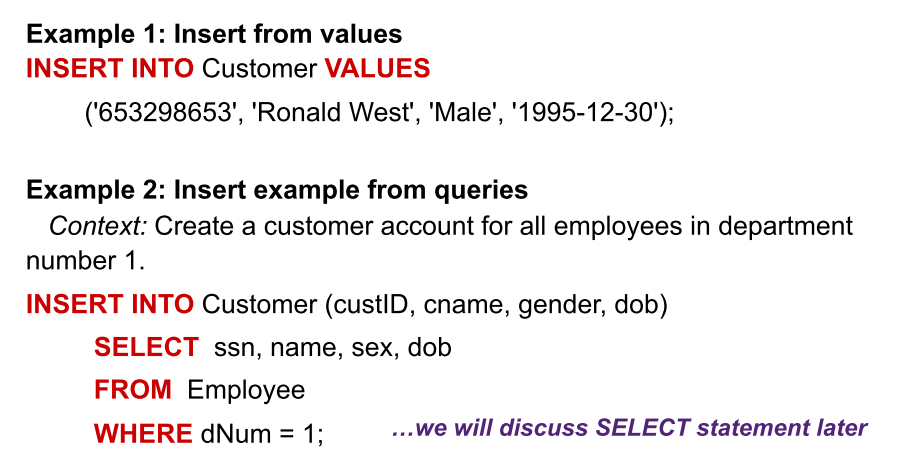
| INSERT | New tuples may be inserted. - Not all the attributes in the table have to be listed. - Values are listed in the same order as the attributes were specified in the CREATE TABLE command |
 |
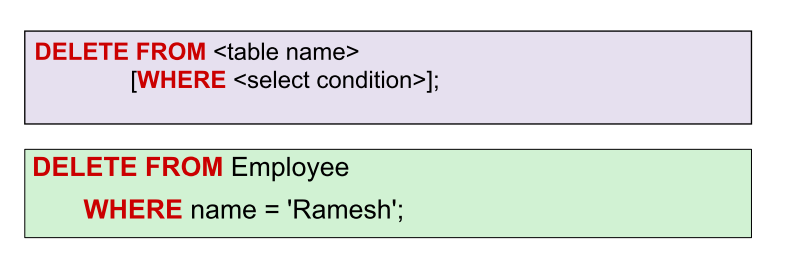
| DELETE | used to remove existing tuples from a relation. - A single DELETE statement may delete zero, one, several or all tuples from a table - Tuples are explicitly deleted from a single table |
 |
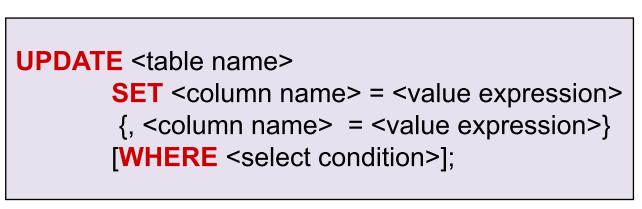
| UPDATE | Used to modify attribute values of one or more selected tuples in a relation. - Tuples are selected for update from a single table. - Updating a primary key value may propagate to other tables |
 |
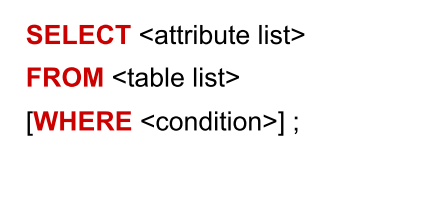
| SELECT | Attributes of specific tuples, entire tuples or even entire relations may be retrieved In the SELECT statement, users specify what the result of the query should be, and the DBMS decides the operations and order of execution, thus SQL queries are declarative |
 |
SELECT - Basic Syntax
SELECT <attribute list>
FROM <table list>
[WHERE <condition>];
- <attribute list> is a list of attribute names (or an expression) whose values are to be retrieved by the query.
- <table list> is a list of relation names required to process the query.
- <condition> is a conditional (Boolean) expression that identifies the tuples to be retrieved by the query.
Projection in SQL
- Select the attributes of given collection of tuples.
- Distinct: By default, duplicates are not eliminated in SQL relations, which are bags or multisets and not sets. Use of DISTINCT will eliminate duplicates and enforce set semantics.
- The asterix character (*) acts as a wildcard, selecting all of the columns in the table.
Selection in SQL Selection (WHERE clause)
- Select tuples from given collection of tuples.
- <search condition> is a conditional (Boolean) expression that identifies the tuples to be retrieved by the query.
Complete WHERE condition clauses
| WHERE condition type | Operand | Example |
|---|---|---|
| All | =, <> |
ID <> 324, price = 42.30 |
| All | <, > |
ID > 324, price < 42.30 |
| All | = |
name = 'Mary', ID = 23406 |
| NVARCHAR() only | LIKE, NOT LIKE |
name LIKE '%Mary%' will select all the tuples substrings containing the name 'Mary', such as 'Mary-Ann' or 'Maryam' e.g. |
| All | IN |
name IN ('Mary', 'John', 'Steve') acts as a ternary OR operation |
| All | BETWEEN |
salary BETWEEN 10000 AND 30000 |
| All | IS |
name IS NULL acts as a ternary OR operation |