Lecture 2
Design document
- Project overview - purpose of project, target audience etc
- Key features
- UI / UX design HTML mockups
- Database Design - ER diagram with all database tables, fields and relationships between tables
- Technology research timeline
Structure of HTML
<html>
<head>
  <title>Sample HTML Pag Structure</title>
</head>
<body>

  <h1>Heading 1</h1>

  <p><b>Welcome</b> to <i>HTML</i>!</p>

</body>
</html>
- Headings
- Paragraphs
- Lists (ordered and unordered)
- Images
- Tables
Adding CSS
<head>
  <title>Common HTML Tags</title>
  <style>
    h1 {
      color: purple;
    }

    .rounded-border {
      border: 2px solid purple;
      border-radius: 8px;
    }
  </style>
</head>

<body>

  <h1>Heading 1</h1>

  <p><b>Welcome</b> to <i>HTML</i>!</p>
Why cascading?
- Cascading Style Sheets (CSS) refers to the priority scheme used to determine which style rules apply to elements in the web document if multiple rules conflict or overlap.
- This cascading mechanism allows multiple style sheets to influence the look of a document, with a well-defined order of precedence determining how conflicts are resolved.
- If two rules have the same specificity, the last rule declared in the CSS is applied.
Advantages of Classless CSS Frameworks:
- Simplicity and Speed: Rapid development of websites by minimizing the need for writing custom CSS or applying specific classes to HTML elements.
- Learning Curve: Great for beginners because they don't require learning a system of classes.
<a> Href tag
- The <a> tag, also known as the anchor tag, is used in HTML to create hyperlinks that navigate to other web pages or resources.
- The href attribute within the <a> tag specifies the destination URL that the link points to.
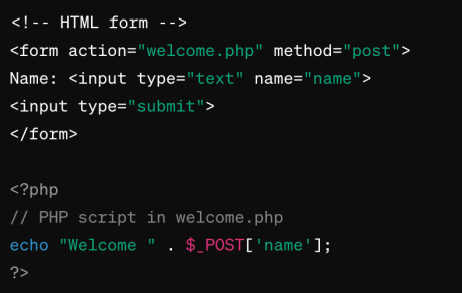
Simple form
- Each of elements can be included
within a
<form>element - Use the action and method attributes
of the
<form>element to specify where and how the form data should be submitted <input>is a single line text field<textarea>is a multiline text field<button>is a button and with the type attribute set to ‘submit’ will send the values entered into the form to the action path of the form
Forms – method Get vs Post
GET Method
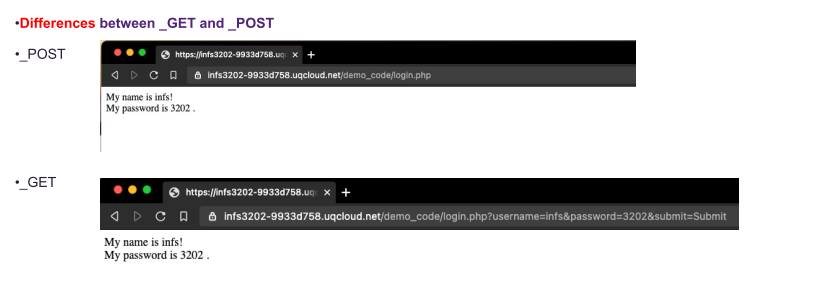
- Data Appended to URL: Sends data in the URL itself, as key-value pairs in the query string.
- Read Operations: Typically used for retrieving data, not modifying it.
- Limited Data Size: Length restrictions due to URL length limitations (usually up to 2048 characters).
POST Method
- Data in Body: Sends data in the request body, allowing for larger and more complex payloads. No inherent size limitation like with GET.
- Write Operations: Typically used for sending data to be processed or stored on the server.
- Encoding: GET uses URL encoding, whereas POST allows for multiple data types (e.g., application/json, multipart/form-data).
Details and summary
• The <details> and <summary> tags are HTML elements used together to create an interactive widget that users
can click to hide or show more content.
• This feature is particularly useful for implementing FAQs, collapsible lists, or any content that benefits from a
hide/show interaction to keep the page clean and improve user experience by not overwhelming them with
information all at once.
PHP
What is PHP?
- PHP: Hypertext Preprocessor
- Server-side scripting language designed for web development
- Can be embedded into HTML Why Use PHP?
- Widely used and open-source
- Efficient for building dynamic web pages
- Compatible with various databases
- Large community and extensive documentation
Basic syntax
- Starts with
- PHP statements end with a semicolon (;)
- A PHP file normally contains HTML tags, and some PHP scripting codes.
- The file extension is “.php”
PHP - Variables
- Variables are "containers" for storing information.
- Rules for PHP variable names:
- Start with $ (e.g., $name = “Aneesha”)
- Must begin with a letter or the underscore character
- Can only contain alpha-numeric characters and underscores
- Should not contain spaces
- Case sensitive ($Name ≠ $name)
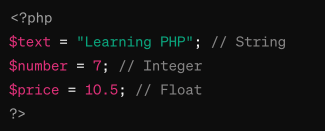
- PHP supports several data types: Strings, Integers, Floats, Booleans, Arrays, etc.

String concatenation
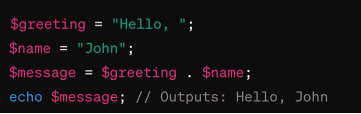
- String concatenation in PHP is the process of joining two or more strings together into one single string.
- PHP uses the dot (.) operator for string concatenation.
- Useful generating HTML content with embedded PHP variables, combining user input into messages, or assembling file paths and URLs from separate parts.
PHP – Control Structures – If statements
if Statement:
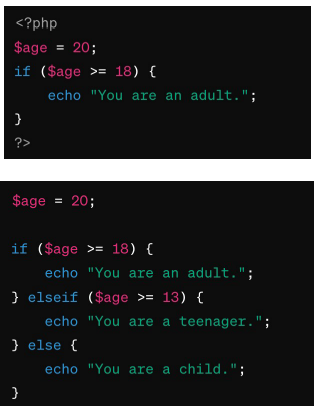
- The if statement is used to execute a block of code if a specified condition is true.
- It can be combined with an else statement to execute a code block if the condition is false.
- You can also use elseif to specify a new condition to test if the first condition is false.
Loops
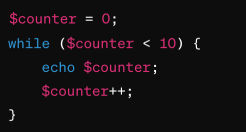
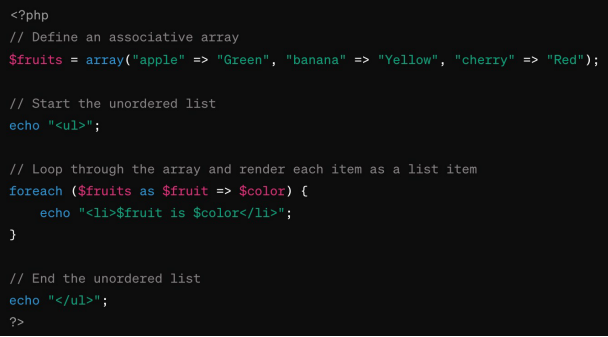
PHP supports while, for and foreach loops

Working with forms
PHP - Built-in SuperGlobals
- Superglobal variables in are predefined variables that are accessible from anywhere in a PHP script.
- Superglobal variables are automatically available in all scopes, including functions and methods,
- Superglobal variables provide a simple way to access common values or data structures,
- e.g. HTTP headers, form data, session data, server environment variables, and more.
- Superglobal variables examples:.
- $GLOBALS
- $_SERVER
- $_GET
- $_POST
- $_FILES
- $_COOKIE
- $_SESSION
- $_REQUEST
- $_ENV
PHP – Forms – Get vs Post
Information sent from a form with the GET method is visible to everyone (it will be displayed in the browser's address bar) and has limits on the amount of information to send.
When to use Get
- This method should not be used when sending passwords or other sensitive information!
- This method is not suitable for very large variable values.
- This method is case insensitive (all characters in lower case).
- This can be useful for example where you want to be able to bookmark a page with specific query string values.

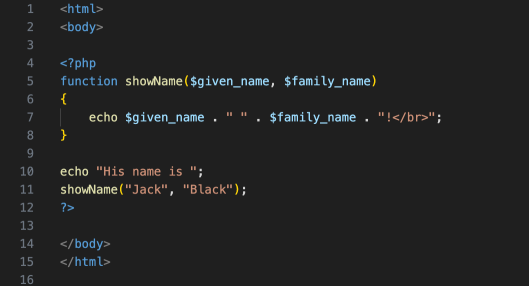
Function in PHP
• A function will be executed by a call to the function.
• The PHP script defines a function showName that takes two parameters, $given_name and $family_name, and echoes them with a space in between and an exclamation mark, followed by a break (<br>).
PHP - functions
- Classes are the blueprint for creating objects.
- They encapsulate data for the object and methods to manipulate that data.
- arrow indicates the instance variables
- Using classes and objects allows you to implement the principles of object-oriented programming (OOP).
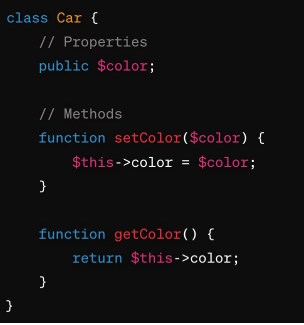
Classes - visibility
- public: The property or method can be accessed from anywhere.
- protected: The property or method can be accessed within the class and by classes derived from that class.
- private: The property or method can ONLY be accessed within the class.
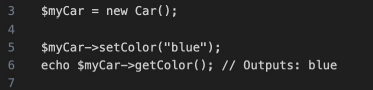
Creating Objects
To create an instance of a class (i.e., an object), use the new keyword followed by the class name: Accessing Properties and Methods
Once you have an object, you can access its properties and methods using the arrow operator ->. Here's how to use the setColor and getColor methods:
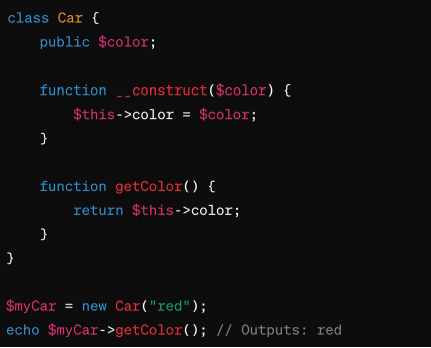
PHP – Classes – Constructor Method
- A special method called a constructor (__construct()) can be defined in a class.
- It is automatically called when an object is created.
- Constructors are typically used to initialize properties or perform setup tasks.
UQCloud & NGINX Web Server
Elements of a Web Server
The basic elements of a web server includes
- Hardware
- operating system
- http server
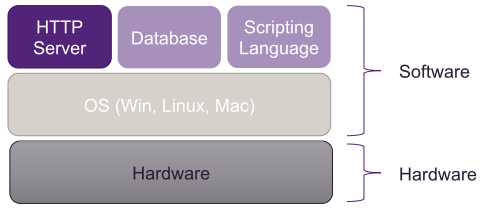
Web server software
Top five open source web server
- Apache HTTP Server
- NGINX
- Apache Tomcat
- Node.js
- Lighttpd
UQCloud gives each student a Zone, which is a server that runs NGINX where various services can be enabled eg PHP, databases, etc…
NGINX Web server – Basic config file
- root /var/www/html/htdocs;: The root directive specifies the directory where Nginx should look for the files to serve.
- index index.html index.htm;:
This specifies the default files that Nginx should look for when a directory is requested.
- After you change the configuration run: