Lecture 11 Revision
Web Security
What is Web Security?
Web security encompasses the strategies, protocols, and tools designed to protect websites, web applications, and users from threats on the internet.
Definition:
- Protecting web servers, web applications, and user data from attacks such as hacking, malware, and breaches. Objective:
- Ensure data integrity, confidentiality, and availability across web environments.
Challenges:
- Dealing with threats like SQL injection, XSS (Cross-Site Scripting), and DDoS (Distributed Denial of Service) attacks.
Importance:
- Vital for safeguarding sensitive information, maintaining user trust, and complying with regulations.
Strategies, internal protocols
- tools
- trying to protect your server from other users who are trying to hack it
- ensure data integrity
- sensitive data confidential
Keep your users trust
- comply with regulations
OPTUS Data Breach in 2022
Large telecom company
- in 2022, had a big data breach
- current and former customer involved in data breach
- driver's license, home address, name, etc.
- The Optus data breach of September 2022, occurred through an unprotected and publically exposed API. This API didn’t require user authentication before facilitating a connection. A lack of an authentication policy meant anyone that discovered the API on the internet could connect to it without submitting a username or password.
- The API exposed sensitive private data e.g. Drivers License, Medicare number, etc
- The URL to the API had a auto-increment client number It was easy to automate calls to the API to get the data from another user e.g. https://somedomain.com/getuserdetails?user_id=10 From: https://www.upguard.com/blog/how-did-the-optus-data-breach-happen
- Authentication and Authorization are very important across all URL and APIs
- Secure all Routes by default, have well defined authorization and open only as needed making sure to test that the data make available is not sensitive.
Was not SQL injection or Cross-site scripting
- optus has an API, which their mobile services were calling
- API was available on the internet, and did not
- API call could get back distinct user's details
- authorisation was not even in place
- routes by default are requiring authentication
SQL injection
- SQL injection typically happens when a web application requests user input, such as a username or user ID. If the input provided is an SQL statement or part of an SQL statement instead of legitimate data, the application may execute this statement on the database without realizing its malicious intent.
- SQL is a text stream to a database
- update, insert, view data
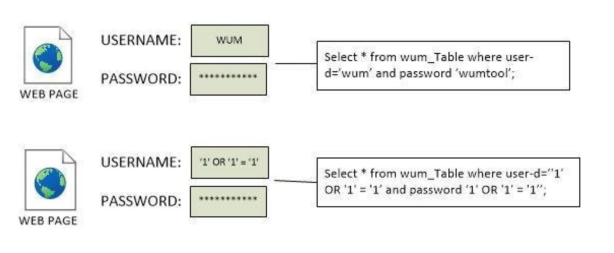
- An attacker can inject SQL control characters and command keywords (e.g.,single quote (‘), double quote (“), equal (=), comment (- -), etc.) to change the query structure.
SELECT * FROM user WHERE name=‘Charles’ AND passwd=‘topsecret’
Attack - use Charles
SELECT * FROM user WHERE name=‘Charles’ -- ‘ AND passwd=‘ ’
-- : the remainder of the statement is to be treated as a comment and not executed
Retrieving Hidden Data
- URL
https://somesite.com/products?category=handbags
- Category is included in a Query checking if released is 1
SELECT * FROM products WHERE category = ‘handbags' AND released = 1
- URL with SQL Comment
https://somesite.com/products?category=handbags' --
- Resulting Query will return all items
SELECT * FROM products WHERE category = ‘handbags’--’ AND released = 1
- URL
https://somesite.com/products?category=handbags
- Category is included in a Query checking if released is 1 SELECT * FROM products WHERE category = ‘handbags' AND released = 1
- URL with SQL Comment
https://somesite.com/products?category=handbags'+OR+1=1--
- Resulting Query will return all items
SELECT * FROM products WHERE category = ‘handbags' OR 1=1--' AND released = 1
- Category is included in a Query checking if released is 1
SELECT * FROM products WHERE category = ‘handbags' AND released = 1
- URL with SQL Comment
https://somesite.com/products?category=handbags’;delete * from users --
- Delete Query will be executed on users table.
- Update queries as well a unions with other tables can be returned
SELECT * FROM user WHERE name=‘Charles’ AND passwd=‘topsecret’
close the query off, and add authorisation DML
Charles’; INSERT INTO groupMembership (userID, group)
VALUES (SELECT userID FROM users
WHERE userName=‘Charles', 'Administrator'); --
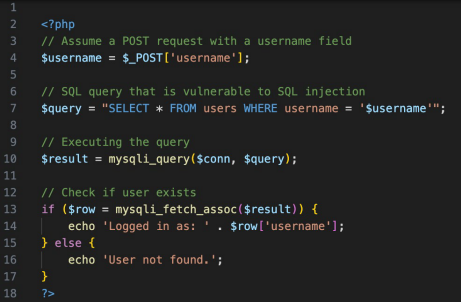
SQL injection vulnerability
Prepared Statements in PHP
- This version of the code uses a prepared statement, which separates the data (user input) from the code (SQL query), thus preventing SQL injection.
- The bind_param function binds the user input to a placeholder in the SQL query (?), specifying "s" to treat it as a string.
- This ensures that the input is handled safely, regardless of its content.
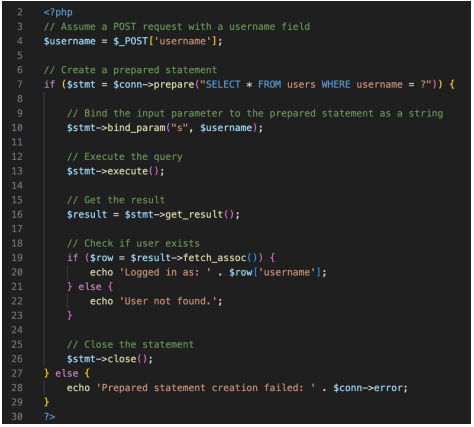
bind a variable to prevent SQL injection
SQL injection in Codeigniter
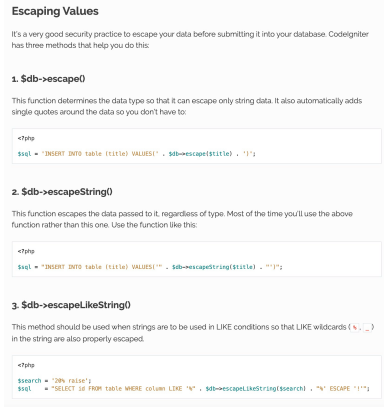
- If you must create SQL directly and concatenate with variable that may come from a url querystring or user input then escape the values.
Cross-site Scripting
What is XSS?
- Injection security attack
- An attacker injects malicious client-side scripts into the content from trusted websites.
When does it occur?
- An attacker injects malicious scripts into the web pages, which will be viewed by other users.
- Malicious scripts are eventually executed by your Web browsers!
- Most likely this is Javascript code.
How serious is it?
- It has been estimated that approximately 65% of websites are vulnerable to an XSS attack in some form.
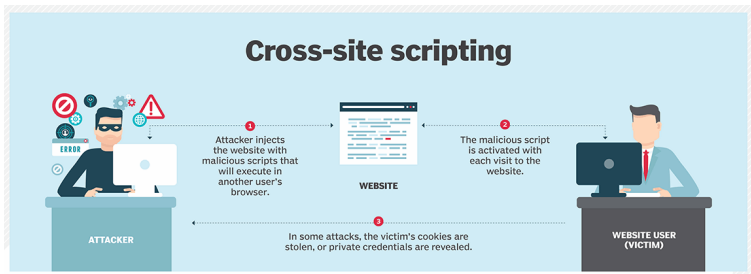
- Sites that are a blog or a forum
- freetext field e.g.
- some of the scripts between script tags could be malicious
- Stored in you system in some way
- Will be able to do a range of thing, looking at cookies, etc.
Reflected XSS
- Occurs when user input, such as search terms or other data, is immediately used by web pages without proper sanitization and reflected back to the user.
Example: A user might enter a script into a search box that is immediately displayed on the result page without filtering, like so:
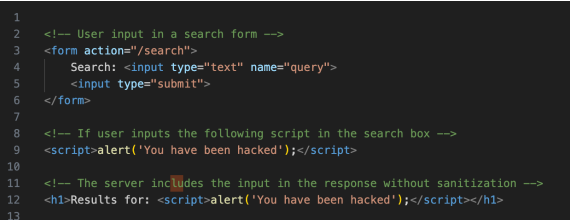
- By nature of the get request
- Enter data (a search page, e.g.)
- normally sends a get request, appends the query in the query strong
- pull out the query string and show it on the webpage
- alter the particular search query
- Sharing of a URL, can see what the user sees next
Stored XSS
Occurs when malicious scripts are permanently stored on target servers, such as in a database, message forum, visitor log, comment field, etc., and then later served to other users.

- anybody has access, when they are writing in a forum e.g.
- add a script that is eventually sent to users
DOM-based XSS
Occurs when a script takes data from the client side, such as the URL, and processes it in a way that executes script without proper sanitization.
Example: Using URL parameters to modify the DOM:
In this case, the JavaScript will execute the script content of the name parameter as it is directly included in the DOM.
- javascript is able to lookup things on the current page

Preventing XSS
-
Strip HTML tags and JS before storing
-
Escape all user entered data eg
-
esc(): This is a function call. In the context of many PHP frameworks, including CodeIgniter, esc() is a function used for escaping output to prevent Cross-Site Scripting (XSS) attacks. It performs character escaping suitable for HTML output, similar to PHP's native htmlspecialchars() function.
-
Apply the esc() function to this name to escape any special HTML characters (like <, >, ", ', and &). This conversion prevents potentially malicious scripts embedded in the user data from executing in the browser, thus thwarting XSS attacks.
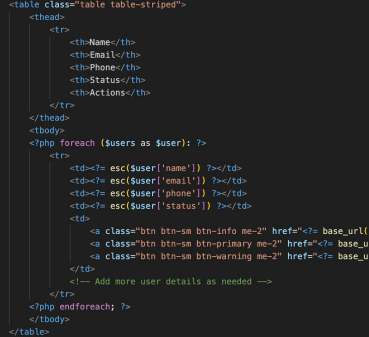
- display and not execute within the browser
Example XSS in a Learning Management System
- Students reported getting blocked by their virus protection when they visited course content
- The site editor’s laptop was infected and everything they edited on the web was inserting the Trojan javascript
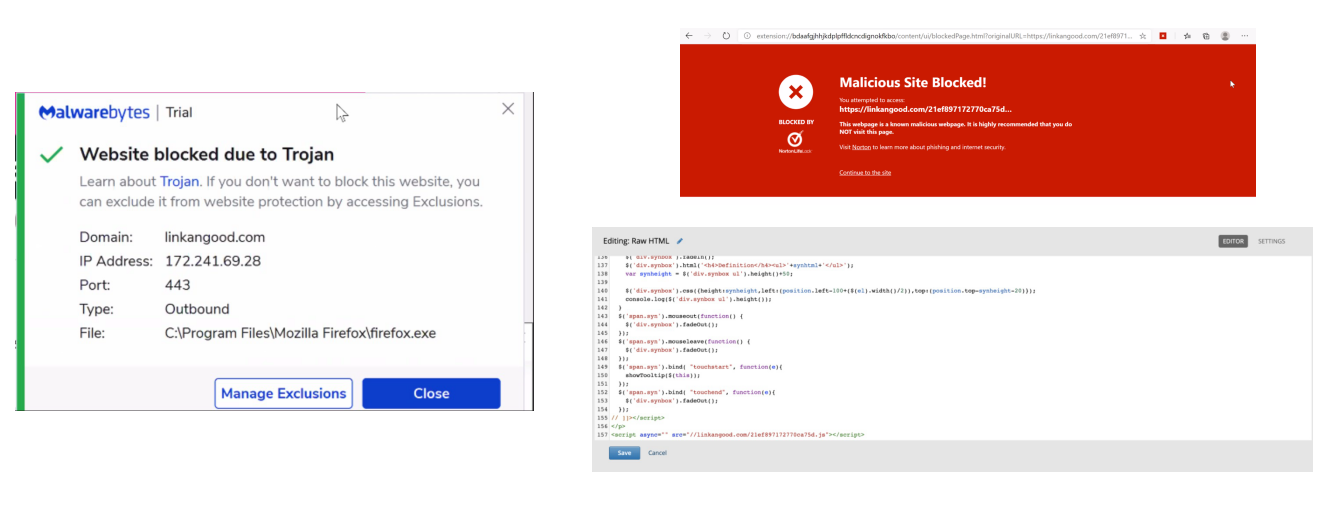
- Trojan on the course site
- computer was infected with malware of developer
- malware would automatically inject javascript before sending data, etc.
Cross-Origin Resource Sharing (CORS)
Cross-Origin Resource Sharing (CORS) is an HTTP-header based mechanism that allows a server to indicate any origins (domain, scheme, or port) other than its own from which a browser should permit loading resources.
- It is a set of HTTP headers that define whether browsers permit web applications running at one origin to access resources from a different origin.
Origin Concept: An origin is defined by the scheme (protocol), host (domain), and port of a URL. For instance, the origin of https://example.com:443 is different from https://example.com:8443 because they have different ports.
Same-Origin Policy: Browsers implement a same-origin policy by default. This policy restricts how a document or script loaded from one origin can interact with resources from another origin. Its primary purpose is to prevent malicious websites from interacting with other sites on which the user might be authenticated (like banking sites).
Cross-Origin Requests: When a script tries to request resources from a different origin (cross-origin), the browser blocks the request unless the server on the other end allows it explicitly.
- can't load from the same domain but other ports
- loading on port 443, can't load on same domain but other ports
- all scripts/images have to come from the same domain/origin
- both servers need to be able to allow it
CORS Example
https://reflectoring.io/complete-guide-to-cors/
-
Most likely currently experienced if you are developing locally can calling an API eg Locally developing React or Vue.js frontend
-
Calling an API on your UQCloud Zone using FetchAPI
-
Setting CORS headers in CodeIgniter https://gist.github.com/kenjis/e757d2b4193b6843724e447e6eaa1254
- localhost on port 5000 e.g.
- hit another API on a different port e.g., comes with an error
- particular domain name, run a webpage
- do a javaScript fetch from teh same origin, will be able to fufil it
- Cross domain request will be excluded
- Disabling CORS (default )
Why is CORS important
- The victim visits evilwebsite.com while logged into goodwebsite.com.
- Evilwebsite.com loads a malicious script onto the victim’s computer that interacts with goodwebsite.com.
- Unaware, the victim runs the malicious script, which then makes a cross-origin request to goodwebsite.com. In this scenario, assume the request aims to access credentials needed for a sensitive action, like revealing the user's password.
- Upon receiving this cross-origin request, goodwebsite.com checks the CORS header to determine whether to allow the data transfer. In this case, let's assume that CORS is configured to permit requests with credentials (Access-Control-Allow-Credentials: true).
- The request passes validation, and consequently, the data is transmitted from the victim’s browser back to evilwebsite.com.
- able to do a call (fetch API) to another domain
Cross Site Request Forgery (CSRF)
- Cross-Site Request Forgery (CSRF or XSRF) is a type of security vulnerability typically found in web applications. It allows an attacker to induce users to perform actions that they do not intend to do while they are authenticated. This vulnerability exploits the trust that a site has in the user's browser.
- The danger of CSRF lies in exploiting the trust that a web application has in the user's browser. An attacker can manipulate a user’s browser to perform unwanted actions on a web application where they are authenticated. This can lead to unauthorized changes or transactions, data theft, and account compromise.
- forms, and posts back to a server
- how do we know that a form can't be replicated to another site?
- inadvertently gain access to another site
- How do we trust that the data from a form is coming from the right place?
CSRF - Example
Here’s a step-by-step breakdown of a typical CSRF attack:
- User Login: The user logs into a website, www.example.com, which authenticates the user and stores a session cookie on their browser.
- Malicious Request: The user, without logging out from www.example.com, visits a malicious website, www.evil.com. This site executes a harmful action by requesting www.example.com to perform a specific task (e.g., changing the user's email address or transferring funds).
- Browser Submits Request: The user’s browser automatically includes cookies pertaining to www.example.com with the request. If the session is still active, the server at www.example.com might execute the request without any additional verification.
- Action Executed: Without the user’s consent, the action is carried out as if the user had intended it.
- Browser automatically includes cookies
- User might be consenting accidentally
CSRF Prevention in CodeIgniter
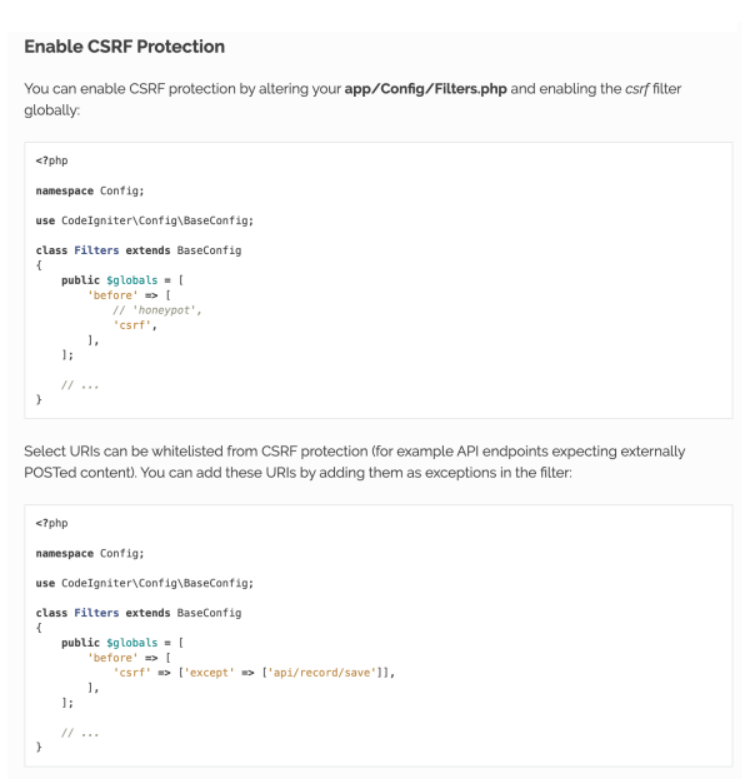
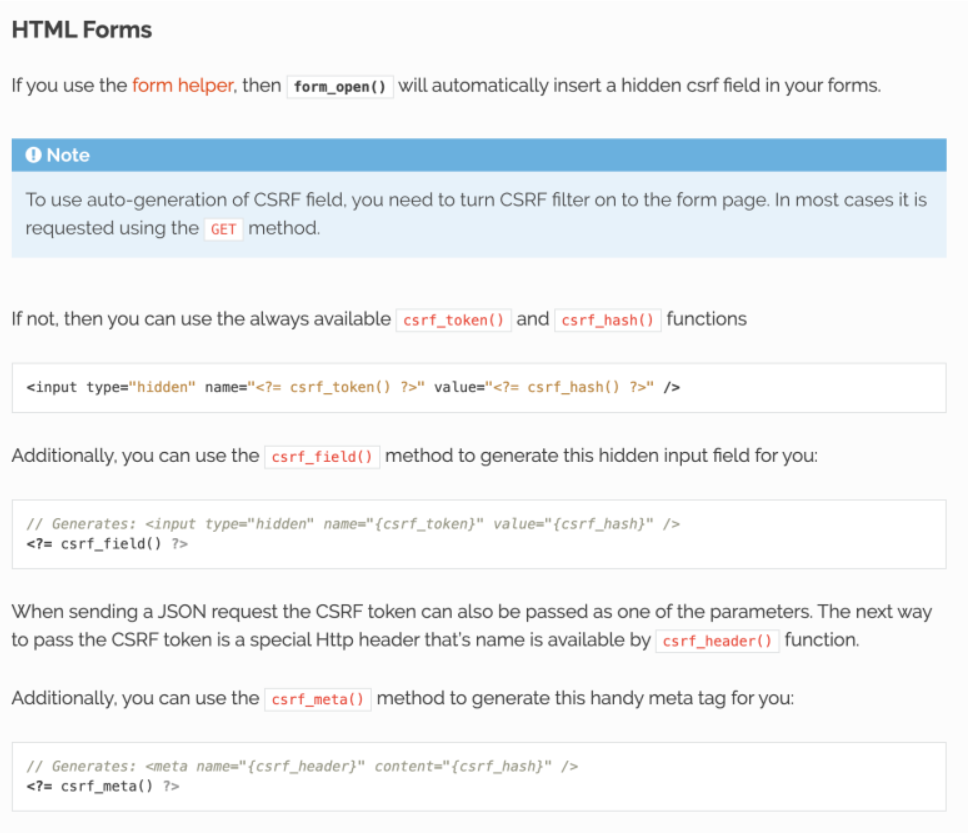
- CSRF included in input
- Enable the CSRF inside the
app/Config/Filters.php
- can exempt against a particular request
- can put the CSRF token inside the API request
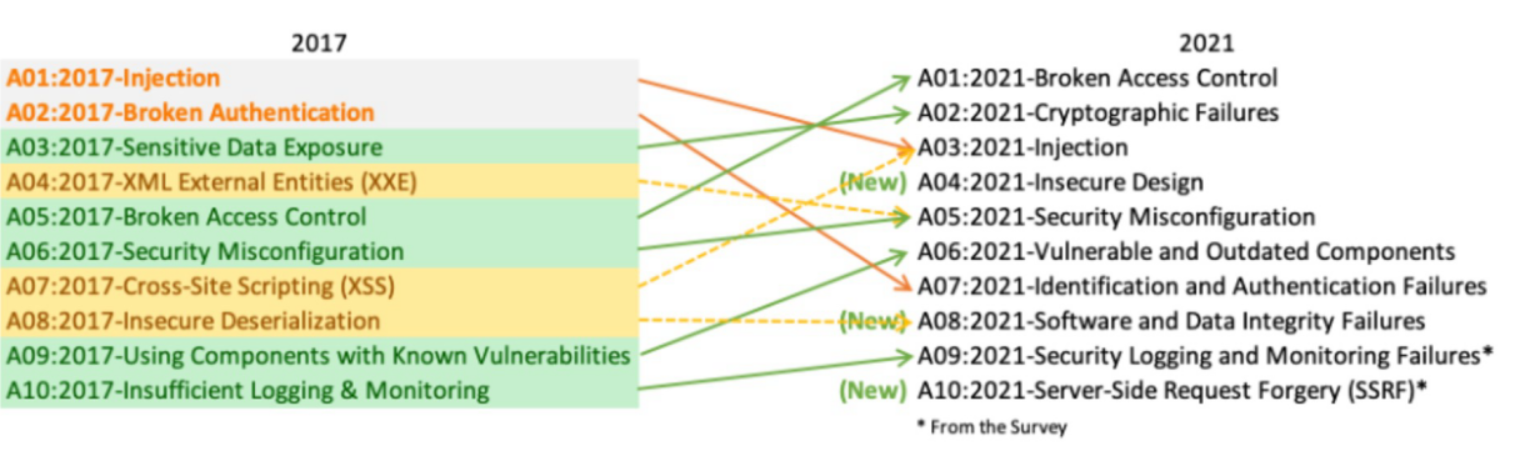
Open Web Applications Security Project
- OWASP is an online community (https://owasp.org/) that produces freely-available articles, methodologies, documentation, tools, and technologies in the field of web application security.

- proper testing in a development environment