Lecture 12 Revision
Transitioning to Other Web Frameworks
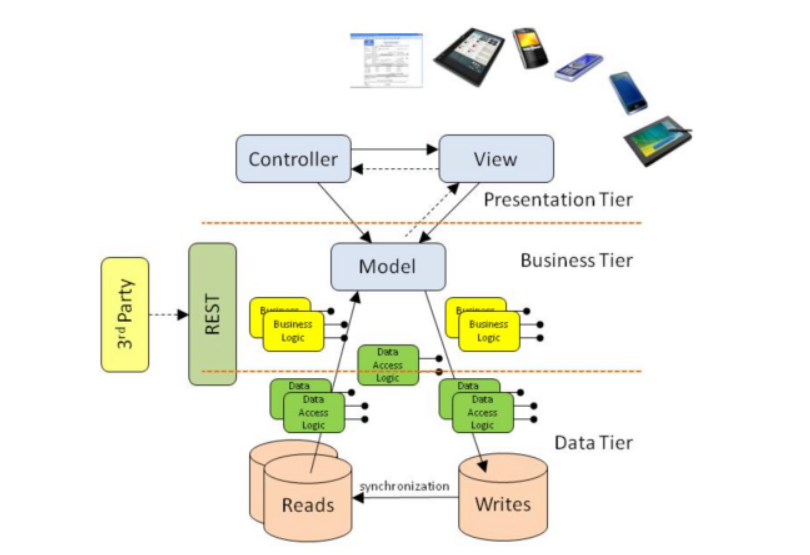
Model
- remove the need to write your own SQL
- easier to deal with Databases
View
- HTML templates we can make dynamic
Convention vs. Configuration is a design philosophy that:
- impacts how software frameworks are structured (i.e. where files are located)
- how they expect developers to interact with them
- It's a trade-off between the ease of following predefined paths and files (convention) or the flexibility to define everything explicitly (configuration).
Important advice:
- Web frameworks (CodeIgniter, Django, Ruby on Rails, Flask, Next,JS) come with a predefined folder structure
- Learn what the structure is and where files go
- This will improve your productivity!
Web frameworks come with their own conventions
Codeigniter with their own file structure
learning structure of default project
Want to add a new route - new controller, view, should all fall into place
CodeIgniter – Mapping a Model to a DB Table
Model Configuration: The model class provides configuration options to facilitate the smooth functioning of its methods.
- $table: Specifies the database table that this model primarily works with.
- $primaryKey: Specifies the name of the column that uniquely identifies the records in this table.
- $useAutoIncrement: Specifies if the table uses an auto-increment feature for $primaryKey.
- $returnType: This setting allows you to define the type of data that is returned.
- $allowedFields: This array should be updated with the field names that can be set during save(), insert(), or update() methods. A
just needed one file, everything else auto generated
- mapping between class and corresponding tables, could grab data from a form without any processing in particular
How to transition to other web Frameworks?
- Web fundamentals are the same.
- HTML
- Javascript
- Forms (Post vs Get)
posting them off, the method (POST, GET)
- MVC implementations are very similar
- Eg Flask, Django, FastAPI
- …. But there are differences
- And different conventions and folder structures
- And more powerful Models (including Object Relational Modeling) than the models in CodeIgniter
- And different templating libraries (i.e. alternatives to embedded PHP in HTML)
- And different ways to implement Routing
- More recently there are newer ideas
- React (client-side)
- Next.JS (React that runs on Server with new ideas for layouts)
Codeigniter has a fully-fledged ORM
- writes the migration for you Codeigniter using vanilla PHP
- there are python templating
Routing
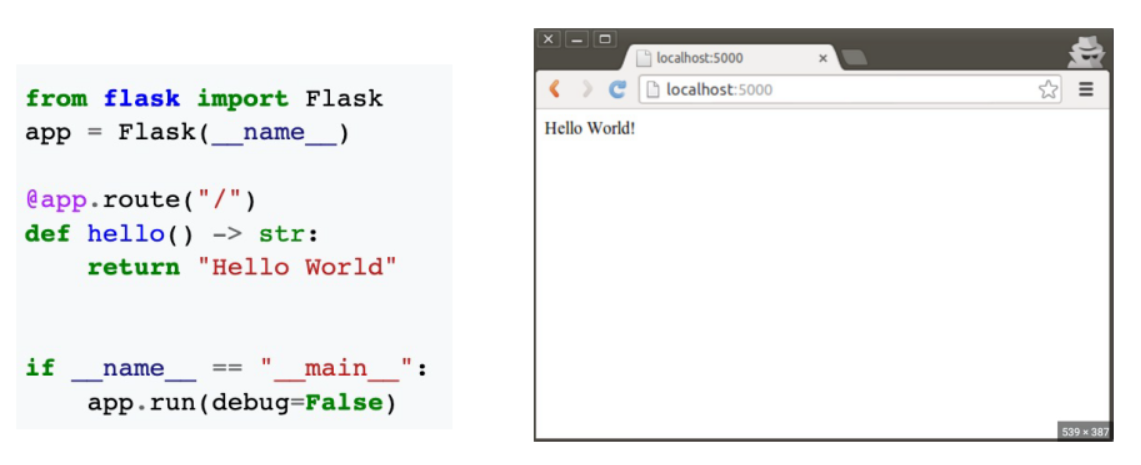
- flask uses decorated methods
Comparing Frameworks
- We will look at Django, React and Next.js
- We will cover:
- Installation
- Project Structure
- Routing and Controllers
- How to make a base template?
- Models
- We will build a small WIKI app
how does a base template look like in these frameworks
Django (Server-side Python Framework)
- Well-known python framework
Creating a Django Project
- Create a virtual environment
- python3 -m venv venv
- source venv/bin/activate
- Install Django and a Markdown library
- pip install django
- pip install markdown
- Create a Django project and app
- django-admin startproject wiki_project
- python manage.py startapp wiki_app
- Django has its own CLI
- gives us the initial project files that it needs
Django Project Structure
The main directories are:
- wiki_app: Contains the application-specific code, including models, views, forms, and templates.
- wiki_project: Contains the project-level configuration files and settings.
- settings.py: The main Django project settings file.
- urls.py: The URL configuration file for the project.
- notion of settings
- urls.py, has routes and what should execute
Creating a Model for the WIKI
In Django we don’t create the migration first.
- We create a model using simple syntax. Then we generate the migration. Django can convert a model into the migration file.
- This is much easier than CodeIgniter
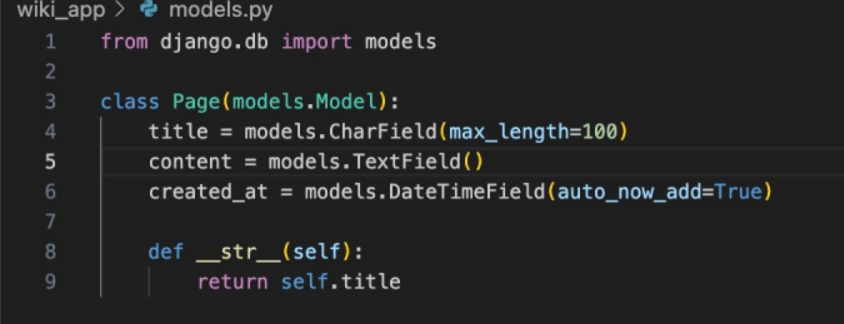
create a class, give it it's fields, and that is your model
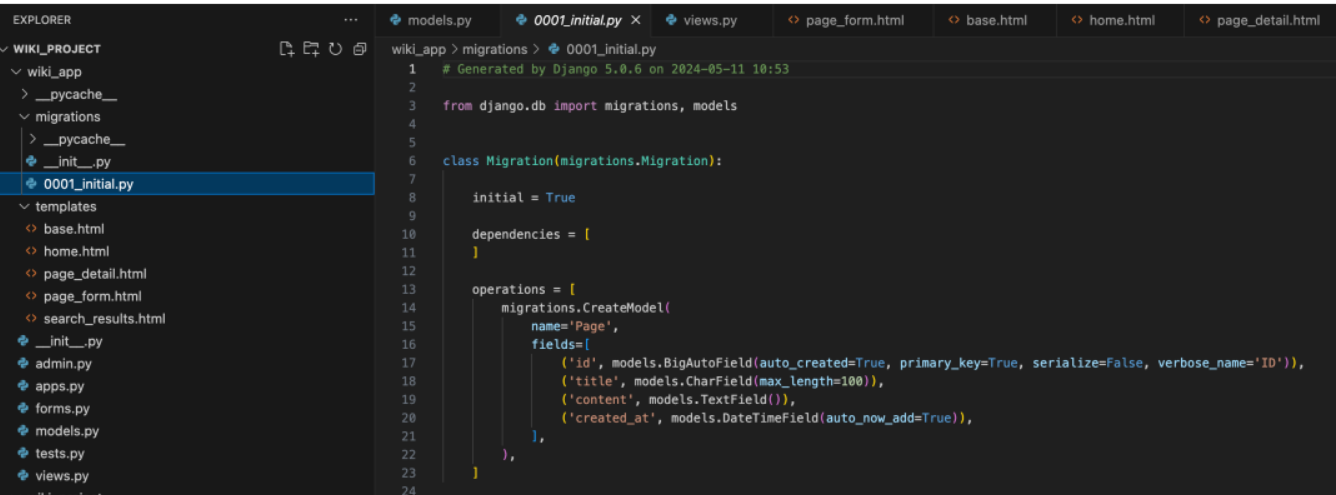
- commandline tool creates the migration file
- another tool runs the migration
Autogenerated Migration
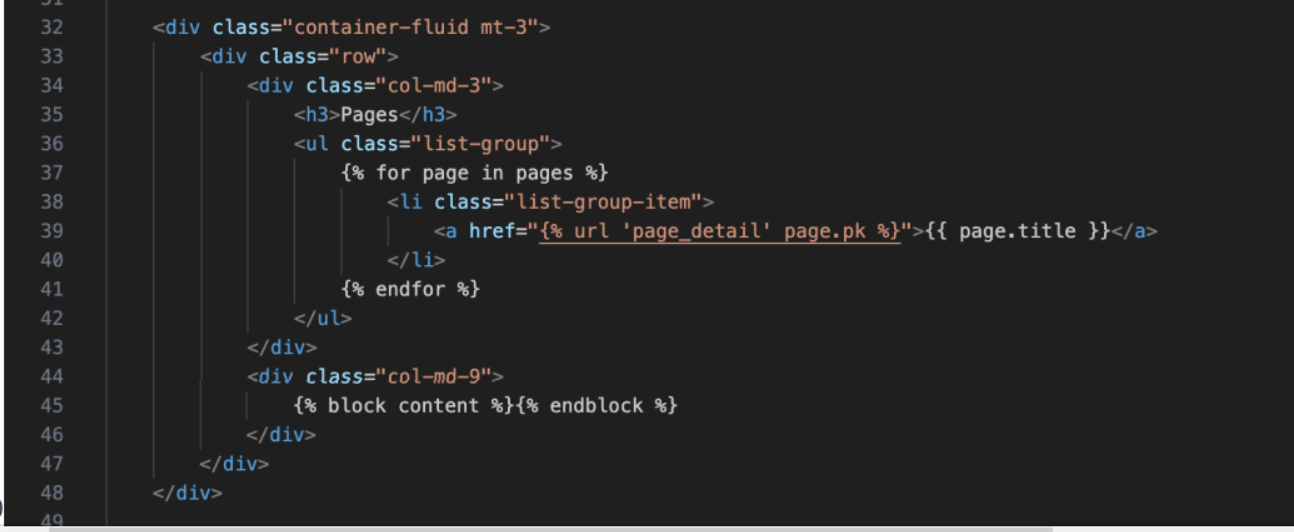
Base Templates
| Base Template | Section |
|---|---|
 |
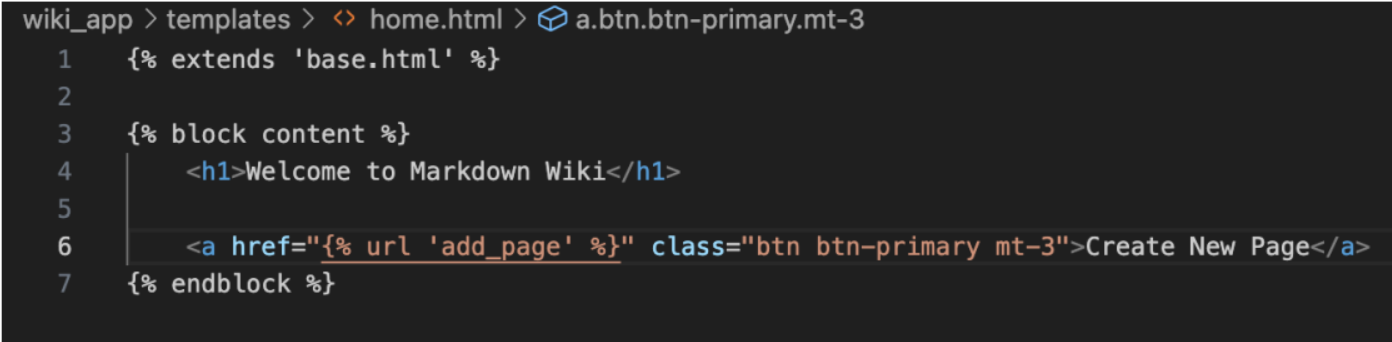 |
- We can embed Python within HTML.
- This uses Jinja Templating
- We can also define blocks
- Blocks are like the CodeIgniter sections.
defining a block, can put the content in
- when the whole HTML view is rendered, pull in the template
Views
- The views.py file contains methods that can use models and render templates
- This is essentially the equivalent of the CodeIgniter Controllers
- Django Models are much more powerful. Django has a full Object Relational Mapper (ORM)
- Data is passed to the template
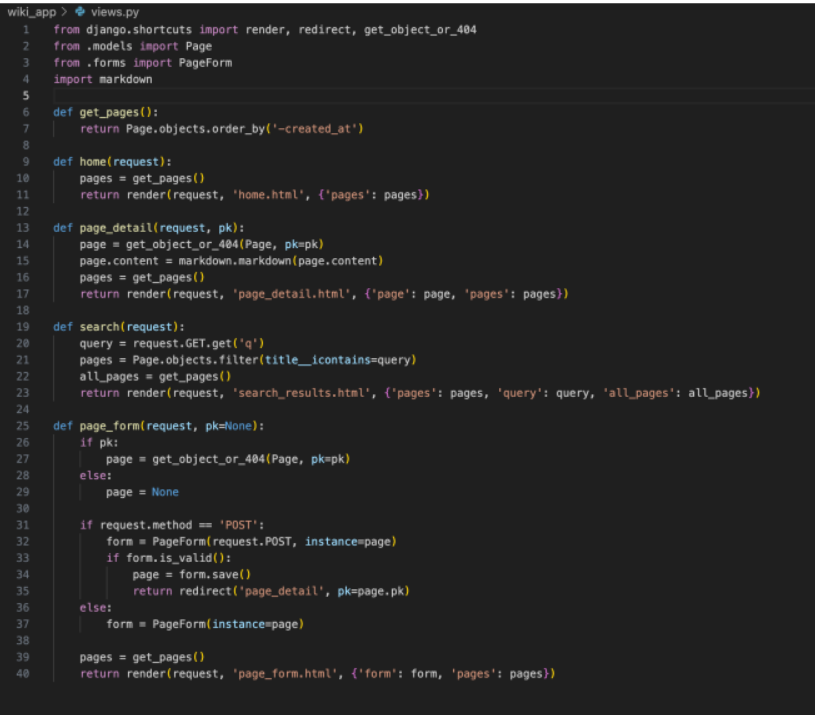
From urls.py
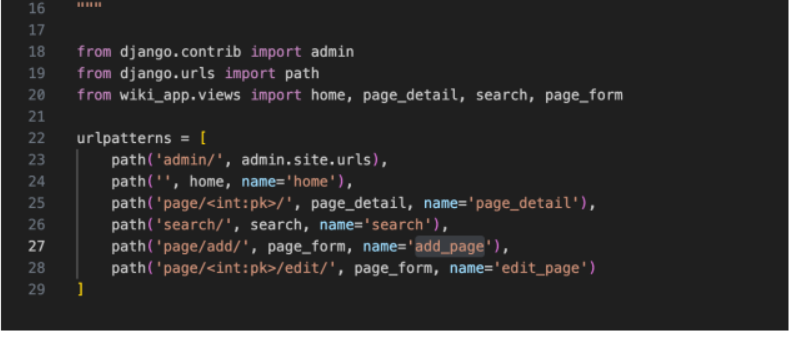
- In Codeigniter, the View is the HTML that is rendered
- In Django, HTML goes into a folder called templates
- View is similar to the controller in Codeigniter
React/next.js
Using create-react-app
- Create a new react client side application:
npx create-react-app simple-app --use-npm- What does create-react-app do?
- A command-line tool developed by Meta (Facebook) that sets up a new React project with a recommended file structure and configuration.
- It simplifies the process of starting a React application by automatically setting up a development environment, including the necessary dependencies and build scripts, without requiring manual configuration.
- Client-side framework
- open source project by meta
Comes with a command line tool
- knowing some linux is handy
- install node.js
Project base folder and all the folders you need
Creating a React Project
Create a new react client side application:
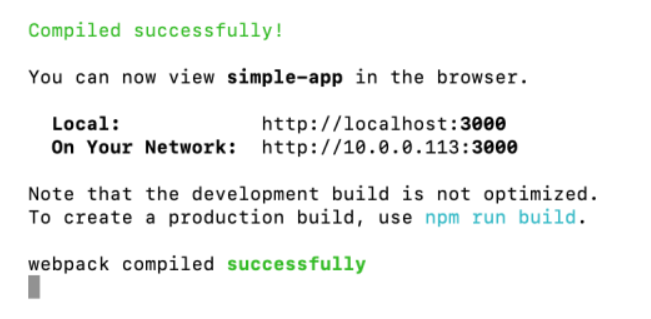
- npx create-react-app simple-app --use-npm
- cd simple-app
- npm start
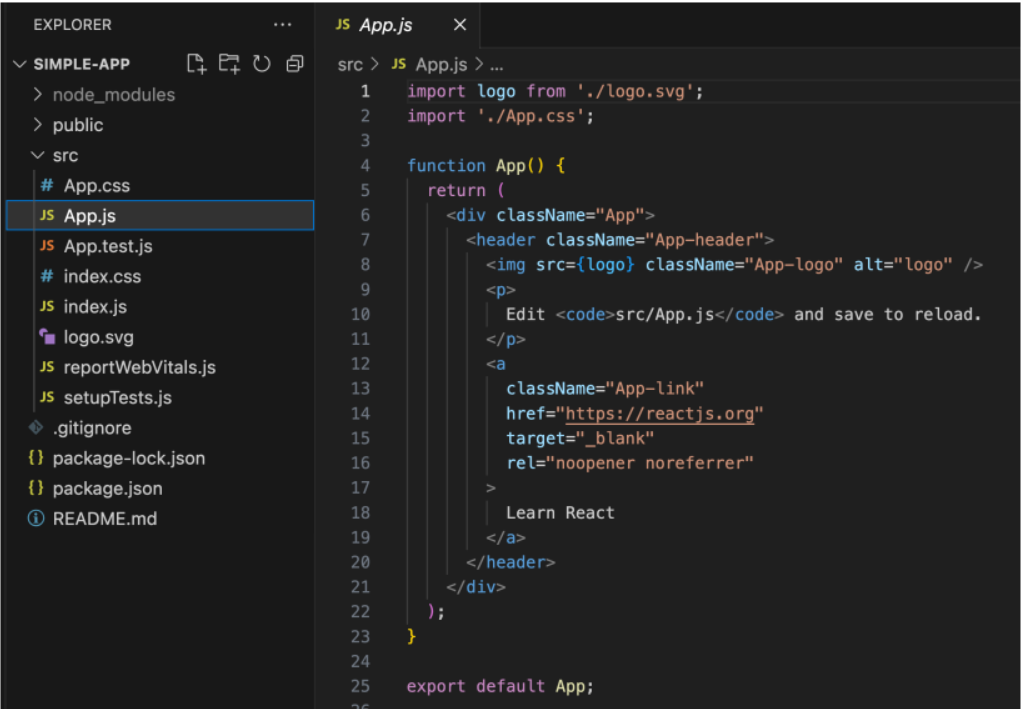
- convention is important
- app.js, generates a page with a logo
Has functions returning HTML
- simplify HTML
- output HTML - called JSX
- use HTML tags inside a function
- create our own tags and render them
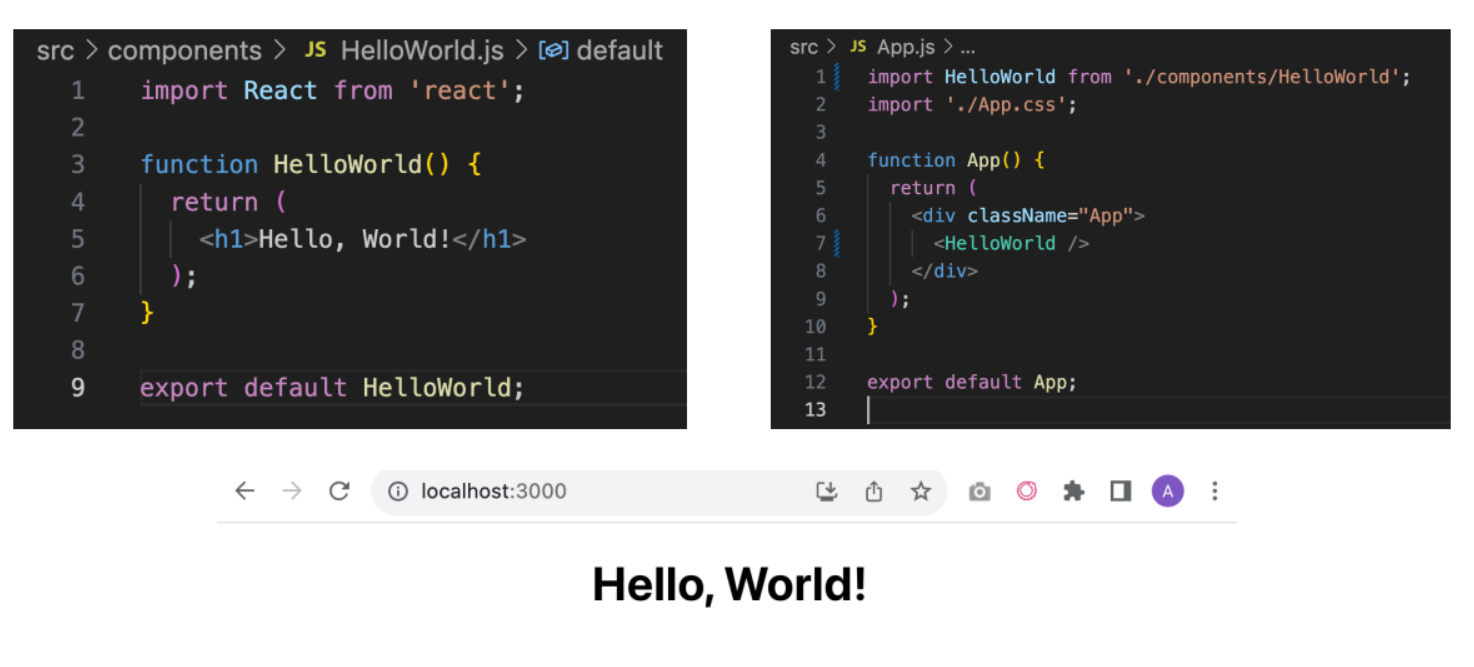
- becomes it's own HTML tag
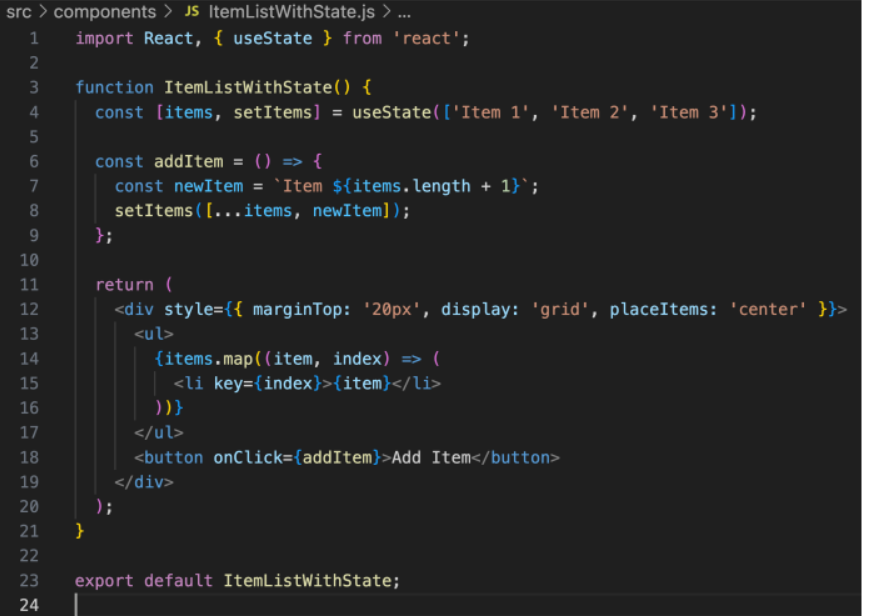
ItemList Component
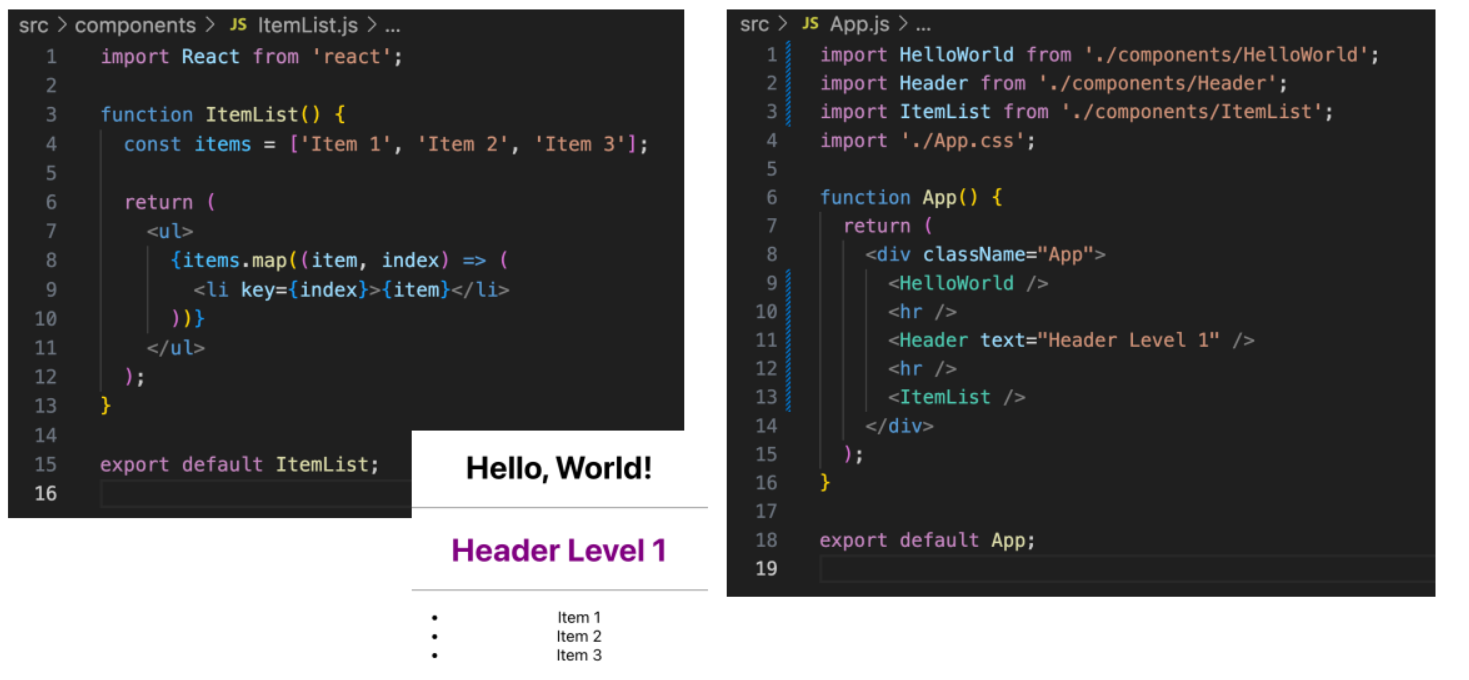
- use javaScript to map
- embed the logic inside the function
- loops and maps are the cleanest functional way
Add Item with a button
| Code | output |
|---|---|
 |
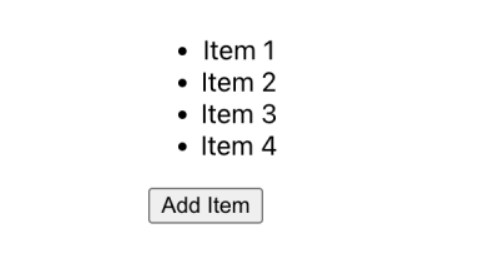 |
- What have we not had to program?
- State is a very powerful concept!
- When state is updated the component is re-rendered
codeigniter using restful API's, had to use javascript to write it to the screen
- add to do items to the screen
- use HTML template, and coding it
Any time anything in state changes, view will re-render
EXAM commonalities in projects
- gives us base code
- know the file structure
- create components in sub-folders
- when it compiles, to HTMl and javascript
- all of this will run inside the browser
When you do the build, will output one HTML files and one JavaScript file
- and will download incrementally based on what you will need
- compresses and minimises
Next.JS
React style of code which will run on the server
- Can't connect to a database, e.g., credentials will be exposed
- benefits of server-side, have database
JavaScript that runs on the server
- server side - integrate other functionality - expose API's
Using create-next-app
- Install Node.js https://nodejs.org/en
- Create a new react client side application:
npx create-next-app@latest
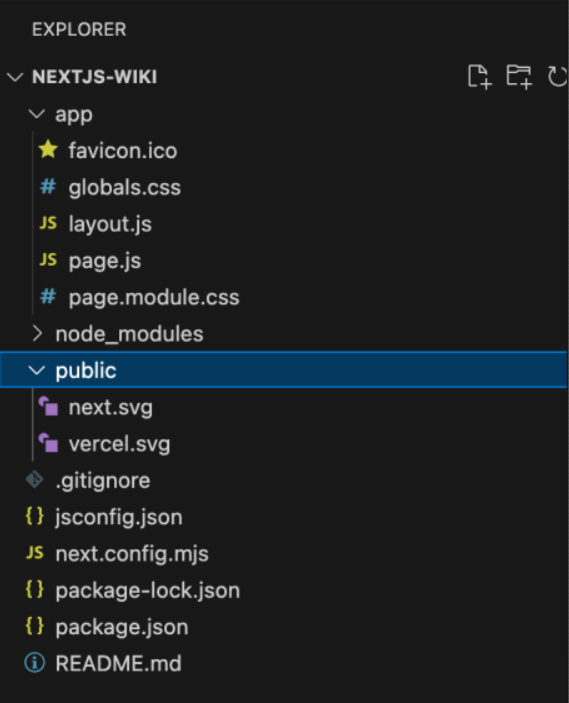
- layout.js and page.js
- We will use Prisma as our ORM and Bootstrap for CSS
npm install @prisma/client bootstrap
- Initialise Prisma
npx prisma init
- Prisma, a way to create models
- just defining a structure
- what is the ID field, etc
Create the schema
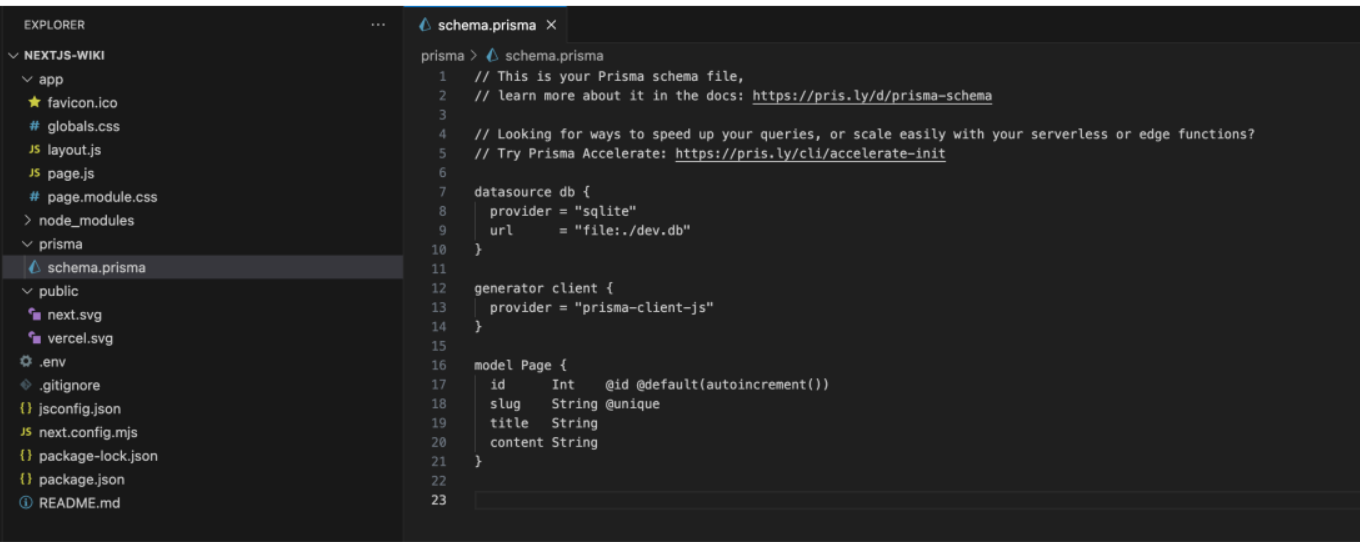
Generate the Prisma Client
- Run this command to create the client
npx prisma generate
Prisma Client is an auto-generated and type-safe query builder for Node.js
- Auto-generated: Prisma Client is automatically generated based on your Prisma schema file (schema.prisma). It provides an intuitive and type-safe API for querying and modifying your database.
- Query builder: Prisma Client provides a fluent and expressive query builder API. It allows you to construct complex database queries using a chain of methods, making your code more readable and maintainable.
- CRUD operations: Prisma Client supports all the common CRUD (Create, Read, Update, Delete) operations. It provides methods like create, findUnique, findMany, update, delete, etc., to perform these operations on your database entities.
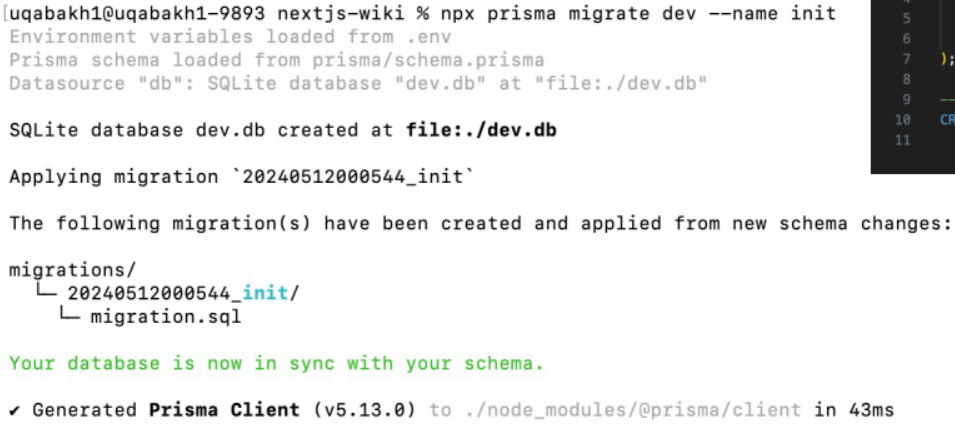
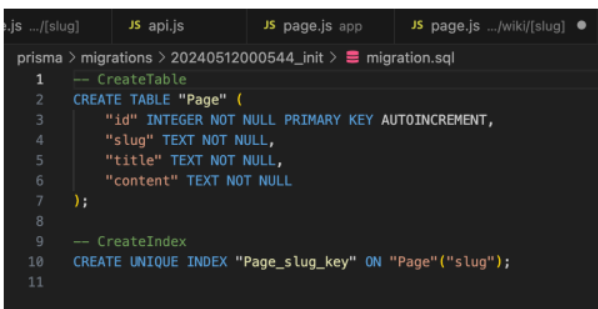
Create the database table (Similar to Migrations)
- Run this command to create the client
npx prisma migrate dev --name init
| Command | Output (SQL) |
|---|---|
 |
 |
Querybuilder and
- prismaclient to interact with the database
- give me the ORM, for CRUD operations
Run migrate function
- have a migrations folder, based on date and time generates the code to generate the table for us
Page-based Routing
- Include a folder within app and it becomes the route
- Must have page.js within the folder
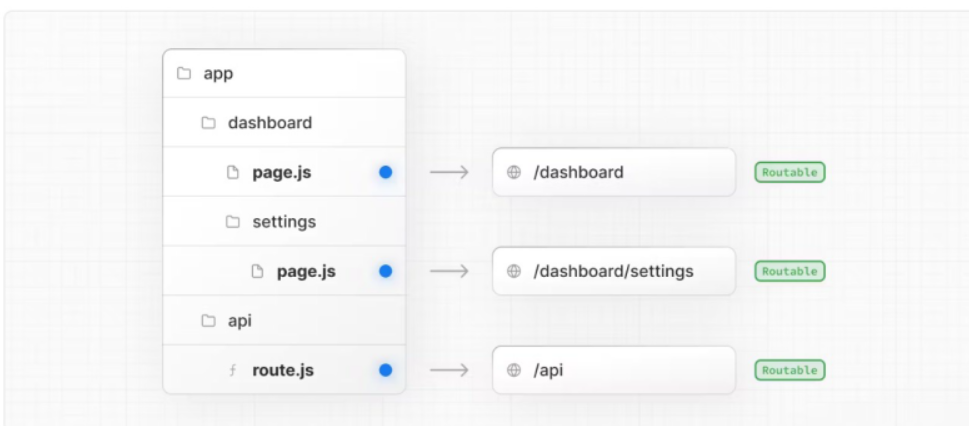
normally always seen a routes file
- New Idea: people make folders, and the names of the folders becomes the path to the app
- page.js is the file that is loaded in that directory
- e.g. settings inside the dashboard folder, subdirectory in dashboard
Dynamic Page based Routing
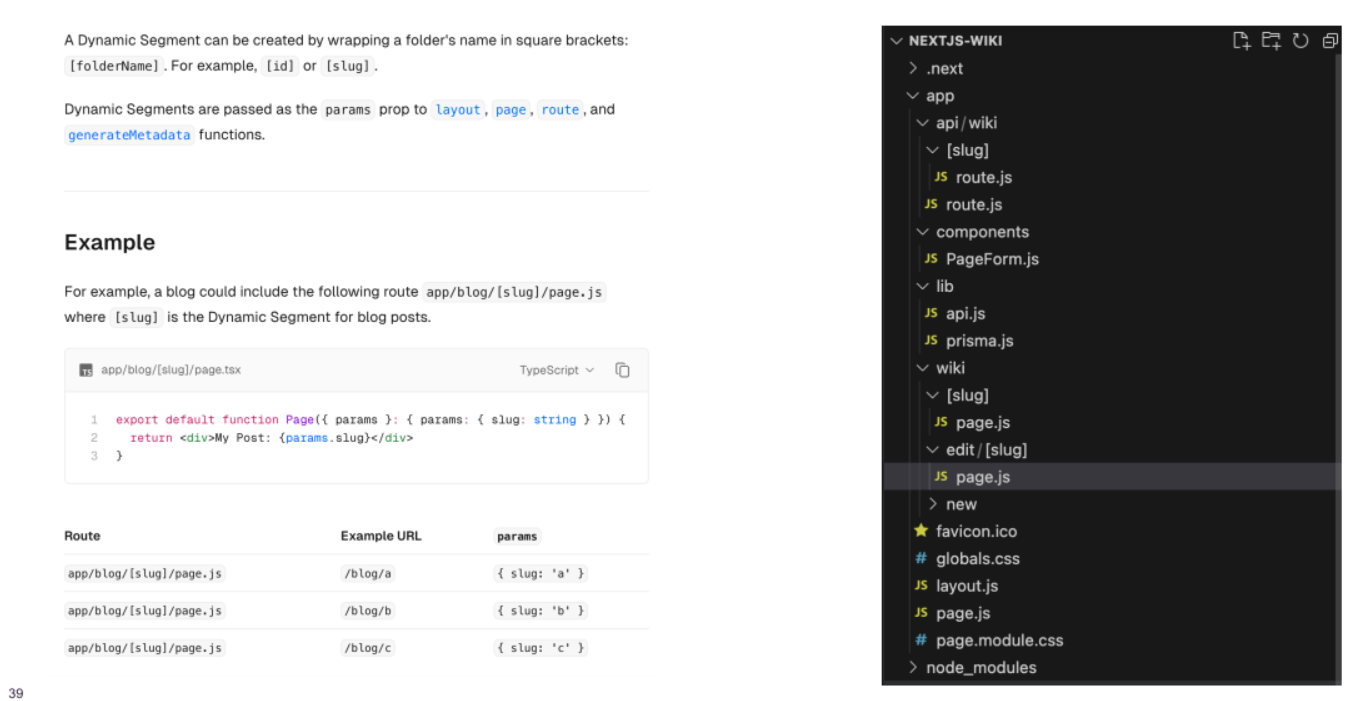
Want ID at the end of the route to load something
- using square braces, can be a dynamic variable
- still make the folders, use square braces for a dynamic variable
Edit/something
- navigates to page edit/[slug]
- passes in dynamic variable into page
Run Next.js Dev Server
- Run the dev server
- npm run dev
Should run on port 3000 unless that is being used. It will then increment the port number eg 3001
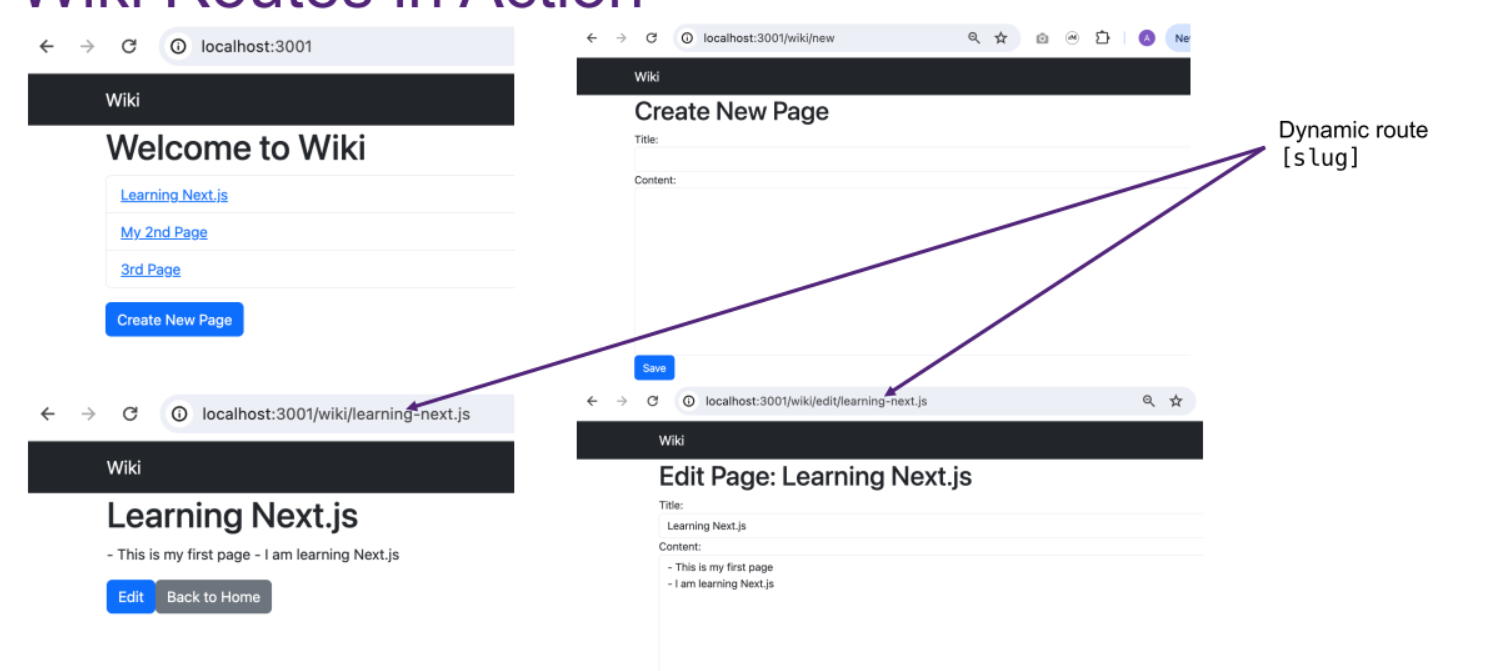
load the initial page, load new and
Layout
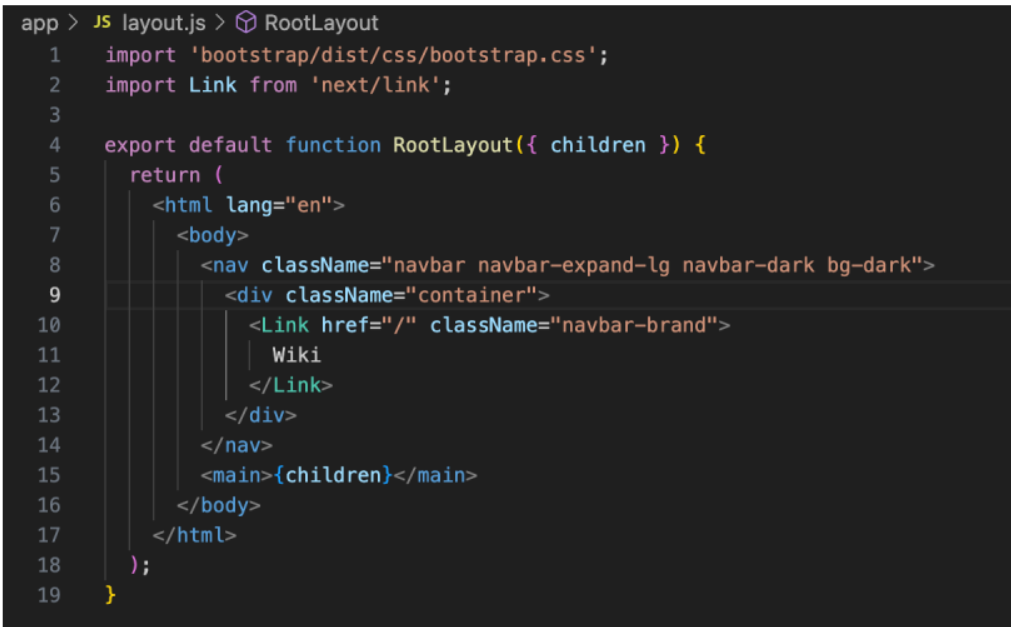
Client-side and Server-side Code
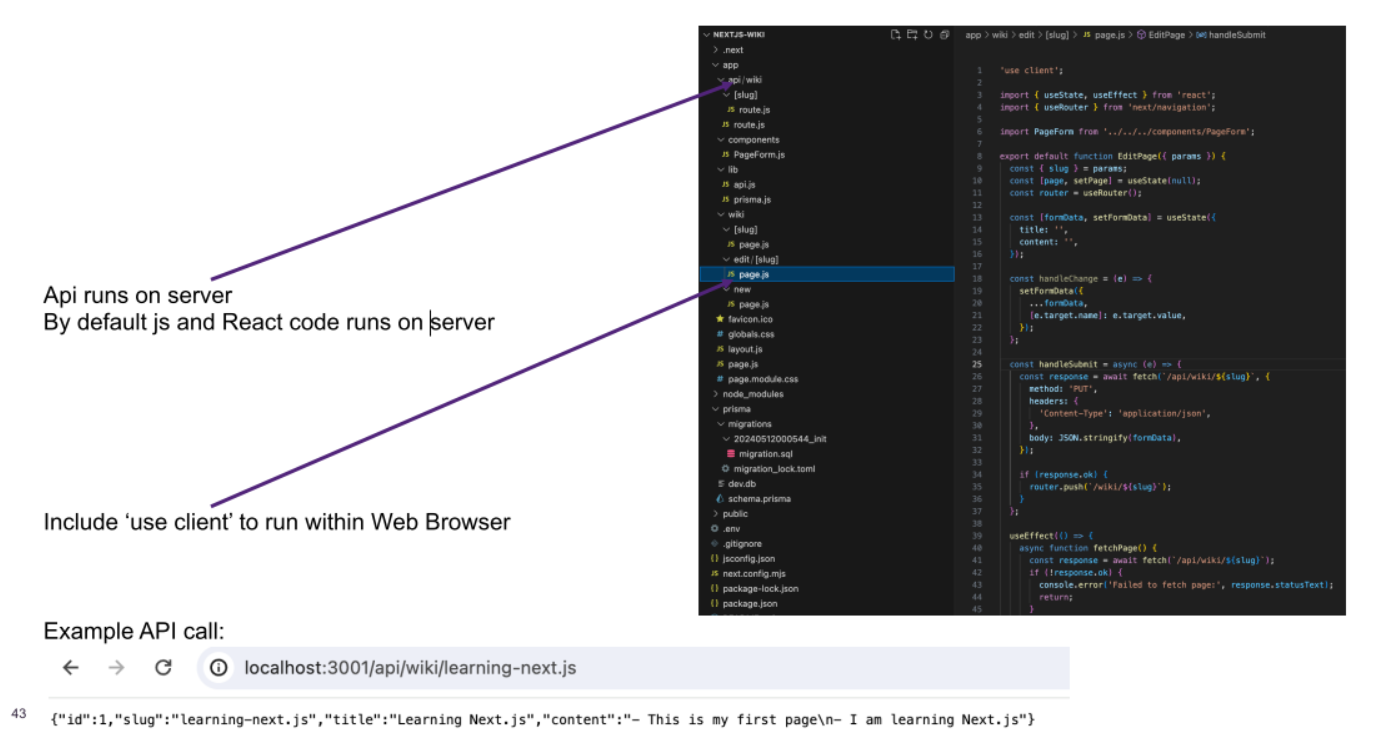
API, edit a page or update a page
- allow me to run it on the server
- edit page, want that to run on the client, call and run fetchAPI
- fetchAPI will fetch from the server
Other Frameworks
Flask
- Very concise syntax
- Uses decorators in Python to define Routes
- Need to install your own ORM eg SQL Alchemy