Relational vs NoSQLL Databases
Relational Databases
- Structured Data:
- Relational databases use SQL for defining and manipulating data.
- Table-based:
- Data is stored in tables consisting of rows and columns.
- Relational:
- SQL databases use relationships (foreign keys) to connect data across tables.
- ACID Compliance:
- SQL databases follow the ACID (Atomicity, Consistency, Isolation, Durability) properties for transaction management.
NoSQL Databases
- Schema-less:
- No predefined schema, allowing for flexible data models.
- Distributed Architecture:
- Designed for horizontal scaling and distributed data storage.
- Variety of Data Models:
- Supports multiple data models, including document, key-value, column-family, and graph.
- Eventual Consistency:
- Some NoSQL databases prioritize availability over immediate consistency i.e. Basically Available, Soft state, Eventual consistency (BASE).
- Designed for Big Data:
- Handles large volumes of unstructured or semi-structured data.
Don't promise ACID
- priortise availability
- Eventual consistency
- Initial driver for NoSQL was because of semi-structured data that could be growing, and big data
- 2014 eye-opening moment, financial transactions were targeted
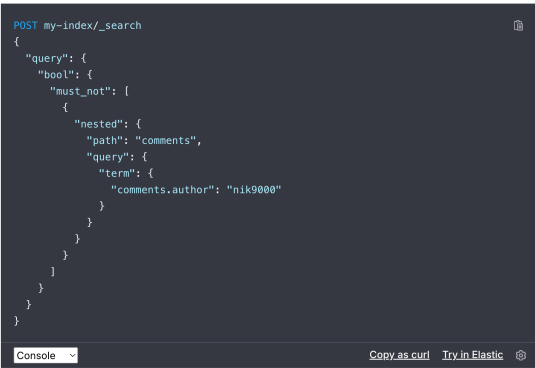
Difficult query languages
Both MySQL and Postgres Support JSON
- Both MySQL and PostgreSQL offer robust support for JSON data, allowing for flexible and efficient storage, querying, and manipulation of JSON documents.
- MySQL provides a native JSON data type with functions for JSON manipulation and indexing support via generated columns.
- PostgreSQL offers both JSON and JSONB data types, with JSONB providing superior indexing and querying capabilities.
- This allows us to combine relational databases with json (document storage) powerful for handling semi-structured data.
Still have relational databases
- flexibility of JSON format
Query Optimisation
- Identify Slow Queries: Use database performance monitoring tools to identify slow-running queries. Common tools include EXPLAIN (MySQL, PostgreSQL) to analyze query execution plans.
- Check Existing Indexes: Review existing indexes to ensure they are being used effectively. Sometimes, an index might be present but not utilized by the query optimizer.
- Create Indexes on Frequently Queried Columns: Index columns that are frequently used in WHERE clauses, JOIN conditions, and ORDER BY clauses to speed up query performance.
- Run query EXPLAIN
- check indexing of your data
- Don't want every field in the table to be indexed