Lecture 1, revision
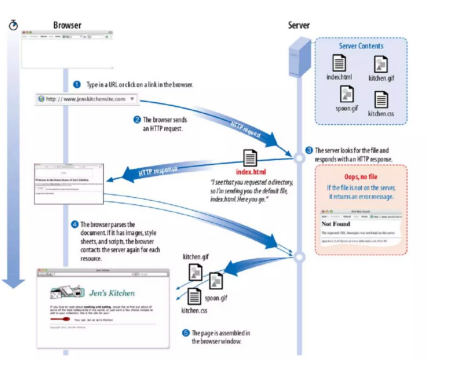
- Server serves us a page, has a page with links did not exist before 1989
Key innovations
- Distributed Nature
- Unlike centralized networks, the WWW is fundamentally distributed across millions of servers worldwide. This means no central authority controls the information or resources, allowing for greater resilience, scalability, and freedom of access.
- Hypertext and Hyperlinks
- The web introduced the use of hypertext—a method for creating links between documents or pages. This allowed users to navigate seamlessly from one document to another, creating a web of interconnected information.
- Separate Servers for Data Hosting
- Information on the web is hosted on separate, independent servers rather than being stored in a single location. This means anyone can set up a web server and publish documents that are accessible to anyone in the world with an internet connection.
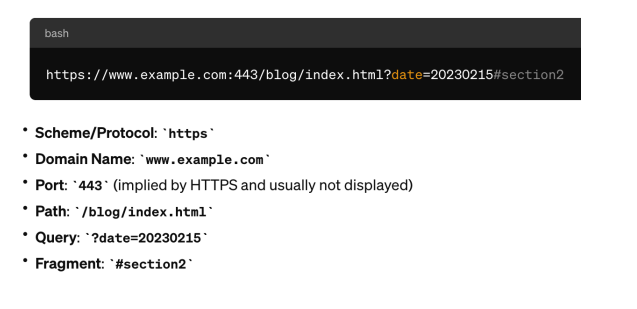
- Uniform Resource Locators (URLs)
- URLs provide a standard way to locate resources on the web. Each web page, image, or video has a unique address that can be shared and accessed globally.
- Platform Independence
- The web was designed to be accessed by any device capable of running a web browser, regardless of its operating system. This universal accessibility was a significant departure from previous systems that often required specific software or hardware.
- Open Standards and Protocols
- The development of open, non-proprietary standards (such as HTML, HTTP, and later CSS and JavaScript) ensured that the web could be continuously developed and improved upon by a global community of developers and organizations.
- User-generated Content
- The WWW enabled not just consumption of information but also its creation and publication by users, leading to the emergence of blogs, forums, social media, and other platforms for shared knowledge and expression.
- navigate
- distributed - one website goes down, but all other serves are up
- hypertext and html
- separate servers and hosting it
- notion of a URL - navigate through files and paths through a server
- can see the specification for HTML
Domain-name service (DNS)
- Function: DNS acts like the internet's phonebook. It translates human-friendly domain names (like www.example.com) into IP addresses (like 192.0.2.1) that computers use to identify each other on the network.
- Process: When you type a website address in your browser, a DNS query is performed. This query travels through a network of DNS servers to find the IP address associated with the domain name.
- Hierarchy: The DNS system is hierarchical, consisting of different levels of DNS servers, including root, top-level domain (TLD), and authoritative name servers, ensuring efficient and distributed resolution of domain names to IP addresses.
Usage:
- To access a website, your browser first uses DNS to resolve the site's domain name to an IP address.
- Then, it uses HTTP to send a request to the server at that IP address to fetch and display the web page.
IP address has a name everyone can remember
- easier to find information
The HyperText Transfer Protocol (HTTP/S)
- Function: HTTP is the protocol used for transferring web pages on the internet. It defines how messages are formatted and transmitted, and how web servers and browsers should respond to various commands.
- Communication: HTTP operates as a request-response protocol between a client (the web browser) and a server. The client sends an HTTP request to the server, and the server responds with an HTTP response, delivering web content.
- Stateless Protocol: HTTP is stateless, meaning it doesn't retain information between request-response sessions. This simplicity allows for faster communication but necessitates additional protocols (like cookies) for managing state information.
- HTTPS: HTTPS is the secure version of HTTP, the protocol over which data is sent between your browser and the website that you are connected to. It means all communications between your browser and the website are encrypted.
protocol to transfer HTML
- S - secure, has encrypted HTML
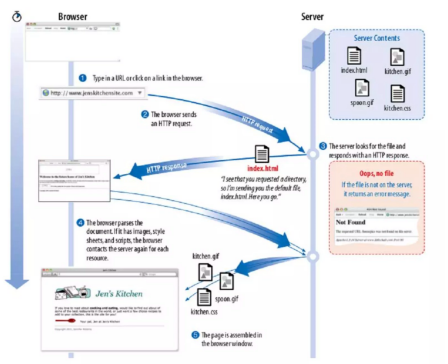
- HTML, images and CSS file
- domain name and path. Web server gets the request and path and returns HTML to browser
- find references and pull stylesheet, files, images etc also.
How does a Webserver Work
A web server is both hardware and software that uses HTTP (HyperText Transfer Protocol) and other protocols to respond to client requests made over the World Wide Web. The hardware aspect is the physical server that stores the web server software and the website's component files. The software aspect is the server software that understands and responds to client requests.
Key Functions of a Web Server
- Hosting Website Files: The web server stores the files that make up all websites, including HTML files, CSS files, JavaScript files, and images. When a user wants to visit a website, their browser sends a request to the web server hosting the site's files.
- Processing Requests: When the web server receives a request from a client's browser, it interprets the request, finds the requested resources (web pages, images, etc.), and sends them back to the client's browser.
- Serving Pages: The web server sends the requested web pages to the client's browser via HTTP. If the requested resource is not available or cannot be served for some reason, the server returns an error message (e.g., "404 Not Found").
- Dynamic Content Generation: Modern web servers can also generate dynamic content. They use server-side scripts and databases to create customized responses based on the user's request or session information. This allows for personalized pages that reflect user preferences or real-time data.
Web Browsers
A client side software to request, receive and process web pages from a Web server
- Chrome, Edge, Safari, Firefox, Chrome, Opera…
- All can handle HTML and HTTP/S
- HTML, CSS, JavaScript Browser hosts are diversified too
- Mobile wireless devices and appliance-based
HyperText Markup Language (HTML)
- Tag syntax to structure documents
- Definition: The standard markup language for documents designed to be displayed in a web browser. It can be assisted by technologies such as CSS and JavaScript.
- Components: Consists of elements represented by tags (like
<html>,<head>,<body>,<p>,<div>, etc.) that structure and define the content of web pages. - Role: Serves as the skeleton of web applications, outlining the structure and content (text, images, videos).
- Links (Hyperlinks): Defined with the
<a>tag, links connect one web page to another, enabling the navigational structure that is fundamental to the web's interconnectedness. - Forms: Utilize the
<form>tag along with input fields (<input>,<textarea>, etc.) to collect user data. Forms are crucial for user interactions, from search queries to login processes.
Cascading Style Sheets (CSS)
- Definition:
- A stylesheet language used to describe the presentation of a document written in HTML. CSS describes how elements should be rendered on screen, on paper, or in other media.
- Flexibility:
- Introduced concepts like the box model, flexbox, and grid, allowing for sophisticated layouts and responsive designs that adapt to different screen sizes.
- Contribution: CSS revolutionized web design by separating content from design, enabling the creation of visually engaging and user-friendly interfaces.
Server-Side Scripting (PHP) and Database
These technologies allow for the development of complex, dynamic, and responsive websites, ranging from simple informational sites to comprehensive web-based applications (like social networks, e- commerce platforms, and interactive tools).
- Dynamic Content Generation: Server-side scripts can generate HTML content on the fly, rather than serving static pages. This allows web applications to present customized views for each user, depending on their actions or profile data.
- Data Processing: These scripts are responsible for handling form submissions, processing user inputs, and performing operations like searches, data calculations, and more.
- Interaction with Databases: Server-side scripts can communicate with databases to store and retrieve data. This enables the functionality behind user accounts, content management systems, and other features that rely on data persistence.
- User Authentication and Management: Managing user sessions and authenticating users to ensure secure access to resources is a critical feature enabled by server-side scripting.
- API Integration: Server-side scripting often involves integrating third-party APIs to extend the functionality of web applications, such as payment gateways, social media integration, or data services.
- pull in from bigger data stores
- serve-side programming came into it
- retrieve from a data store and dynamically render it
- change depending on user
Problems:
- a lot going on in the one file
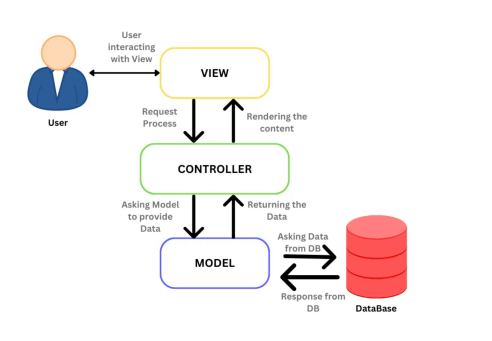
- use MVC framework
- separate out what is being accessed in the controller
Advantages of MVC
- Separation of Concerns: MVC clearly separates the business logic (Model), user interface (View), and the user input (Controller) into different components. This separation helps manage complexity, as developers can work on individual aspects of the application without affecting the whole.
- Development Efficiency: By promoting a division of labor, MVC allows multiple developers to work simultaneously on the model, views, and controllers of an application, which can significantly speed up development time.
- Maintainability: With MVC, maintenance becomes more manageable because the modular nature of the architecture means that parts of the system can be updated or replaced with minimal impact on the rest of the application.
- Reusability: Components in the MVC pattern can often be reused across different parts of an application without modification, or they can be repurposed for other applications with little additional code.
- Testability: The decoupling of components in MVC makes it easier to write automated tests for individual parts of the codebase (unit testing), ensuring that parts of the application are working as expected independently of each other.