Lecture 2 Revision
Creating and Deploying Web Applications
HTML recap
- Common tags
- Headings
- Paragraphs
- Lists (ordered and unordered)
- Images
- Tables
<html>
<head>
  <title>Sample HTML Page Structure</title>
</head>
<body>

  <h1>Heading 1</h1>

  <p><b>Welcome</b> to <i>HTML</i>!</p>

</body>
</html>
HTML Tables:
<!DOCTYPE html>
<html>
<head>
  <title>Table of Harry Potter Books:</title>
</head>
<body>
  <h2>Table of Harry Potter Books:</h2>
  <table border="1">
    <thead>
      <tr>
        <th>Title</th>
        <th>Description</th>
      </tr>
    </thead>
    <tbody>
      <tr>
        <td>Harry Potter and the Philosopher's Stone</td>
        <td>Harry discovers he is a wizard and attends Hogwarts for the first time.</td>
      </tr>
      <tr>
        <td>Harry Potter and the Chamber of Secrets</td>
        <td>Harry returns to Hogwarts and investigates a series of mysterious petrifications.</td>
      </tr>
      <tr>
        <td>Harry Potter and the Prisoner of Azkaban</td>
        <td>Harry learns about his family's past and encounters a dangerous escaped prisoner.</td>
      </tr>
    </tbody>
  </table>
</body>
</html>
the table from above
| Title | Description |
|---|---|
| Harry Potter and the Philosopher's Stone | Harry discovers he is a wizard and attends Hogwarts for the first time. |
| Harry Potter and the Chamber of Secrets | Harry returns to Hogwarts and investigates a series of mysterious petrifications. |
| Harry Potter and the Prisoner of Azkaban | Harry learns about his family's past and encounters a dangerous escaped prisoner. |
Cascading Style Sheets (CSS) - why cascading?
- This cascading mechanism allows multiple style sheets to influence the look of a document, with a well-defined order of precedence determining how conflicts are resolved.
Links - The <a href> tag
- The <a> tag, also known as the anchor tag, is used in HTML to create hyperlinks that navigate to other web pages or resources.
- The href attribute within the <a> tag specifies the destination URL that the link points to.
- The href value can be an absolute URL, a relative URL, or a URL fragment (used for scrolling to specific sections within the same page).
- Absolute URL: A complete web address, including the protocol (e.g., http://, https://), domain, and path. Example: <a href="https://www.example.com">Visit </a>
- Relative URL: A partial web address that is relative to the current page's location. Relative URLs are often used for links within the same website. Example: <a href="about/index.html">Learn More</a>
- The target attribute can be used to control how the linked content is displayed when clicked eg _blank opens the link in a new tab or window.
- The <a> tag can be used to create text links, image links, or any content that can be clicked to navigate.
- absolute URL includes the protocol
Forms
<!DOCTYPE html>
<html lang="en">
<head>
  <meta charset="UTF-8">
  <title>Blog Post Form:</title>
  <link rel="stylesheet" href="style.css">
</head>
<body>
  <h1>Write a Blog Post</h1>
  <form action="/submit-blog" method="post">
    <div>
      <label for="title">Title:</label>
      <input type="text" id="title" name="title" required>
    </div>
    <div>
      <label for="blog">Blog Content:</label>
      <textarea id="blog" name="blog" rows="10" cols="50" required></textarea>
    </div>
    <div>
      <button type="submit">Submit</button>
    </div>
  </form>
</body>
</html>
In html:
Write a Blog Post
- Each of elements can be included within a
<form>element - Use the action and method attributes of the
<form>element to specify where and how the form data should be submitted <input>is a single line text field<textarea>is a multiline text field<button>is a button and with the type attribute set to ‘submit’ will send the values entered into the form to the action path of the form
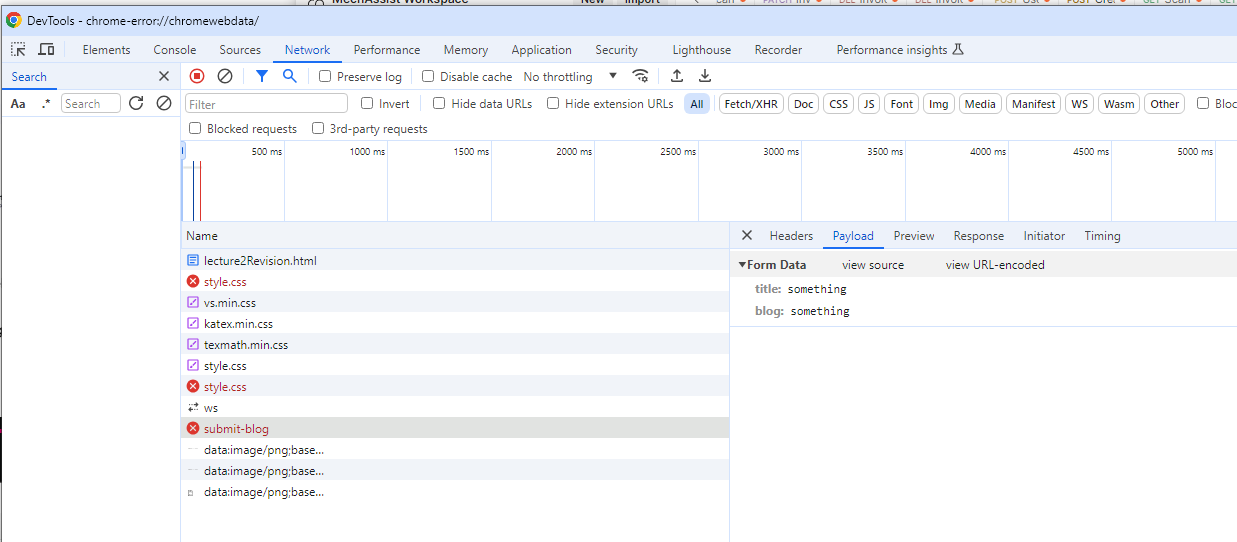
Form - method Get vs Post
GET Method
- Data Appended to URL: Sends data in the URL itself, as key-value pairs in the query string.
- Read Operations: Typically used for retrieving data, not modifying it.
- Limited Data Size: Length restrictions due to URL length limitations (usually up to 2048 characters).
POST Method
- Data in Body: Sends data in the request body, allowing for larger and more complex payloads. No inherent size limitation like with GET.
- Write Operations: Typically used for sending data to be processed or stored on the server.
- Encoding: GET uses URL encoding, whereas POST allows for multiple data types (e.g., application/json, multipart/form-data).
PHP – Forms – Get vs Post
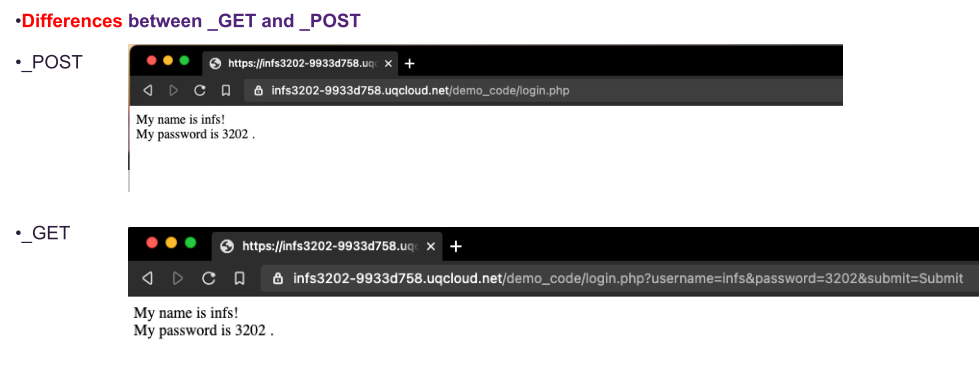
When to use Get
- When to use the method=“get”
- This method should not be used when sending passwords or other sensitive information!
- This method is not suitable for very large variable values.
- This method is case insensitive (all characters in lower case).
- This can be useful for example where you want to be able to bookmark a page with specific query string values.
UQCloud and NGINX Web Server
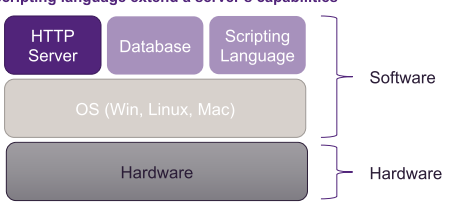
The basic elements of a web server includes
- Hardware
- operating system
- http server The addition of a database and scripting language extend a server’s capabilities
Operating system
A operating system is what allows you to interact with the applications and hardware that make up your computer. It facilitates resource allocation to your applications, and communication between hardware and software. Typically, operating systems for servers fall under three categories:
- Linux based
- Windows based
- and Mac based
Top five open source web server
- Apache HTTP Server
- NGINX
- Apache Tomcat
- Node.js
- Lighttpd
Connecting to your student zone
SSH
- All zones may be accessed for administration purposes through the commandline, though SSH access uses UQ usernames and passwords.
SFTP
- With a UQ user account, you can also access your zone over SFTP using a client such as WinSCP or FileZilla to upload or download files.
NGINX Web server – Basic config file
http {
    server {
        listen 80; # Listen on port 80 for HTTP requests
        server_name example.com; # Replace with your domain name or use localhost

        # Document root where the files are located
        root /var/www/html/htdocs;

        # Default file to serve
        index index.html index.htm;

        # Serve files
        location / {
            try_files $uri $uri/ =404;
        }
    }
}
- root /var/www/html/htdocs;:
- The root directive specifies the directory where Nginx should look for the files to serve.
- index index.html index.htm;:
- This specifies the default files that Nginx should look for when a directory is requested.
location / {
    try_files $uri $uri/ =404;
}
- The location directive is used to match specific request patterns and apply configurations to them. It can be used to serve files, proxy requests, apply different root directories, etc.
After you change the configuration run:
$ sudo systemctl reload nginx
HTTP Status Codes
HTTP status codes are standardized responses that a web server sends to your browser to indicate the outcome of a requested action.
| Code | Description |
|---|---|
| 200 Ok | The request has succeeded. The meaning of the success depends on the HTTP method used. |
| 201 Created | The request has been fulfilled, resulting in the creation of a new resource. |
| 400 Bad Request | The server cannot process the request due to a client error (e.g., malformed request syntax). |
| 401 Unauthorized | The request requires user authentication. |
| 404 Not Found | The server has not found anything matching the Request-URI. |
| 408 Request Timeout | The client did not produce a request within the time that the server was prepared to wait. |
| 500 Internal Server Error | The server encountered an unexpected condition which prevented it from fulfilling the request. Usually a server-side setup issue or server-side coding error. |