Lecture 3 revision
MVC – Controllers and Views
3-layer architecture
- The 3-Layer Architecture is a
software design pattern that divides
applications into three main
categories or layers:
- Presentation
- Business Logic (or Application Layer)
- Data Layer
- This architecture aims to separate the user interface, the business logic, and the data storage, which promotes a clean separation of concerns.
MVC + 3-layer architecture
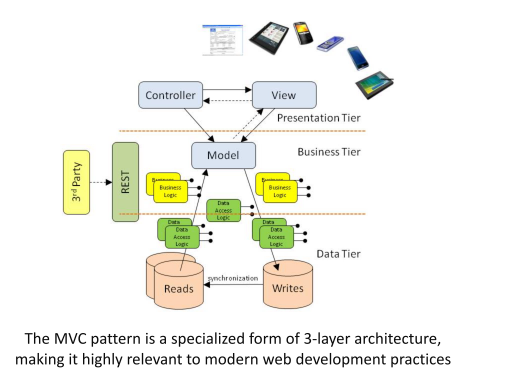
- The MVC pattern is a specialized form of 3-layer architecture, making it highly relevant to modern web development practices
- separate out what we are building into three separate layers
- MVC allows us to use REST
- REST - representation state controllers
Model–view–controller (MVC) - a software architectural pattern, that separates an application's data, user interface, and control flow into three components:
- Model:
- Represents the data.
- The model is often connected to a database and is responsible for retrieving and storing data.
- View:
- Represents the user interface of an application,
- is responsible for displaying data and getting user input.
- HTML, CSS, and JavaScript.
- Controller:
- Manages the flow of data between the model and the view,
- is responsible for processing user input and directing the application’s behaviour.
- includes code that implements business rules and other functionality.
- Model uses ORM a lot of the time
- model connects to the database is retrieves and stores the data
View
- HTML, CSS, javascript
- user interface of an application
Controller
- Flow of data between the model and the view
- business rules, processing
Benefits of MVC
- Simplifies Complex Applications:
- By separating the application into three components, developers can focus on one aspect without affecting others.
- Facilitates Parallel Development:
- Different developers can work on the Model, View, and Controller simultaneously.
- Easy to Modify or Scale:
- Changes to the business logic or user interface can be made with minimal impact on the other components.
- Supports Reusability:
- Components can be reused across different parts of the application or in different applications.
Convention vs Configuration
Convention vs. Configuration is a design philosophy that:
- impacts how software frameworks are structured (i.e. where files are located)
- how they expect developers to interact with them
- It's a trade-off between the ease of following predefined paths and files (convention) or the flexibility to define everything explicitly (configuration).
- Important advice:
- Web frameworks (CodeIgniter, Django, Ruby on Rails, Flask, Next,JS) come with a predefined folder structure
- Learn what the structure is and where files go
- This will improve your productivity!
tools that you run from the command line that will do this for you
- CLI builds whole project scaffold for you
Why Choose CodeIgniter
- Simplicity and Efficiency:
- Ideal for developers who need a straightforward and rapid development process without the bulkiness of larger frameworks.
- Flexibility:
- Unlike some frameworks that enforce strict project environments, CodeIgniter provides the flexibility to organize files and structure the application as desired.
- Documentation & Support:
- Excellent documentation and community support make it accessible for beginners and efficient for experienced developers.
Codeigniter Models
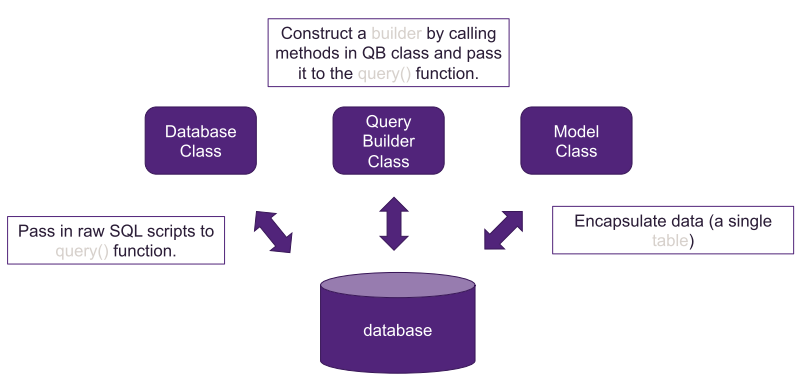
- The CodeIgniter's Model offers convenient features and additional functionality to make working with a single
table in the database easier.
- automatic database connection;
- basic Create Read Update Delete methods;
- in-model validation;
- automatic pagination;
- and more
- Models in CodeIgniter 4 are stored in the app/Models directory
- Use Spark to create a new model file e.g. php spark make:model Customers
- A new file called Customers.php is placed in app/Models
- To access models within your classes, you can create a new instance or use the model() helper function.
Raw SQL & QueryBuilder Class
- Builder can help you generate the raw SQL scripts, which will be sent to query().
- To load the Query Builder, use the table() method on the database connection.
- It's important to note that the Query Builder needs to be explicitly loaded if you require.
- Get Data(i.e. SELECT *): $builder->get()