Lecture 5 Revision
MVC – Creating CRUD Applications
Base Template View
- Create a HTML template that keeps the full page HTML (including the Header and Footer)
- Define sections for content
- Can have multiple sections
- Other views can inherit the template and then just need to include content for the sections
- serves to reduce duplication
- keep similar files together
Base Template
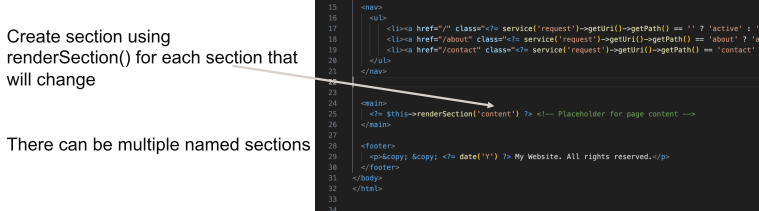
- only done one here, could have any number of them
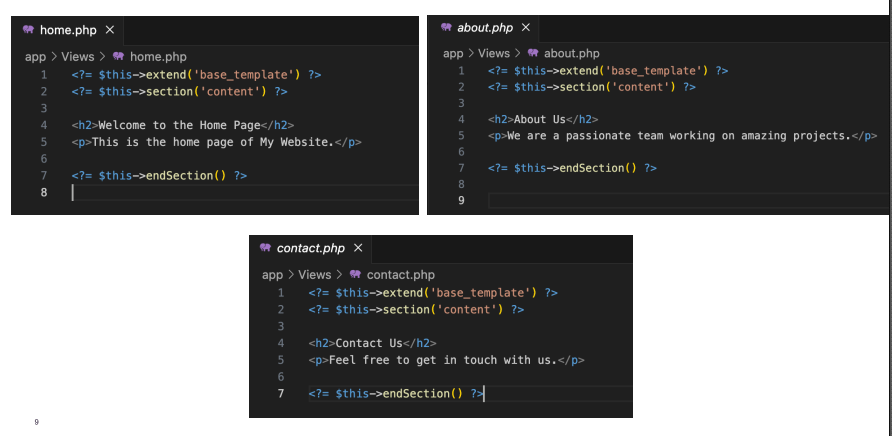
- this is the actual HTML I am giving for this section
- base template is a skeleton with slots - placeholder for page content
- create the outline of these components separately
Create Read Update Delete (CRUD)
- Definition of CRUD:
- CRUD stands for Create, Read, Update, and Delete. These are the four basic functions of persistent storage.
- Foundation of User Interfaces:
- CRUD operations form the foundation of user interfaces in many applications, enabling users to interact directly with data.
- Ubiquity in Web Applications:
- Almost every web application has a backend database and uses CRUD operations to interact with the data.
- APIs and CRUD:
- Many RESTful APIs are designed around CRUD operations, mapping HTTP methods (POST, GET, PUT/PATCH, DELETE) to CRUD functionalities.
- Database Operations:
- At the database level, CRUD corresponds to SQL commands INSERT, SELECT, UPDATE, and DELETE, respectively.
- Design User interfaces to build things
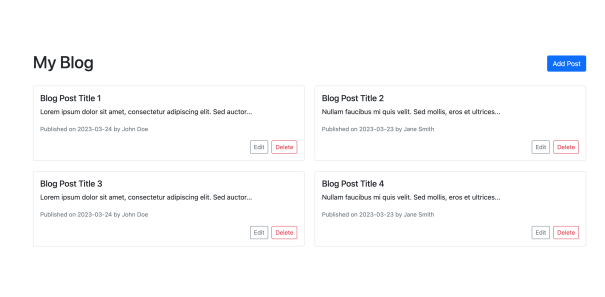
E.g. Customer app
Need an:
- Add button that displays an Add form
- Edit button in each row
- Delete button in each row
- Display the status of the last operation
Example
Designing a Database
- Each table must represent a single subject
- No data item will be unnecessarily stored in more than one table, i.e., No data redundancy
- All non-key attributes in a table are dependent on the primary key
- Each table is void of insertion, update, deletion anomalies
- Objective of normalisation is to ensure that all tables are in at least 3 rd Normal Form (3NF)
First Normal Form
- To achieve 1NF, we need to ensure that each column contains atomic values and there are no repeating groups.
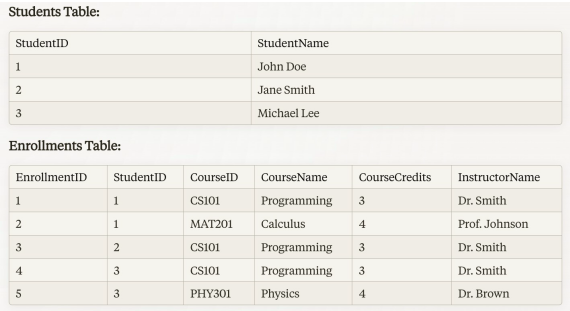
- In this case, we can split the table into two separate tables: "Students" and "Enrollments".
Second Normal Form
-
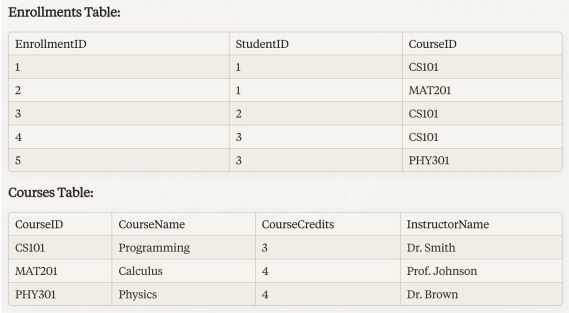
To achieve 2NF, we need to ensure that all non-key columns depend on the entire primary key.
-
In the "Enrollments" table, the primary key is a combination of "StudentID" and "CourseID".
-
However, the course details (CourseName, CourseCredits, InstructorName) depend only on the "CourseID".
-
To resolve this, we can split the "Enrollments" table further into "Enrollments" and "Courses" tables.
-
remove partial dependencies
Third normal form
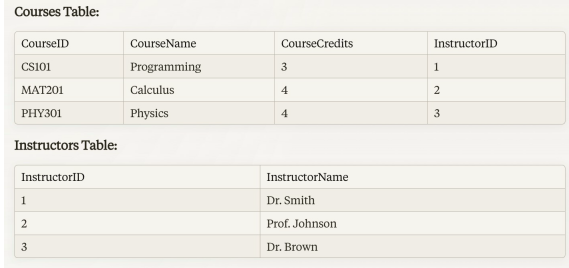
- To achieve 3NF, we need to ensure that there are no transitive dependencies.
Normalisation Overview
| Form | Description |
|---|---|
| 1NF | Outcome: Identifying non-atomic values from relations. Test: Relation should have no multivalued attributes or nested relations. |
| 2NF | Outcome: Identifying partial dependencies, which helps remove some anomalies. Test: LHS of any non-trivial FD in F+ is not a proper subset of a candidate key, or RHS is a prime attribute |
| 3NF | Outcome: Identifying partial and transitive dependencies, which helps remove most anomalies Test: LHS of any non-trivial FD in F+ is a superkey, or RHS is a prime attribute. |
| BCNF | Outcome: Identifying all anomalies at the cost of not preserving all FDsTest: LHS of any non-trivial FD in F+ is a superkey. |