Lecture 6
MVC – Advanced CodeIgniter
Caching
- Caching is a technique used to store copies of files or data results in a temporary storage location (cache), so future requests for those files or data can be served faster.
- In web development, caching can refer to storing parts of web pages or views, database query results, or even computational results to improve performance and reduce the load on the system.
Why Do We Need It?
- Performance Enhancement:
- By reducing the need to perform time-consuming operations (like database queries or complex calculations) for every request, caching significantly speeds up the response time of applications.
- Reduced Load:
- It decreases the load on the server, as cached content is served directly without going through the entire application logic or database querying process again.
- Improved User Experience:
- Faster response times contribute to a smoother and more responsive user experience.
- Scalability:
- Caching helps in scaling applications by managing resource utilization more efficiently, allowing the system to handle more users without requiring proportional increases in hardware or processing power.
using up server resources
Sometimes it might not be worth it to rerun queries and regenerate page
Person editing blog page e.g. once a week, might not need to regenerate page every min
Cache a page, and can just retrieve it
Faster, reduce the load on the server, and can scale the servers
What type of Caching does CodeIgniter Support?
CodeIgniter provides a simple yet flexible caching mechanism that supports different types of caching:
- Page Caching:
- This method caches the entire output of a page. When a request is made, CodeIgniter checks if a cached version of the page exists and serves it directly, bypassing the normal system execution.
- Querystring Caching:
- Uses the combination of variables in the URL querystring and saves versions to the cache.
Cache Config
- Location of Cache Settings: The primary configuration file for cache settings in CodeIgniter is located at app/Config/Cache.php. Specify the default cache handler eg file or redis etc.
- In codeigniter, a cache file directory
- HTML is rendered and saved
- memcache, redis and filetype e.g.
Where is the cached file stored?
-
Cached files are saved in the writable/cache folder
-
Get cache information
php spark cache:info
-
Clear cache
php spark cache:clear
File uploads
-
File uploads are a critical component of many web applications, from social media platforms where users share images and videos, to business applications that handle documents, spreadsheets, and other business-critical files.
-
Personalization: Allows users to upload avatars, backgrounds, or other personal images, enhancing their engagement and personal connection to the application.
-
Content Sharing: Enables users to share content, such as photos, videos, and documents, facilitating collaboration and interaction within the application.
-
Dynamic Content: File uploads are essential for content management systems (CMS), enabling administrators and users to update website content, including text, images, and videos.
-
Data Import: Enables efficient data import processes, allowing users to upload files containing bulk data, which can be processed and integrated into the application's database.
- upload images and share them, e.g.
- upload their own image or avatar
Processing a File Upload
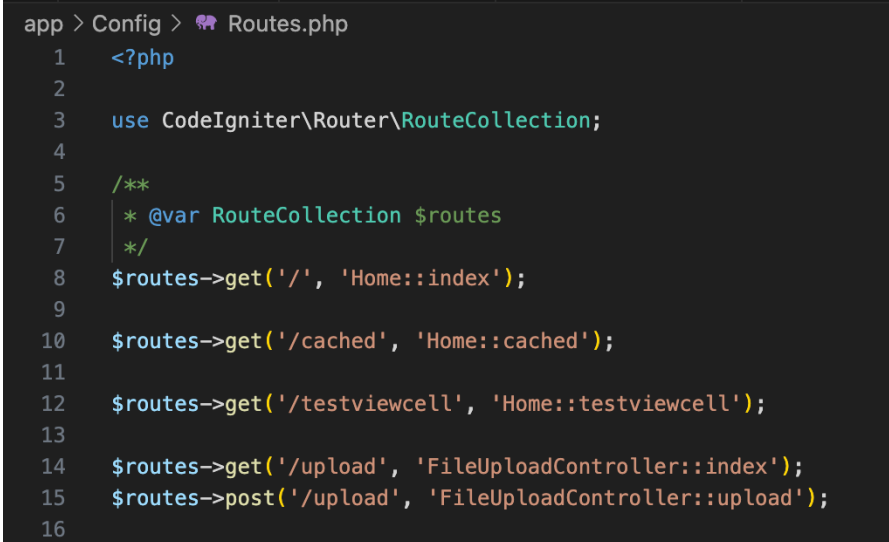
Create Routes
- Same /uploads route will handle get and post
- Get will display the upload form
- Post will accept the posted file
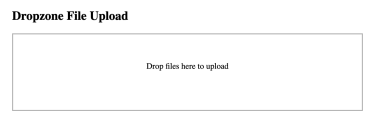
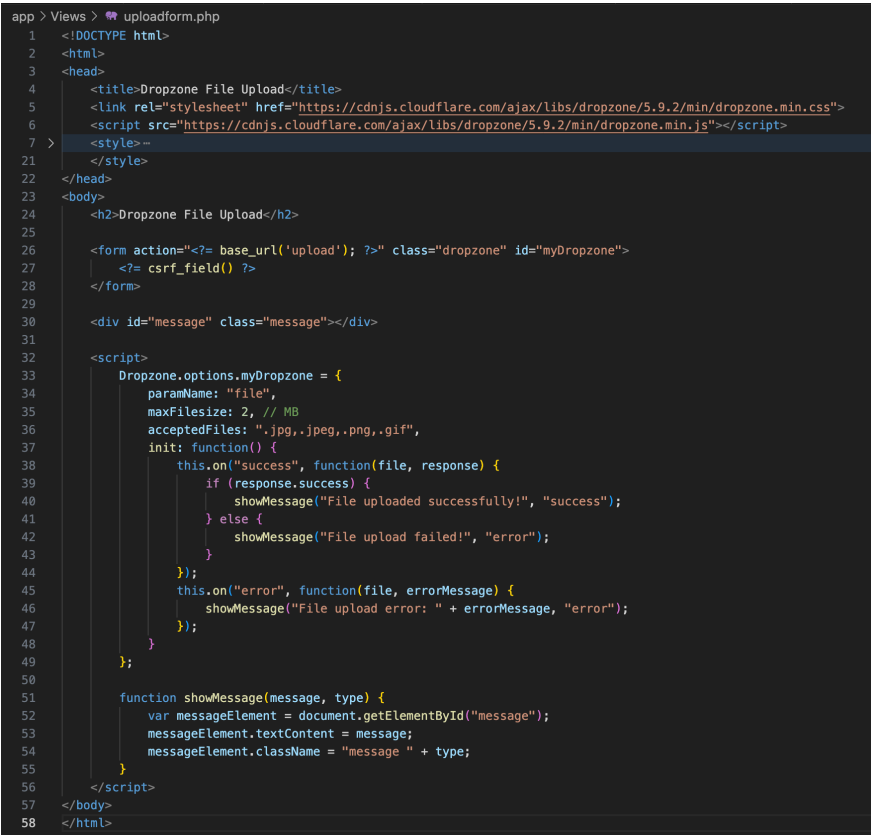
Create the View
- Use the DropZone Javascript Library
- A CSRF must be included in the form to make sure the form post is from the same server.
| View | Code |
|---|---|
 |
 |
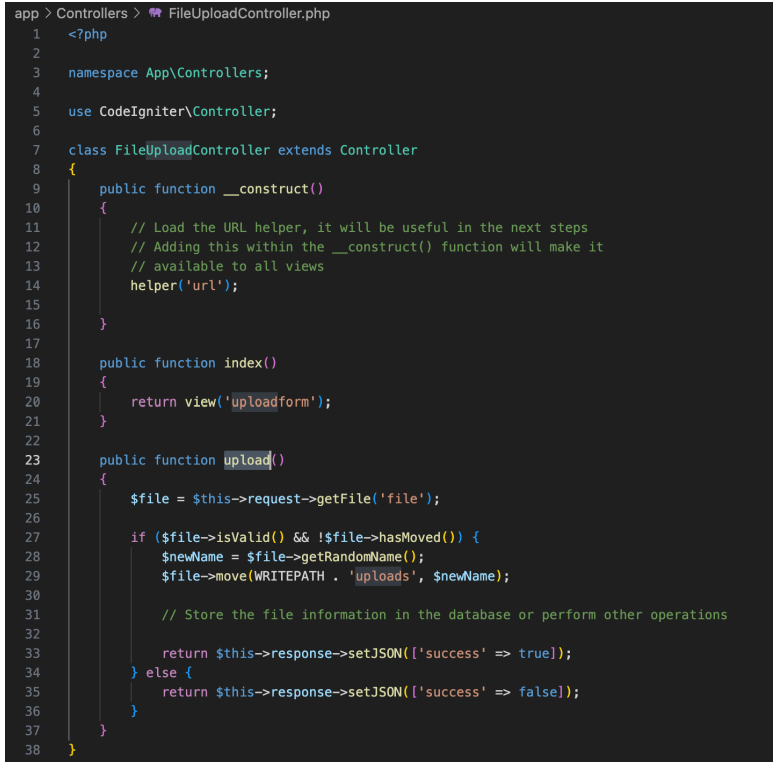
Create the Controller
- The file is saved to /writable/uploads with a random filename
- A JSON response needs to be returned
- You will need to manage where uploads are stored for your users and how to secure access
Creating a View Cell
- A view cell is a re-usable code fragment/component that can take parameters and render HTML
- Very useful for re-usable elements eg Latest News, Ad’s or Alerts
- Create a View cell
php spark make:cell AlertMessageCell
Take some parameters, and render some HTML back
- one file for the parameters, one file for the alert message
What is Composer?
- You currently use composer to create a new CodeIgniter Project. Composer is also a Package Manager
- Manage Packages: Composer allows you to declare the libraries your project depends on and manages (installs/updates) them for you.
- CLI Tool: Composer operates through a command-line interface, making it accessible for automation and integration with development, testing, and deployment workflows.
- composer.lock: When you install dependencies, Composer creates a composer.lock file, locking your project to specific versions of packages. This ensures that all team members and production environments use the same versions, leading to consistent environments and avoiding "works on my machine" issues.
- Update Control: You can update dependencies individually or collectively to newer versions as needed, according to the constraints defined in composer.json, while composer.lock ensures that these updates are tracked and consistent across all environments.
Only used composer to start codeigniter project
- allow you to manage packages
- composer.lock file, way to lock your environment and versions of things
- gitignore, none of the install packages are added to git
- git clone will not install, composer install will.
Sessions
Sessions are a fundamental aspect of web development, enabling web applications to store and access user data across multiple requests.
- User Data Storage:
- Sessions provide a way to persist user data across multiple web pages or requests. Unlike cookies, session data is stored on the server.
- Unique Identifiers:
- Each user is identified through a unique session ID, typically sent to the user's browser via a cookie. This ID is then used to retrieve session data on subsequent requests.
Why Use Sessions?
- State Management:
- HTTP is a stateless protocol, meaning it doesn't retain information between requests. Sessions enable a stateful experience, allowing applications to "remember" user actions and preferences.
store and access data across multiple requests to website
- store user data, has unique session ID
- make http requests is a stateless protocol
- stateless, does depend on previous communications
Sessions in Codeigniter
Framework Integration:
- CodeIgniter's Session Library provides a more robust and flexible way to handle session data compared to native PHP sessions.
- It supports various storage drivers (files, database, Redis, Memcached) for session data.
Key Features
- Flashdata: Special session data that is only available for the next server request, and is automatically deleted afterwards. Ideal for one-time messages, like form submission success or error messages.
- Tempdata: Similar to flashdata, but allows for specifying a time limit (in seconds) for how long the data should be available in the session.
- Regeneration of Session ID: CodeIgniter automatically regenerates the session ID periodically to prevent session fixation attacks.
- Session data is simply an array associated with a particular session ID (cookie).
- Flash data
- Tempdata
- Usually associated with a cookie on the user's computer
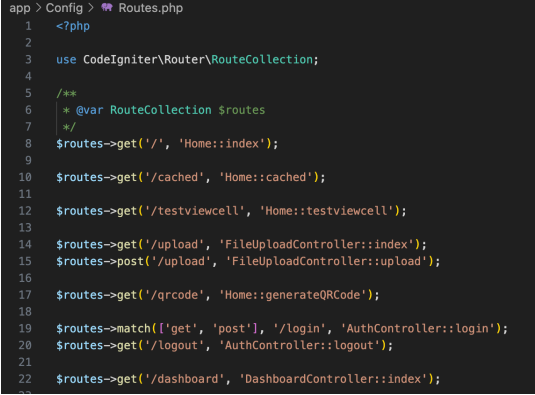
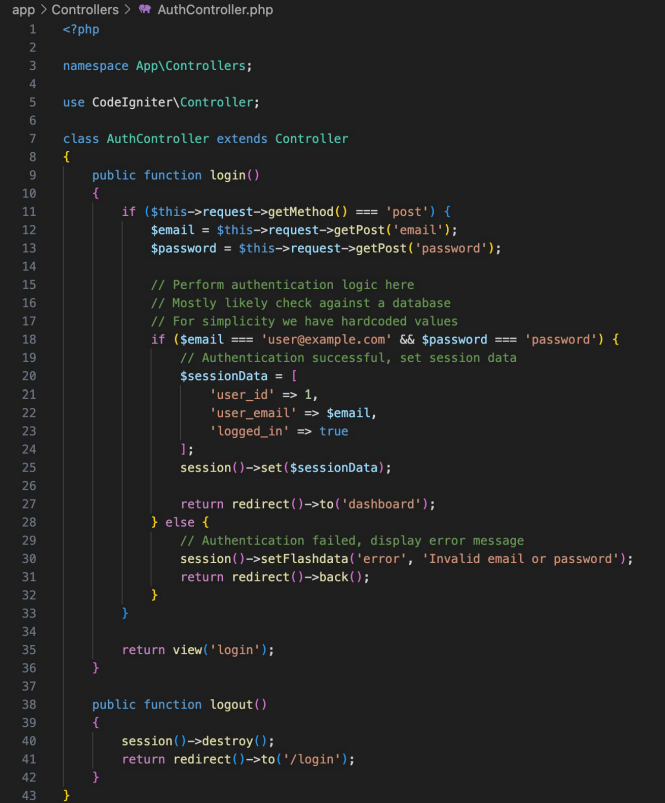
Login Example using Sessions
| Routes | Controllers |
|---|---|
 |
 |
Authentication vs Authorisation
-
Authentication and authorization are fundamental security processes in the context of web and application development.
-
While they are closely related and often used together, they serve distinct purposes.
-
Authentication is about verifying identity (who you are), while authorization is about granting access to resources (what you are allowed to do).
-
Authentication always precedes authorization. A system must first recognize who you are before it can determine what you are allowed to access.
-
Authorization is managed through settings, configurations, or roles defining access levels and permissions.
Authentication
- Identity Verification:
- Authentication is the process of verifying who a user is. It involves confirming the identity of a user attempting to access a system or application.
- Credential Check:
- Typically involves validating user credentials against a database or through other means. Common methods include usernames and passwords, biometric verification, OTPs (One-Time Passwords), or security tokens.
- First Step in Security Process:
- Authentication is the initial step in the security process, determining whether a user is who they claim to be before granting access to a system.
- Examples:
- Logging into a web application, entering a PIN at an ATM, or using a fingerprint to unlock a smartphone.
Authorisation
- Access Control:
- Authorization occurs after authentication and determines what resources a user is allowed to access and what operations they are permitted to perform.
- Role-Based Access:
- Often implemented using roles assigned to authenticated users, which dictate access levels or permissions within a system or application.
- Policy Enforcement:
- Involves enforcing policies that control access to resources based on roles, clearance levels, or other attributes associated with the authenticated user.
- Examples:
- A user (authenticated) is allowed to view a document but not edit it (authorization), or an employee (authenticated) can access employee-only areas within a company’s website (authorization).
- what you can do on the site