Lecture 8 Revision
RESTful API’s and JavaScript
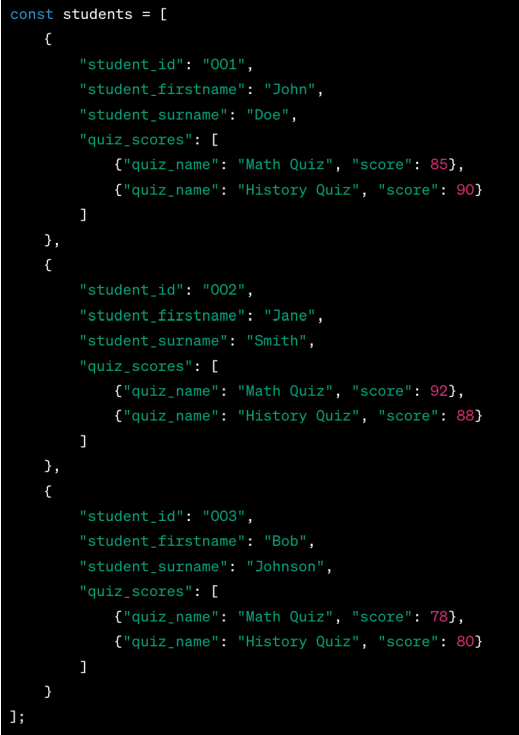
JavaScript Object Notation (JSON)
- JSON is a lightweight data interchange format that's easy for humans to read and write and easy for machines to parse and generate.
- The structure of JSON includes two types of structures:
- a collection of key/value pairs and an ordered list of values (array)
- The JSON format is text only and can be easily sent to and from a server (post to an API and get from an API)
represent an object
- left, defining fields/keys
- All keys and string values are written in double quotes
- A colon separates each key from its value.
- The entire set of key/value pairs is enclosed in curly braces {}.
JSON can be nested
RESTFul API’s
- API (Application Programming Interface):
- A set of rules and protocols for building and interacting with software applications.
- Bridge for Communication:
- APIs allow different software systems to communicate with each other without needing to know how they’re implemented.
- Automation and Efficiency:
- APIs allow routine tasks to be handled automatically without human intervention, increasing efficiency.
How are API’s used in Web Development?
- Backend Connectivity:
- APIs serve as the backend framework for the web app, connecting the user interface to server-side databases and processes. This enables the application to retrieve and store data dynamically.
- Data Services:
- APIs provide web applications with dynamic access to external data services, such as weather updates, stock prices, or geographic information.
- Dynamic Content Loading:
- APIs allow web applications to load content dynamically without the need to reload the entire page. This is often seen in social media feeds, where new content is seamlessly loaded as the user scrolls.
- Expose your Apps Functionality to Other Sites:
- Just as you use API’s from other sites, you too can make available services for other to use.
- want to build a better UI
- data services, have other people use your API
What is a RESTful API?
- Representational State Transfer
- Architectural style for designing networked applications
Stateless Communication
- Each request from a client contains all the information needed for processing
Resource-Based
- Resources are identified by URLs
- Once you know the resource name the process of listing, creating, editing and deleting is the same
HTTP Methods
- GET, POST, PUT, DELETE
CRUD with RESTful
-
You can perform CRUD (Create, Read, Update, Delete) operations on a resource (eg Item) using various HTTP methods.
-
Listing Items (GET)
-
Reading an Item by id (GET)
-
Create an Item (POST) to https://url/api/item
-
Edit an Item (PUT) to https://url/api/item/4
-
Delete an Item (DELETE) to https://url/api/item/4
Javascript recap
| Building Block | JavaScript Example |
|---|---|
| Variable Assignment | const y = 2; //Declare a constact let x = 5; // Block scoped variable that can be changed |
| String | let myString = "Hello, world!"; |
| Integer | let myInt = 10; |
| Float | let myFloat = 20.5; |
| Boolean | let myBool = true; |
| Array/List | let myList = [1, 2, 3, 4, 5]; |
| Object | let myObject = {'key1': 'value1', 'key2': 'value2’}; |
| Conditional (if) | if (x > 5) { console.log("x is greater than 5"); } |
| Conditional (if-else) | if (x > 5) { console.log("x is greater than 5"); } else { console.log("x is less than or equal to 5"); } |
| Conditional (if-else if-else) | if (x > 5) { console.log("x is greater than 5"); } else if (x == 5) { console.log("x is equal to 5"); } else { console.log("x is less than 5"); } |
| Functions | function myFunction() { console.log("This is a function"); } let square = x => x * x; let add = (a, b) => a + b; let getObject = () => ({ name: "John", age: 30 }); console.log(getObject()); // Output: { name: "John", age: 30 } function createGreeting(name) { return Hello, my name is ${name}.; } const greeting = createGreeting("Alice"); console.log(greeting); |
Adding a list (example 1)
| Code | Page |
|---|---|
 |
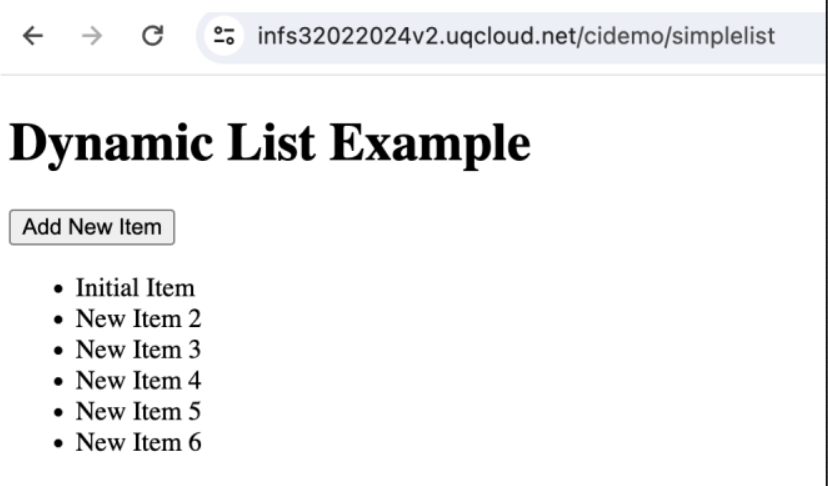 |
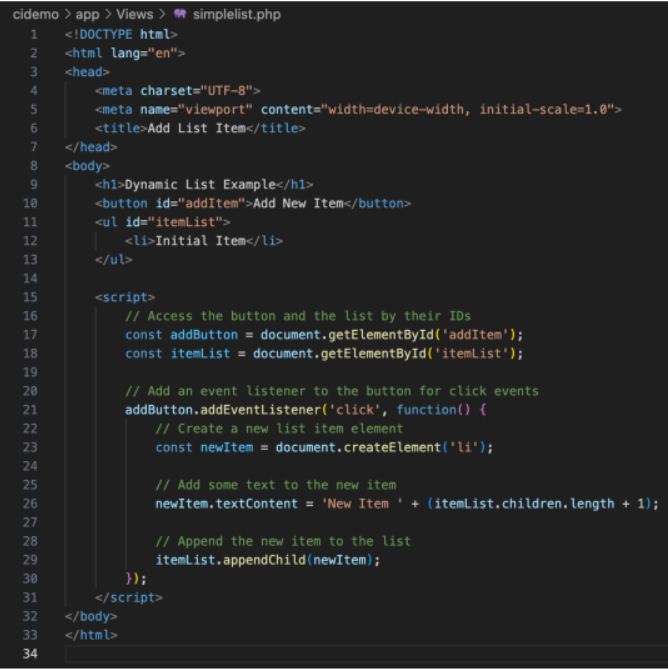
How it works:
HTML Structure: The page includes a button labeled "Add New Item" and an unordered list (<ul>) with an initial list item.
JavaScript Logic: When the button is clicked, the JavaScript code executes:
- It creates a new <li> element.
- It sets the text of the new list item to "New Item" followed by the number, which is determined by the number of existing children in the list plus one.
- It then appends this new list item to the existing list (<ul>).
Adding a list (example 2)
| Code | Page |
|---|---|
 |
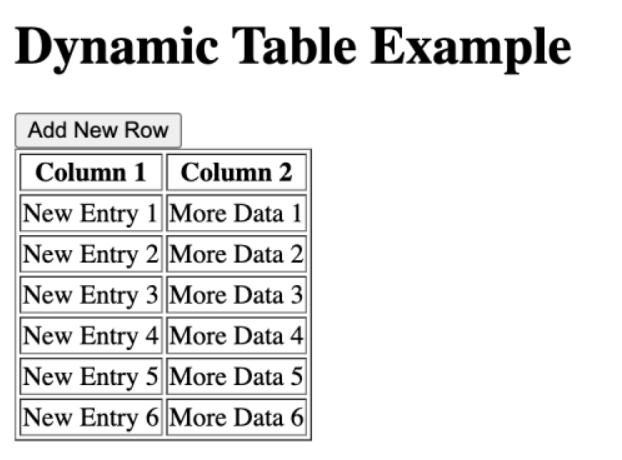 |
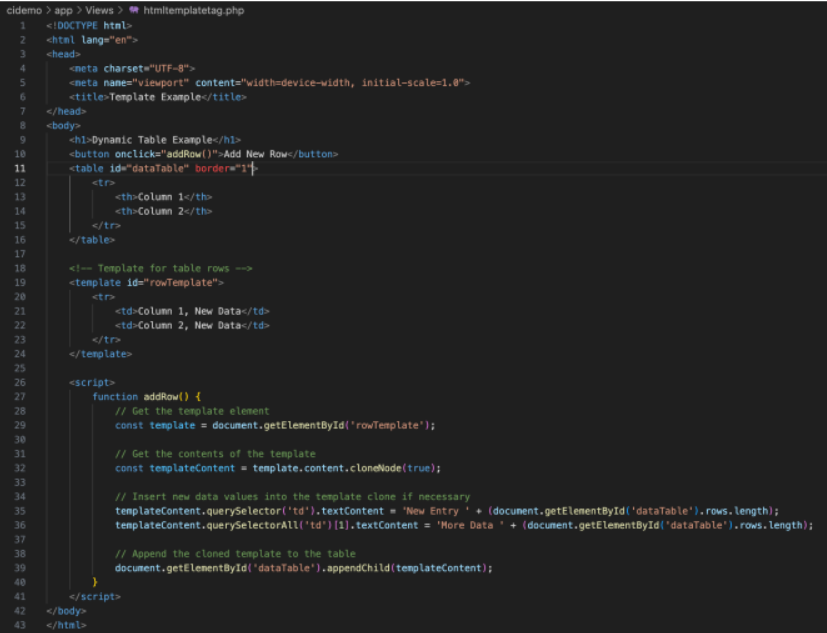
How This Works:
HTML Structure: The page includes a button and a table with headers. Below the table, there's a <template> tag containing a template for the table rows.
Template Tag : Inside the <template> tag, there’s a predefined table row (<tr>) with two cells (<td>). This row will not be displayed on the page until it is instantiated by JavaScript.
- JavaScript Functionality:
- The function
addRow()is triggered when the user clicks the "Add New Row" button. This function retrieves the template's content and clones it. - It modifies the text content of the table cells to include dynamic data based on how many rows are currently in the table. Finally, the cloned and updated template content is appended to the existing table.
- The function
Fetch API
fetch('<?= base_url("item"); ?>/')
    .then(response => response.json())
    .then(items => {
        items.forEach(item => {
            const li = createListItem(item);
            todoList.appendChild(li);
        });
    });
- Returns a Promise (which you can think of like a real promise) – at some point it will resolve for a success or reject if there is an error
Two ways to handle
- Promise chaining with
.then()functions - using
awaite.g.const response = await fetch('https://dog.ceo/api/breeds/list/all');
- Will fulfil the promise if something is returned
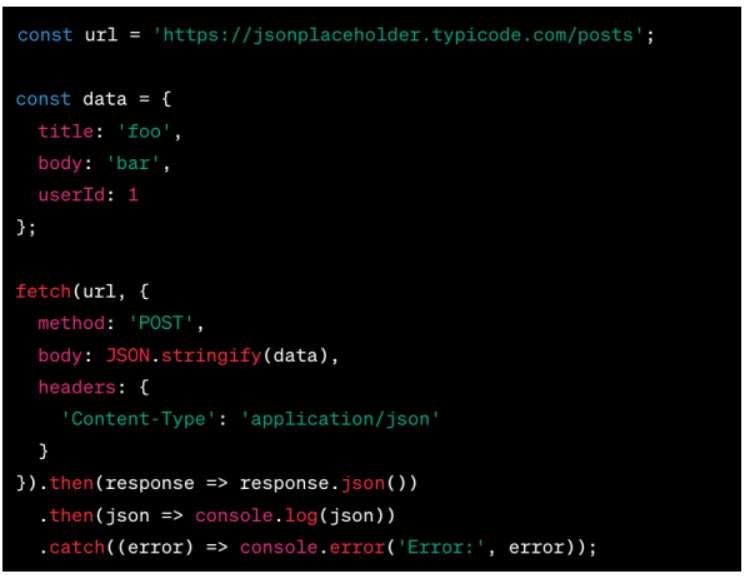
- Also used to send (post) data back to an API endpoint
- An example would be to post data from a form and use an API to save the data
Todo List app
- Create a template
<template id="itemTemplate">
    <li class="list-group-item">
        <div class="form-check">
            <input class="form-check-input" type="checkbox">
            <label class="form-check-label"></label>
            <input type="text" class="form-control d-none">
        </div>
        <div class="btn-group btn-group-sm float-end">
            <button type="button" class="btn btn-secondary edit-btn">Edit</button>
            <button type="button" class="btn btn-danger delete-btn">Delete</button>
        </div>
    </li>
</template>
- Add event listener to add more items
<script>
    const todoForm = document.getElementById('todoForm');
    const newItem = document.getElementById('newItem');
    const todoList = document.getElementById('todoList');
    const itemTemplate = document.getElementById('itemTemplate');

    // Fetch and render existing items
    fetch('<?= base_url("item"); ?>/')
        .then(response => response.json())
        .then(items => {
            items.forEach(item => {
                const li = createListItem(item);
                todoList.appendChild(li);
            });
        });


// Create list item from template
function createListItem(item) {
    const li = itemTemplate.content.firstElementChild.cloneNode(true);
    li.dataset.id = item.id;
    const checkbox = li.querySelector('.form-check-input');
    checkbox.checked = item.completed === '1'; // Check the checkbox if completed is '1'
    const label = li.querySelector('.form-check-label');
    label.textContent = item.item;
    return li;
}
</script>
- additional functionality
<script>
// Handle item editing
todoList.addEventListener('keypress', event => {
    if (event.key === 'Enter') {
        const li = event.target.closest('li');
        const label = li.querySelector('.form-check-label');
        const input = li.querySelector('input[type="text"]');
        const id = li.dataset.id;
        const item = input.value;

        fetch(`<?= base_url("item"); ?>/${id}`, {
            method: 'PUT',
            headers: { 'Content-Type': 'application/json' },
            body: JSON.stringify({ item })
        })
        .then(() => {
            label.textContent = item;
            label.classList.remove('d-none');
            input.classList.add('d-none');
        });
    }
});

// Handle item actions
todoList.addEventListener('click', event => {
    const li = event.target.closest('li');
    const checkbox = li.querySelector('.form-check-input');
    const label = li.querySelector('.form-check-label');
    const input = li.querySelector('input[type="text"]');
    const editBtn = li.querySelector('.edit-btn');
    const deleteBtn = li.querySelector('.delete-btn');
    const id = li.dataset.id;

    if (event.target === checkbox) {
        const completed = checkbox.checked;
        fetch(`<?= base_url("item"); ?>/${id}`, {
            method: 'PUT',
            headers: { 'Content-Type': 'application/json' },
            body: JSON.stringify({ completed })
        });
    } else if (event.target === editBtn) {
        label.classList.add('d-none');
        input.classList.remove('d-none');
        input.value = label.textContent;
        input.focus();
    } else if (event.target === deleteBtn) {
        fetch(`<?= base_url("item"); ?>/${id}`, { method: 'DELETE' })
            .then(() => li.remove());
    }
});
</script>