Lecture 9 Revision
Accessibility & Progressive Web Apps
What is Web Accessibility?
Web accessibility means ensuring websites, tools, and technologies are designed and developed so that all people, including those with disabilities, can use them.
Inclusivity: About providing equal access and opportunities to everyone, regardless of their ability. This includes people with impairments like visual, auditory, physical, speech, cognitive, and neurological disabilities.
Key Benefits:
- Usability: Makes your site usable to the broadest group of people.
- Legal Compliance: Meets international standards and laws, reducing legal risks.
- Broader Reach: Accessible sites reach a wider audience, including the elderly and those with temporary disabilities.
Standards:
- Follows guidelines such as the Web Content Accessibility Guidelines (WCAG), which provide criteria to improve accessibility.
- server side, access to a database
- broad audience of people who can visit your website
- If they have a disability, be able to navigate your content
- text instead of an image
Guidelines for accessability
- WCAG
Why is Accessibility Important?
Ethical Responsibility:
- Inclusivity: Ensures everyone has equal access to information and functionality.
- Equality: Supports the right to information and interaction for all users, regardless of their physical capabilities. Legal Compliance:
- Regulations: Many countries have laws requiring digital accessibility (e.g., ADA in the USA, EN 301 549 in the EU).
- Avoid Penalties: Non-compliance can lead to legal actions and fines. Business Benefits:
- Wider Audience: Accessibility increases your potential market as it includes users with disabilities, which represent about 15% of the global population.
- SEO Improvement: Accessible sites tend to have better search engine rankings due to good structure and usability.
Inclusivity
- Potential for extra subscribers
Legal
- penalties if you don't follow them
Benefits
- SEO, index your content by improving accessibility
Accessibility = Improve User Experience
- Universal Design:
- Features that aid accessibility (like clear navigation and text-to-speech) often enhance the user experience for all visitors.
- Flexibility:
- Accommodates a wider range of user preferences and needs, improving overall satisfaction.
Web Content Accessibility Guidelines (WCAG)
- WCAG provides a set of recommendations for making web content more accessible to people with disabilities.
- Developed by the Web Accessibility Initiative (WAI) of the World Wide Web Consortium (W3C), the main international standards organization for the Internet.
- Widely adopted as the standard for web accessibility by organizations and governments worldwide.
- Forms the basis for many national laws governing digital accessibility.
- Have an initiative called www initiative
- legislation refers to these guideline often
WCAG – Key Principles
- Perceivable:
- Information must be presented in ways that users can perceive (e.g., text alternatives for images, captions for videos).
- Operable:
- User interface components and navigation must be operable (e.g., all functionality available from a keyboard).
- Understandable:
- Information and operation of the user interface must be understandable (e.g., text is readable and understandable).
- Robust:
- Content must be robust enough to be reliably interpreted by a wide variety of user agents, including assistive technologies.
- test for the ability to tab through things, without the use of a keyboard
Understandable
- readable and understandable
Robust
- user agent, different browsers and devices
Accessible Rich Internet Applications (ARIA)
- added rows and attributes to HTML to better describe things ARIA
ARIA
- ARIA helps make web content and web applications more accessible to people with disabilities, especially when traditional HTML falls short.
- Bridge Gaps: It provides additional semantics that can be used by assistive technologies like screen readers.
Core Features of ARIA:
- Roles: Define what an element is or does (e.g., role="button", role="navigation"). Roles help assistive technology understand the purpose of an element.
- Properties and States: Describe the properties of elements or their current state (e.g., aria-expanded="false", aria-haspopup="true"). These attributes help communicate changes and features of interactive components to users.
When to Use ARIA:
- Enhancement, Not Replacement: Use ARIA to enhance elements, not to replace basic HTML functionalities. Start with semantic HTML, then add ARIA for additional details if needed.
- Complex Widgets: For interactive controls or complex widgets that HTML cannot define alone, such as sliders, drag-and-drop functionalities, or modal dialogs.
Basic Accessibility Features - Part 1
Text Alternatives:
- Purpose: Provide alternatives for non-text content.
- Examples: Alt text for images, labels for links, labels for buttons, transcripts for audio.
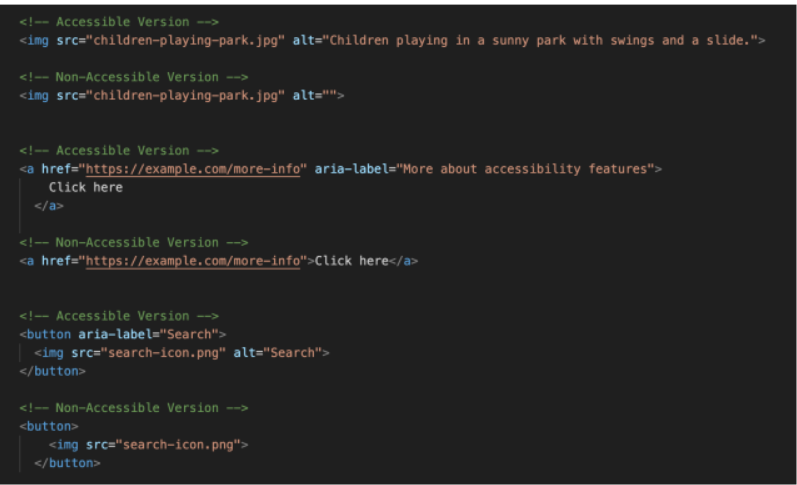
- Links
- images
- buttons
Basic Accessibility Features - Part 2
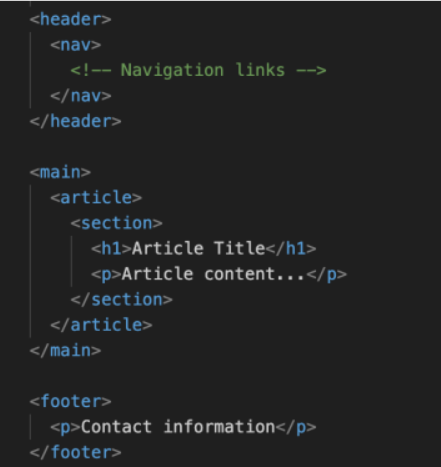
Semantic HTML:
- Purpose: Use HTML elements according to their intended purpose.
- Examples: Using <header>, <nav>, <main>, <footer> for structuring, <button> for buttons, <h1> to <h6> for headings.
Basic Accessibility Features – Part 3
Accessible Forms:
- Purpose: Make forms easy to complete and understand.
- Examples: Label elements explicitly linked to input fields, clear instructions, error messages.
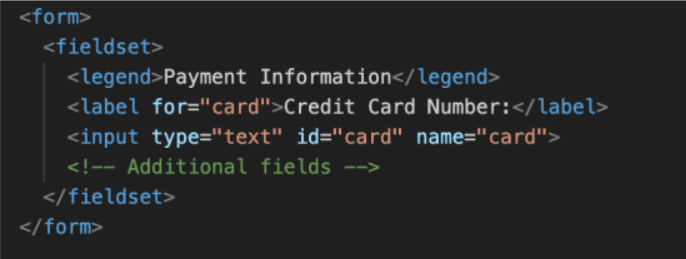
- adding labels
- fieldset is helpful
- using 'for'
Basic Accessibility Features – Part 4
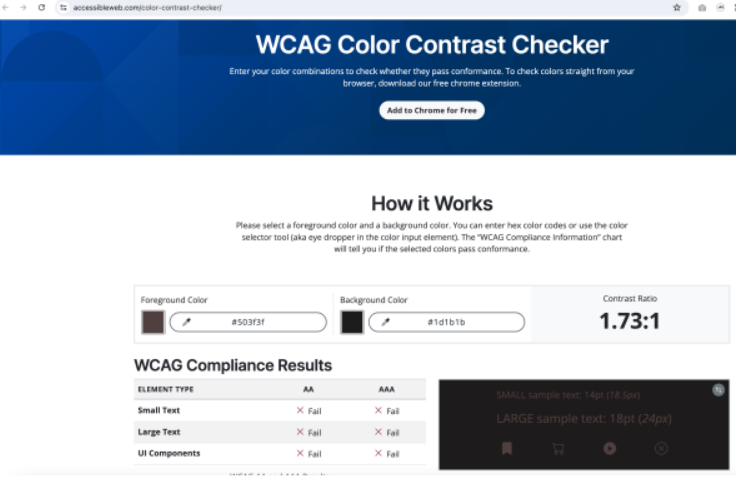
Color Contrast:
- Purpose: Ensure that text stands out against the background.
- Examples: High contrast color schemes, avoiding color reliance for conveying information.
Accessibility Testing Tools
WAVE Web accessibility Evaluation Tools
Australian Requirements
- WCAG Compliance: Websites must adhere to the Web Content Accessibility Guidelines (WCAG) to be considered accessible.
- DDA Requirements: The Disability Discrimination Act 1992 (DDA) mandates that web content should be accessible to people with disabilities to prevent discrimination.
- National Transition Strategy: Specifies that all Australian government websites must meet at least WCAG 2.0 Level AA standards.
- Current Standard: WCAG 2.0 is the current Australian standard, with WCAG 2.1 and the new WCAG 2.2 offering further guidance for mobile and cognitive disabilities.
Responsive Design
Responsive design is crucial for a variety of reasons, many of which center on delivering a seamless and effective user experience across different devices and screen sizes.
User Experience
- Adaptability: Users access websites from a multitude of devices with varying screen sizes. A responsive design ensures a consistent look and feel.
- Ease of Use: Navigation and site interaction are straightforward regardless of whether a user is on a desktop computer, tablet, or mobile phone. Increased Reach
- Mobile Users: With the increasing number of people using mobile devices to access the internet, having a mobile-responsive site can significantly widen your audience.
- Social Sharing: Content shared on social media is often viewed on mobile devices. Responsive design ensures that your pages look good wherever they're viewed, making users more likely to share.
Without CSS, wouldn't know how to create responsive design
increased reach
- now has more users
- click through links and scroll through things
Increased Reach
The Viewport Meta Tag
The viewport meta tag is a critical element in designing responsive web pages.
- Purpose: The viewport meta tag tells browsers how to adjust the page's dimensions and scaling to suit the display device.
- Control Layout on Mobile: It's essential for controlling the layout on mobile browsers, which would otherwise scale websites down to fit the screen.
- Default Scaling: Without the viewport tag, mobile devices typically render pages at typical desktop widths, then scale them down, making text small and unreadable.
- Viewport Width: The width=device-width setting ensures the width of the page matches the width of the device's screen.
- Initial Scale: The initial-scale=1 setting establishes the initial zoom level when the page is first loaded by the browser.
- Responsive Design: The viewport tag is a foundational element for creating a responsive design, allowing the content to fluidly adjust to different screen sizes.
- Initial scaling
Media Queries
- Media queries are CSS techniques used for creating responsive designs
- Adapt the layout to different screens (e.g., desktops, tablets, phones).
Common Media Features
- max-width / min-width
- max-height / min-height
- orientation: landscape/portrait
CSS @media
change on width, height or orientation
change the styles and colours, specialised CSS
Progressive Web Applications (PWA’s)
A Progressive Web Application (PWA) is a web application that provides a native app-like experience to users, using modern web technologies such as HTML, CSS, and JavaScript. PWAs are designed to work seamlessly across various devices, including desktops, laptops, mobile phones, and tablets.
- Native Def'n - Native is a development option to develop natively using vendor provided libraries and toolkits.
Key Characteristics:
- Responsive: PWAs adapt to different screen sizes and devices, providing an optimal user experience.
- Fast and Reliable: PWAs use modern web technologies to provide fast and reliable performance, even on low-end devices.
- Offline Access: PWAs can function offline or with a slow internet connection, allowing users to access content and functionality even when network connectivity is limited.
- Installable: Users can install PWAs on their devices, creating a native app-like experience.
- Secure: PWAs use HTTPS, ensuring that all data transmitted between the app and the server is encrypted and secure.
- Engaging: PWAs provide a native app-like experience, with features such as push notifications, home screen installation, and more.
instead of building a separately application natively, use the javascript we already know
can compile natively to IOS or android
- from react native, can use maps and position location
- use notifications, etc
difficult to setup and get deployed
If I already know web technologies, I don't have to relearn them
Still design as responsive
- You can install this app on your Mobile Phone’s homepage.
- Then test to check which features are available
What can I use (in terms of features)
- Apple and IOS, they want native built on their environments
- Still HTML, CSS and JavaScript
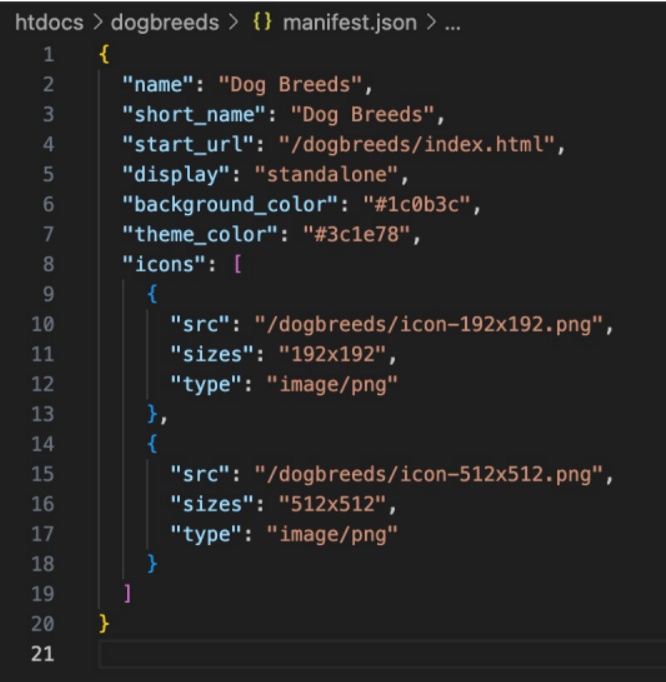
Dog Breeds PWA
Manifest
What is a Service Worker?
A Service Worker is a script that runs in the background of a web browser, separate from the web page, and acts as a proxy between the web application, the browser, and the network. It is a key component of Progressive Web Apps (PWAs) and enables features such as
- offline functionality
- background syncing
- push notifications
- store things for offline access
- caching
Progressive Web Apps – MDN Tutorials
- Needs a manifest.json file
- Needs a service-worker.js
- rest should be html and CSS