Learning Objectives
- Apply system architecture principles to design and deploy Web Information Systems (WIS) solutions.
- Evaluate and articulate the scope, complexity, and key considerations in the design and implementation of Web Information Systems.
- Design and program Web Information Systems (WIS) with server-side functionalities.
- Develop responsive Web-based, database-driven applications using efficient and effective technologies.
- Evaluate and justify the suitability of Web Information Systems solutions in various contexts, considering factors such as user needs and technical constraints.
- Judge in which situations WIS solutions are more or less appropriate.
- Critically analyze current issues and emerging trends in Web Information Systems development, and predict potential impacts on future practices and technologies.
- Right authentication and authorisation
- Reach a large audience despite being web-based
Different Web frameworks
- different technologies, different frameworks
Potential impacts and future practises
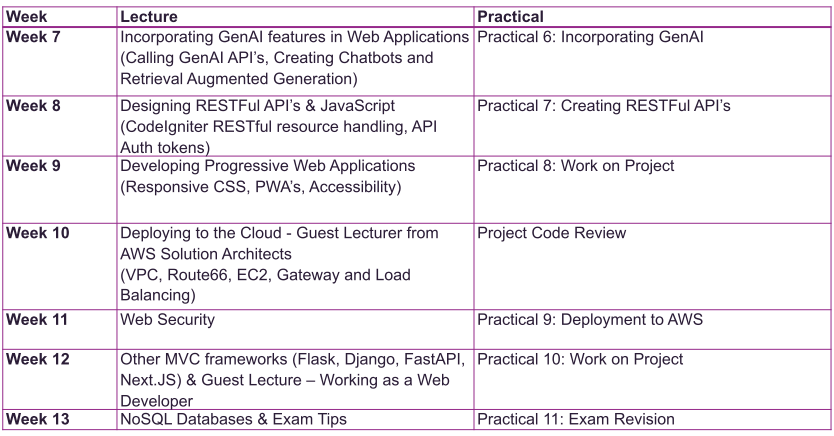
- Generative AI
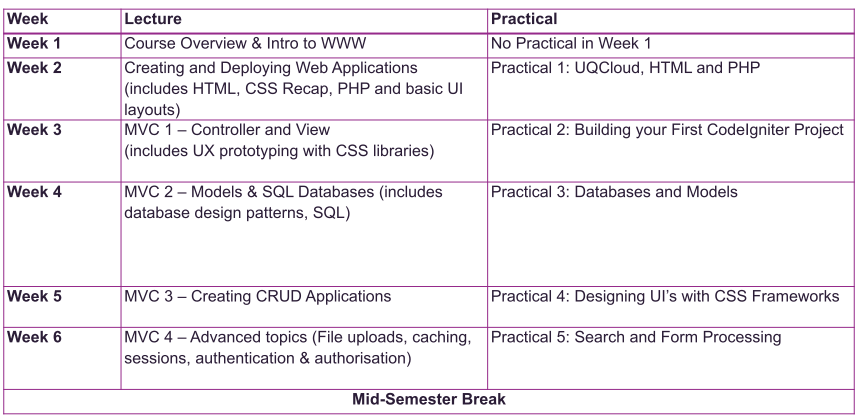
practise migrations
database apps in codeigniter
CRUD lifecycle
- create records, read update and delete it
AI and gen AI -
week 8 build forms, APi calls and
More powerful web applications
icons on phone?
Week 10
- Could technologies
- Autoscaling, turn on/off
Week 11 Web Security
- SQL injection-cross-site scripting,
Week 12
- transition to other MVC frameworks
Exam tips
- Covers the concepts of web information systems/web applications
- Combination of multiple choice questions (32) and free text questions (5)
- Weighting 30 marks
- Identity Verified Assessment Hurdle
- You must get >=15 marks to pass the course
- You must have your Student ID
- No specific questions on PHP syntax as some students have used other frameworks and also because ‘programming’ a web application is already accessed by the Project Assessment Item and the Code Review.
multiple choice and free text
- about web concepts and definitions
Exam tips
- Basic Linux commands e.g. ls, cd, mv, cp, nano, sudo, mkdir, chmod
- Basic Nginx config e.g. root and location,
- Definitions and Acronyms e.g. CSS, HTML, HTTP, SSH, HTTP Status codes, etc
- MVC Architecture
- Relational databases, database design and SQL queries
- Forms and how to process the data
- HTML tags e.g. Form, a, img, link, table, p, etc
- How to build a web application given requirements/features?
- All of the topics covered in Lectures and Labs
- Except Week 7 Gen AI Prompting and AWS Guest Lecture (but some of the AWS Lab definitions are important)
what does nginx config look like
- concepts of an MVC frameworks
Database and database design
- knowing how to process forms
- how CRUD works on server side
- form and all tag attributes
- link and href
How would you build a web-application?
- forms and process them on the server, how to process, put security, make it accessible and responsive
Go generative AI, no prompting, etc.
Guest lecture
- know what an EC2 is, and what a VPC is
- definitions in the lab
From ed discussion:
The previous courses had different course coordinators. I have made a lot of changes and added new content based on what a web developer should know eg new sections on CRUD (in much more detail), Migrations, RESTful API's and Accessibility. The labs also have a lot more detail.
The most that can be asked about GenAI is the things to consider before using it - from the Week 3 slides. There won't be any questions on prompting, calling LLM API's or creatively thinking about integrating GenAI features into your web app.
In Week 13 there will be tips and a practice quiz in the Lecture and Labs.